Designcenter X NX Essentials| How to | Create drawings: part one
Creating technical drawings is an essential step in the design process—communicating intent, ensuring accuracy, and accelerating collaboration. With Designcenter X NX™ Design Essentials Add-on software, a lightweight, browser-based CAD solution from Siemens, engineers and designers can generate detailed drawings anytime, anywhere, from any device.
This cloud-native platform simplifies the creation, editing, and updating of drawings, enabling teams to stay agile and responsive to design changes.
Drawing creation made seamless
With the software, users can create drawings directly from within the part or assembly environment. Selecting the right template and drawing size is straightforward, helping you set up your workspace efficiently.
Once a drawing is initiated, it’s easy to configure drawing views to match the design requirements. Any model view can be used as a base view, and the scale can be adjusted as needed. The platform provides built-in support for orthographic projection, users simply position their cursor around the base view to generate projected views.
Intelligent PMI integration
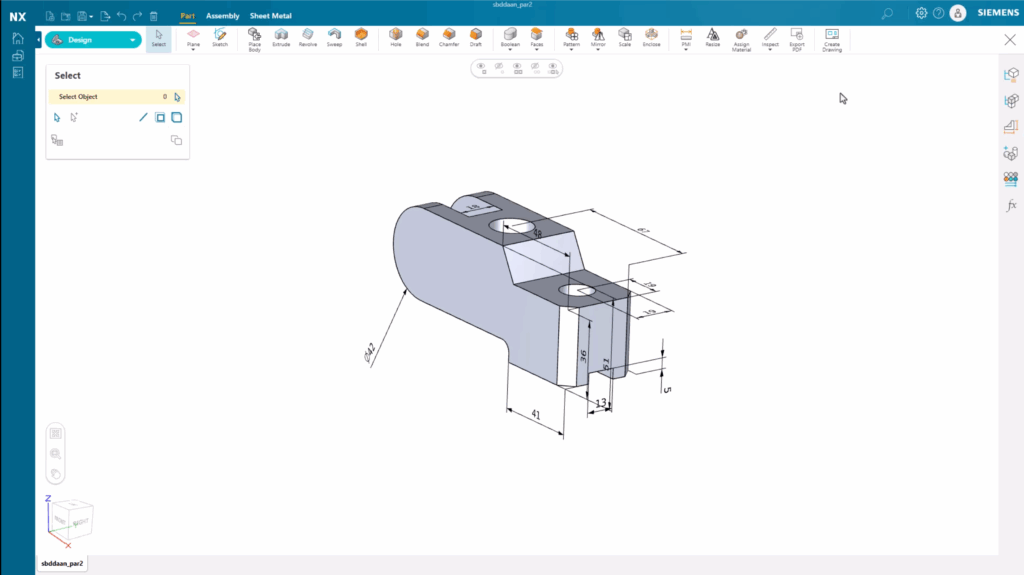
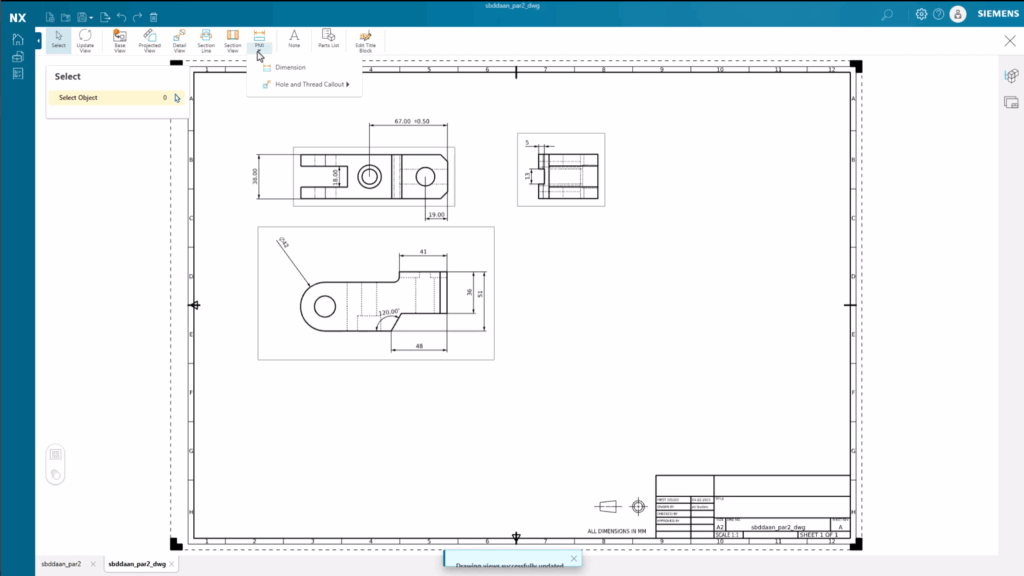
There is also supports Product and Manufacturing Information (PMI) integration, enabling users to carry over 3D annotations directly onto 2D drawings. Once views are in place, users can enhance them with additional PMI
The product offers a range of intuitive tools to add dimensions and annotations, including Auto, Point-to-Point, and Angular methods. Tolerances can be applied as required, providing manufacturers with the exact specifications needed to produce high-quality parts.
Quick updates, real-time collaboration
One of the standout features of the product is how quickly it responds to model changes. When a change—such as adding a hole to the 3D model—is made, the drawing is flagged as out-of-date. With a single click, users can update the drawing, ensuring consistency between the 3D model and 2D documentation.
Hole and thread callouts can be added in either radial or linear format. Unneeded PMI elements can be removed easily, giving users full control over the clarity and precision of the drawing.
Customization and flexibility at your fingertips
The software enables teams to tailor each view to their specific needs. From adjusting the view scale after placement to managing hidden lines or adding custom labels, users have access to powerful options to communicate design intent clearly and consistently.
Lightweight, cloud-native CAD for modern teams
And it combines the power of Siemens CAD technology with the flexibility of the cloud. It’s part of a broader push toward accessible, on-the-go productivity—helping teams innovate faster, collaborate smarter, and adapt to change more easily.
Built on the Siemens Xcelerator platform, Designcenter X NX Essentials integrates seamlessly with other Siemens tools, allowing teams to scale as needed.
Learn more about Designcenter
Designcenter X NX is the leading, next-generation mechanical engineering solution that delivers advanced 3D design capabilities to the Designcenter portfolio. Seamlessly integrating across disciplines, including electrical and electronic systems, to enable more iterations and utilize the latest manufacturing and simulation methods to ensure you build the richest, most comprehensive digital twin of your product and ultimately deliver the best designs to market faster.
Learn more about Designcenter X NX Essentials
Try Designcenter X NX Essentials today.
Explore the future of design with a flexible, browser-based solution that moves as fast as your ideas.