Designcenter NX | Tips and Tricks | Mass Property Management

In our latest Designcenter™ NX™ software Tips and Tricks video, we’re diving deep into a feature that acts as your digital scale and balance: Assembly Mass Properties. This powerful toolset provides engineers and designers with the essential capabilities to accurately calculate and analyze the physical characteristics of their 3D models and assemblies. By understanding crucial elements like weight, center of gravity, and moments of inertia, you can ensure design integrity and prevent costly redesigns long before any physical prototyping begins.
Check out the video below or scroll down to learn more about how Mass Properties can optimize your design workflow and bring your products to life with confidence.
What do Mass Properties tell us?
Mass Properties provides vital information about your 3D models. It acts as a digital scale, giving you precise measurements for mass, weight, density and volume. These numbers are crucial for understanding the fundamental physical characteristics of any component or assembly.
Beyond basic measurements, Mass Properties reveals critical details like center of gravity and moments of inertia. These insights are indispensable for predicting how your design will behave in the real world. Engineers use this data to ensure stability balance and structural integrity long before manufacturing begins.
Ultimately, Mass Properties empowers you to make informed design decisions. It allows you to optimize performance, predict handling characteristics and even estimate energy consumption for moving parts. This proactive analysis helps prevent expensive redesigns and ensures your products meet their targets efficiently.
Setting up Customer Defaults
Before diving into detailed analysis, properly configuring your Customer Defaults is a crucial first step. This foundational setup ensures that your Designcenter NX environment is optimized to automatically capture and integrate essential mass property data. Taking the time here streamlines your entire workflow, saving significant effort down the line.
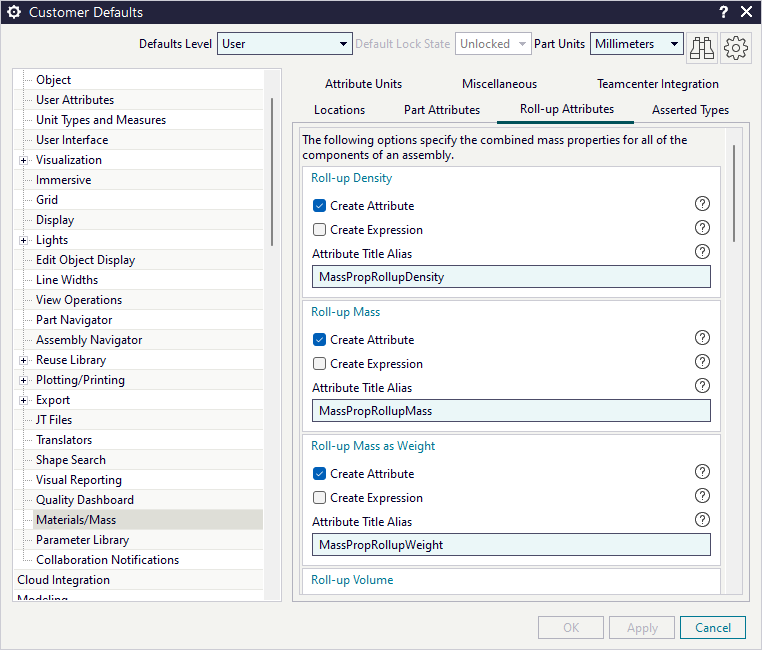
Within the Customer Defaults, specifically in the Materials/Mass section under Gateway, you’ll find the Roll-Up attributes tab. Here, checking “Create Attribute” for key properties automates the generation of mass property values as attributes directly onto your part or assembly files. This automation eliminates manual data entry and reduces the potential for errors, making your design process more efficient and reliable from the start
Tracking Design Targets with Mass Properties
Once your setup is complete, Mass Properties allows for a powerful level of personalization and tracking. You can input your own data into columns like asserted, actual, estimated, and budget. This functionality enables you to closely monitor how your calculated mass properties align with your expected or target values, providing a clear comparison for individual components or entire assemblies.
This ability to compare “from design” values against custom inputs is incredibly valuable for design validation. For instance, if your budget values for mass or weight are below what your current design indicates, it flags an immediate area for optimization. This detailed approach helps ensure your design remains on track to meet specific performance and manufacturing targets throughout the development process.
Optimizing Designs Using Mass Property Data
With all your mass property data gathered and compared against targets, you now possess powerful insights. This information moves beyond simple numbers, becoming a catalyst for informed design modifications. You can pinpoint specific areas where weight reduction is necessary, identify components contributing to an unbalanced assembly, or analyze how material changes impact overall performance.
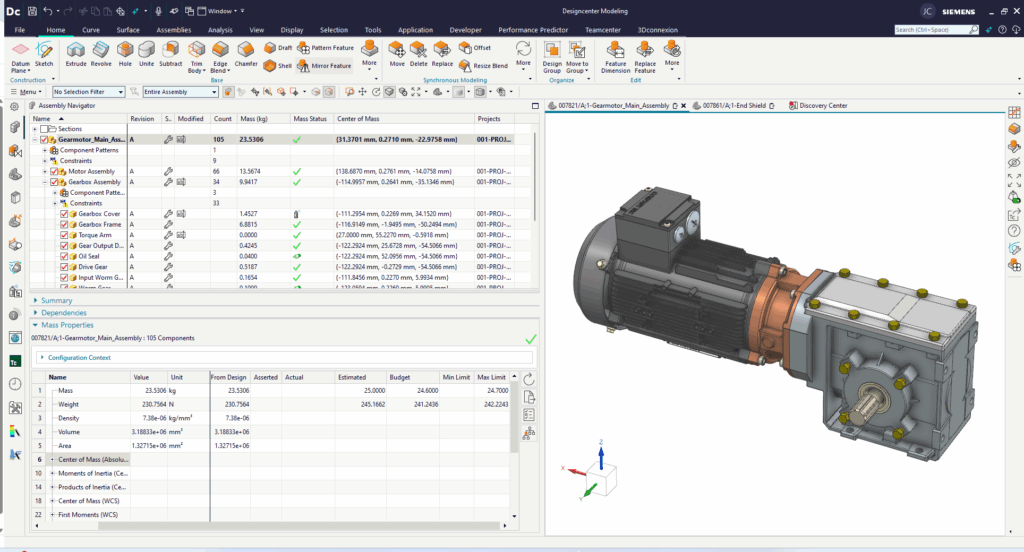
Mass Properties provides the objective data needed to justify design iterations. Instead of guessing, you can make precise adjustments—like optimizing a part’s geometry to shift its center of gravity or selecting a lighter material to meet a weight constraint. This data-driven approach ensures every change you implement is purposeful and contributes directly to improving your product.
Ultimately, using Mass Properties effectively transforms your design process from reactive to proactive. It allows you to iterate with confidence, knowing that each modification is backed by solid engineering data. This leads to more robust, efficient, and cost-effective products, delivered right the first time.
Continue your journey with Designcenter NX
Watch the Create a Technical Drawing How To video here ▶️
Watch the Setting up Immersive Collaborator Tips and Tricks video here ▶️
Take me to the NX design blog 📚