What’s New in Designcenter | June 2026 | Core Capabilities
Today marks the return of our What’s New in Designcenter™ software series, focusing on the June 2026 release of Designcenter. In this blog, we’re shining the spotlight on core capabilities. This release delivers new features to address core design functionality, whilst also looking at tweaks made to the architecture of Designcenter to optimize user efficiency when creating new products.
ICYMI
We released our latest what’s new video for the June 2026 release of Designcenter a couple of weeks ago. In our latest video we take a look at:
- AI tools to analyze, optimize, and generate designs 🤖
- Powerful cloud collaboration and data management features in Designcenter X ☁️
- Designcenter’s dedicated ship design solution🚢
- Continued immersive engineering innovations 🎧
Watch the full video to see how Designcenter can help you design, engineer and collaborate better than ever ▶️
Sketch improvements | More control, more predictability
Sketching in Designcenter continues to be the backbone of many workflows, spanning across different use cases in a variety of industries. In this latest release of Designcenter, the goal is simple; enable all users a greater level of control and predictability when using Sketching tools.
Persistent relations fundamentally change how you interact with sketches. Instead of relations being inferred and perhaps unexpectedly changed, they are now created and maintained explicitly during operations. It doesn’t matter if you’re creating geometry, snapping, or editing curves; all operations will be continuously maintained.
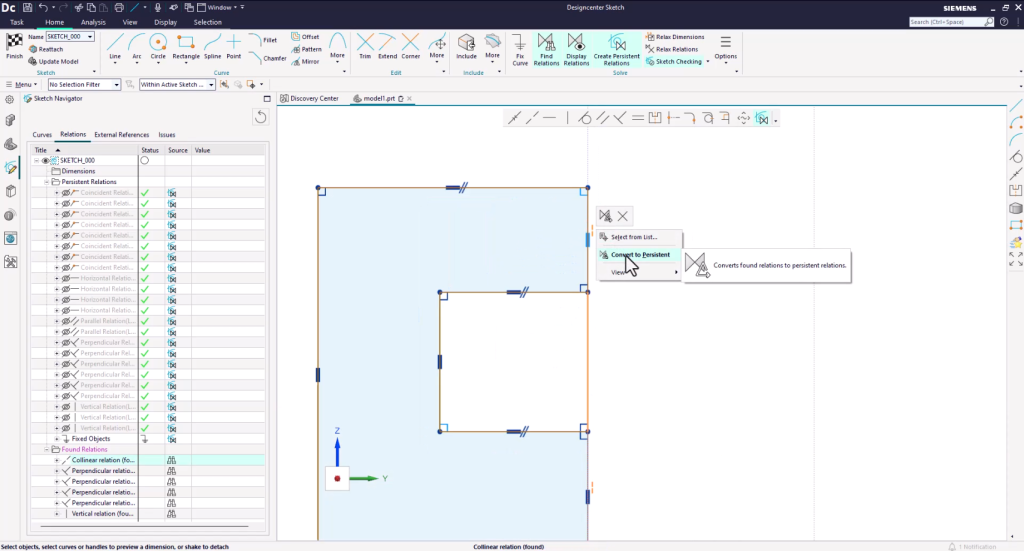
We’ve also worked on enhancing tools to complement Persistent Relations. These tools help you find, manage and convert relations, as well as enabling a wider breadth of support across all dimensions. Additionally, general improvements to sketch editing means that only existing constraints are used during updates, reducing unintended sketch behavior and improving your overall solve times.
Taking all of this into account, you’ll now gain a greater sense of ownership for your design intent, meaning more stable models and fewer surprises downstream.
Synchronous modeling (CAE Driven) | Design for simulation
Designcenter is strengthening the connection between design and simulation workflows through new functionality within synchronous modeling. A key area of focus has been on optimizing the Delete Face feature. With the latest release, you can now work across multiple bodies in a single operation, and we’ve also refined and optimized Partial success scenarios.
Partial success means you can complete an operation when some faces cannot be modified or deleted. These enhancements support all Delete Face types, including Blend, Hole, Blend Size and Size. These updates are particularly useful in simulation contexts, where simplifying geometry quickly and reliably is critical. You can prepare models for CAE faster with fewer interruptions and achieve greater confidence in your final results.
Pattern feature enhancements | Smarter, more flexible reuse
The ability to create bespoke patterns has been supercharged for this release of Designcenter, with expanded support for dependent and modifying features. You can now include a wider range of features, such as algorithmic features, delete face and trim operations with pattern definitions. This lays the foundation for more advanced used cases, including variational patterns, where each instance can behave differently.
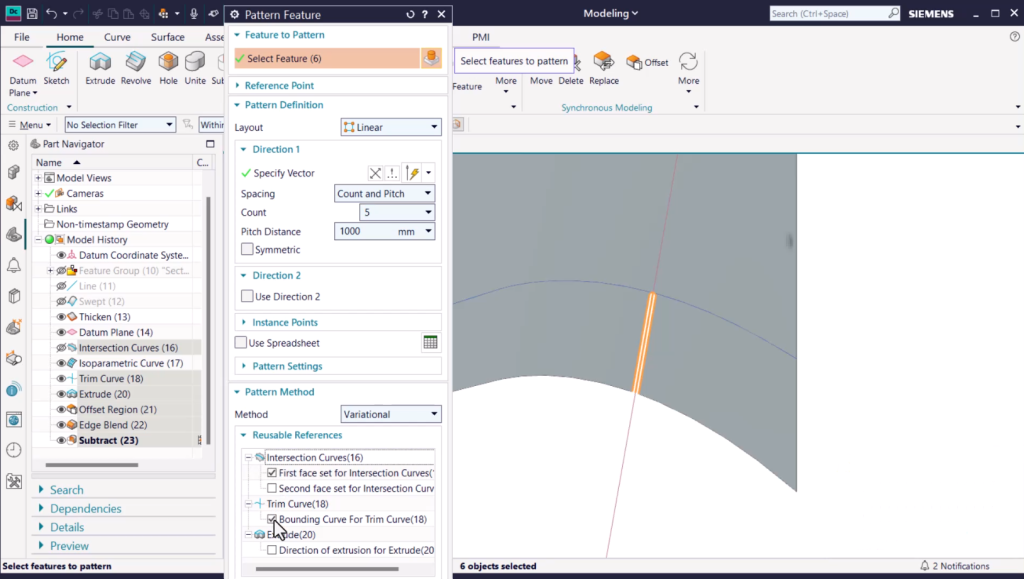
Why does this matter? Well, we’re transforming patterning from a replication tool into something much more; a dynamic design mechanism that supports more complex and adaptable product designs.
Extended scale modeling | From nano to infrastructure
Designcenter continues to push the boundaries of what is possible. Software should not be the limitation of what a user can (or can’t achieve!) when creating new products. That’s why we’ve optimized extended-scale modeling to support the creation of very small and large geometry.
From nanometer-level featured for micro-electronics and MEMS, all the way through to multi-kilometer models, Designcenter supports all of these potential design scenarios that matter to you. This extensive coverage is driven by refined unit handling and modeling capabilities tailored to both ends of the spectrum.
It’s a simple tool which can easily be tweaked to suit your needs. Setting the part units to micrometer will enable nanometer-level features for small parts such as semi-conductors and micro-electromechanical systems. Settings the part units to meter supports conceptual design workflows that require the creation of multi-kilometer bodies.
Re-imagined application access | Simplicity at Scale
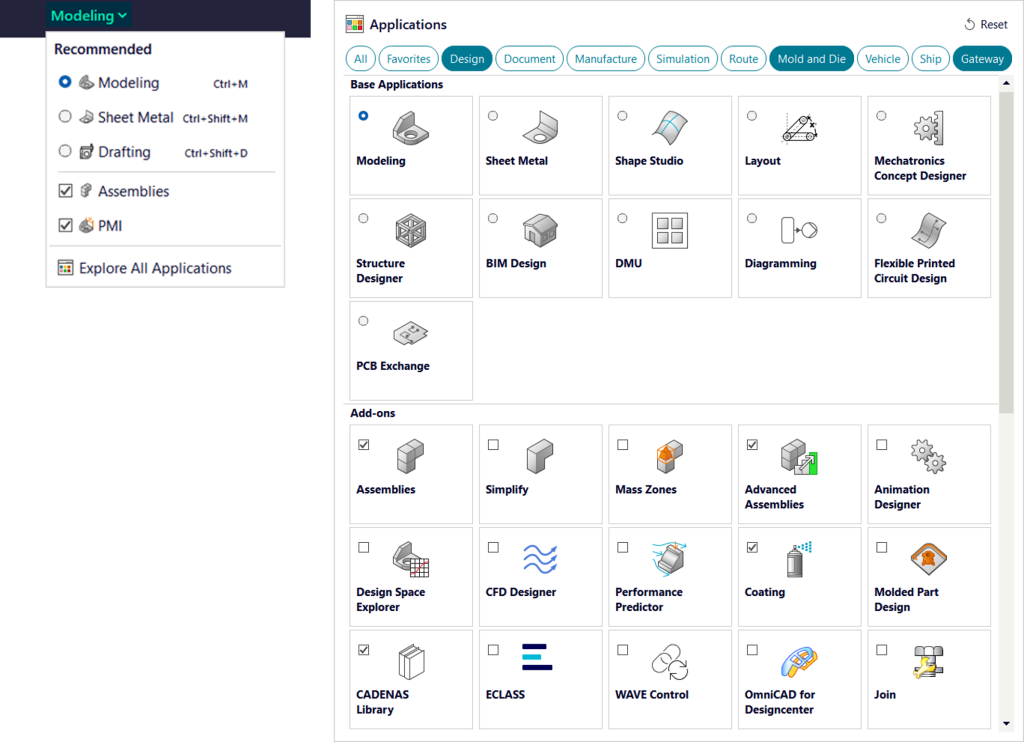
As we continue to expand our capabilities in Designcenter, usability is becoming just as important as available functionality for you. The June 2026 release of Designcenter comes equipped with a redesigned application cluster in the title bar, providing a clearer and more intuitive way to navigate both core and add-on applications. You can pin your favorite applications, switch between compact and expanded views and filter applications based on your specific use cases.
Based on your feedback, we recognized a need to make over 140 modules more easily discoverable, whilst simultaneously making it easier to manage, select and switch between them. It reduces friction for all daily workflows, enabling you to spend less time organizing your UI and more time creating products for the future.
Handling massive datasets
Managing large and complex assemblies has always been a challenge for everyone, but we’re implementing new features so that you can manage them more easily. The Close All Parts and Restart Session tool allows you to quickly reset the session state without needing to fully reauthenticate or manually rebuild your working environment. What’s more, preferences, layouts and recent files are preserved, while all memory-heavy data is refreshed.
Estimates suggest that with these new tool, you can be over 10x faster than traditional methods when working with large datasets. It’s a sure fire way to recover performance quickly, minimize downtime, and maintain productivity for all types of assembly.
Expanded language support
The latest release also sees expanded language support, reaching areas of the world that have previously been overlooked. Support has been extended to:
- Ukrainian
- Hungarian
- Turkish
- Thai
- Vietnamese
This update reflects a broader push toward making Designcenter more accessible to users worldwide, regardless of region or language. Localization is also key; we want to ensure teams can work more effectively in their native language, whilst also reducing on-boarding barriers. After all, Designcenter is for everyone!
Continue your journey with Designcenter
The June 2026 release of Designcenter introduces a range of features focused on improving your day-to-day engineering productivity. Everything from more predictable sketching workflows and advanced capabilities to supporting large datasets and CAE-driven modeling is included. With re-imagined application access and expanded language support, we’re ensuring that Designcenter is more accessible, scalable and efficient for everyone.
We will continue to provide new content detailing the latest and greatest enhancements, so be sure to check the blog in the coming weeks and months!
Watch the What’s new in Designcenter release video
Take me to the Designcenter blog 📚