From Enterprise AI to DIY: My journey with Teamcenter AI Chat and creating a custom serverless version
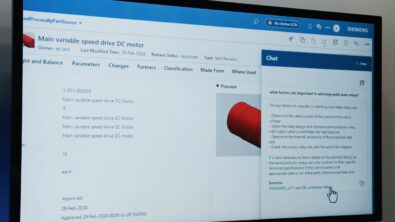
Teamcenter AI Chat — The problem worth solving
In today’s digital enterprises, information isn’t just scattered — it’s deeply buried. Engineers, product managers, and analysts often spend 20–30% of their time searching through documents, specifications, change requests, and legacy systems just to answer what should be simple questions.
While working on Teamcenter-based PLM solutions, I saw this problem firsthand.
Product knowledge lived across
- CAD and JT files
- PDFs and specifications
- Change notices and BOMs
- Internal documentation and tribal knowledge
Traditional keyword search struggled in such environments. It lacked context, semantic understanding, and cross-document reasoning.
This gap led to the idea of Teamcenter AI Chat — an LLM-powered assistant that allows users to ask natural language questions and get accurate, contextual answers directly from enterprise product data.
At its core, the system followed a Retrieval-Augmented Generation (RAG) architecture.
Overall ML system design (RAG-based architecture)
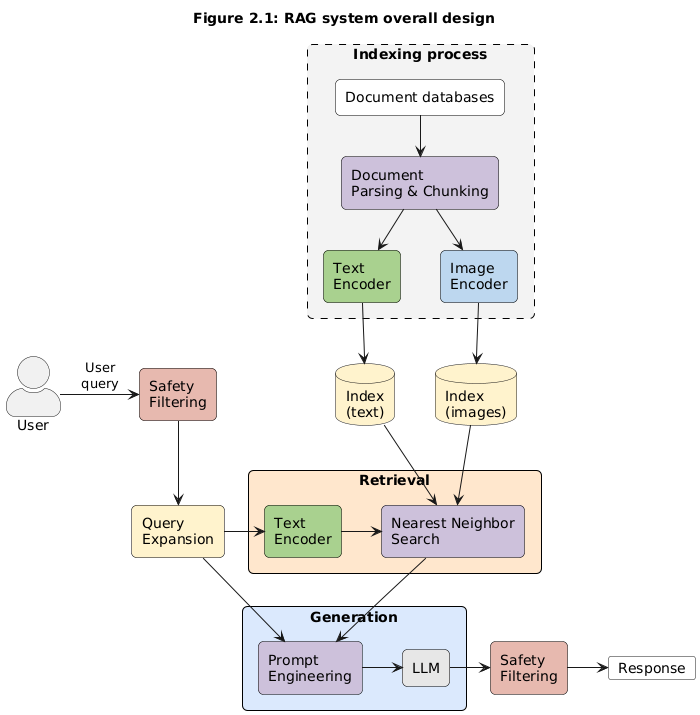
1. Indexing process: Turning enterprise knowledge into searchable intelligence
The indexing process is the foundation of the system. Its responsibility is to convert the enterprise knowledge base into embeddings that can be efficiently searched.
Key Steps:
- Document parsing and chunking
PDFs, technical documents, and metadata are parsed
Large documents are broken into meaningful chunks
(Optional) Advanced parsing like tabular extraction for BOMs and specs - Multimodal embedding generation
Text chunks are encoded using a CLIP text encoder
Images (e.g., diagrams, drawings) are encoded using a CLIP image encoder
Both text and image embeddings are mapped into a shared embedding spac - Index storage
Embeddings are stored in an index table optimized for Approximate Nearest Neighbor (ANN) search. Enables fast and scalable semantic retrieval. This approach allowed the system to search by meaning, not just keywords — a huge advantage over traditional PLM search.
2. Safety filtering: Guardrails for Enterprise AI
Before any query enters the system, it passes through safety filtering.
Purpose:
Detect inappropriate, harmful, or non-compliant queries
Enforce enterprise usage policies
Prevent misuse of internal product data
In regulated or IP-sensitive environments like PLM, this layer is non-negotiable.
3. Query expansion: Making user intent explicit
Enterprise users often ask short, incomplete, or typo-prone questions.
Query expansion improves retrieval quality by:
Fixing grammatical errors and typos
Rewriting queries for better semantic flow
Expanding intent to include related terms and concepts
For example:
“What material is used?”
becomes
“What material is used in the selected CAD component according to the latest design specification?”
This significantly improves recall during retrieval.
4. Retrieval: Finding the most relevant knowledge
Once the query is refined:
The expanded query is converted into an embedding using the CLIP text encoder
An ANN-based nearest neighbor search retrieves the most relevant chunks from the index
This step ensures the LLM is grounded in actual enterprise data, not hallucinations.
5. Generation: From context to answer
The generation phase combines reasoning with factual grounding.
Two Key Steps:
- Prompt engineering
User query + retrieved context are combined into a structured prompt
Techniques like Chain-of-Thought (CoT) help guide reasoning
Ensures answers remain traceable to source documents - LLM inference
The LLM generates the final response using controlled sampling (e.g., top-p)
Optimized for correctness, clarity, and enterprise tone
The result is a response that is:- Context-aware
- Fact-grounded
- Safe and explainable
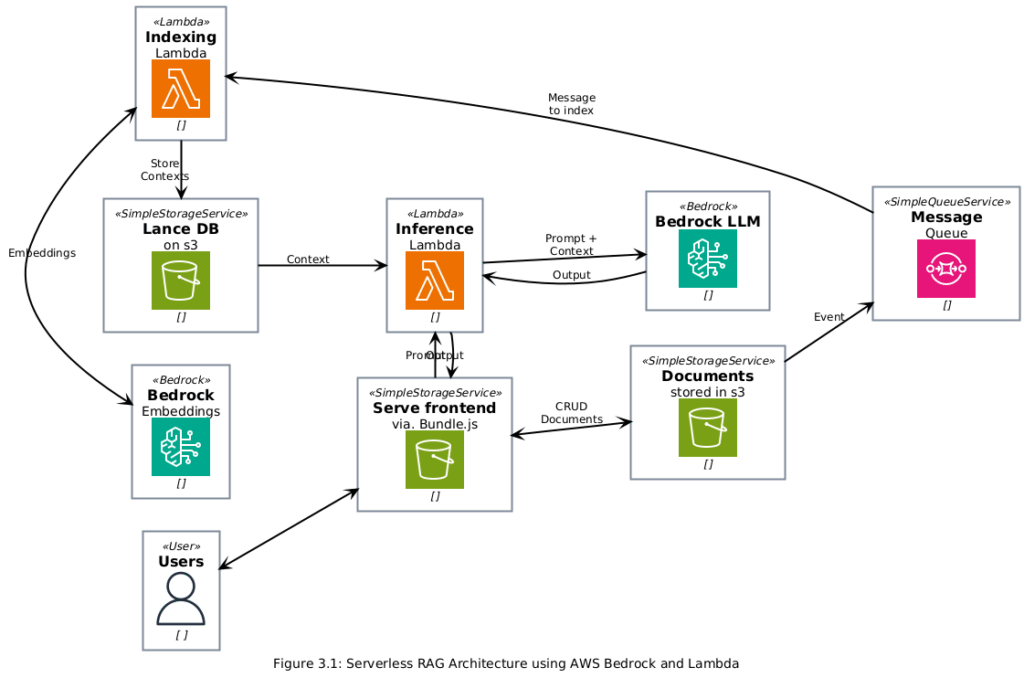
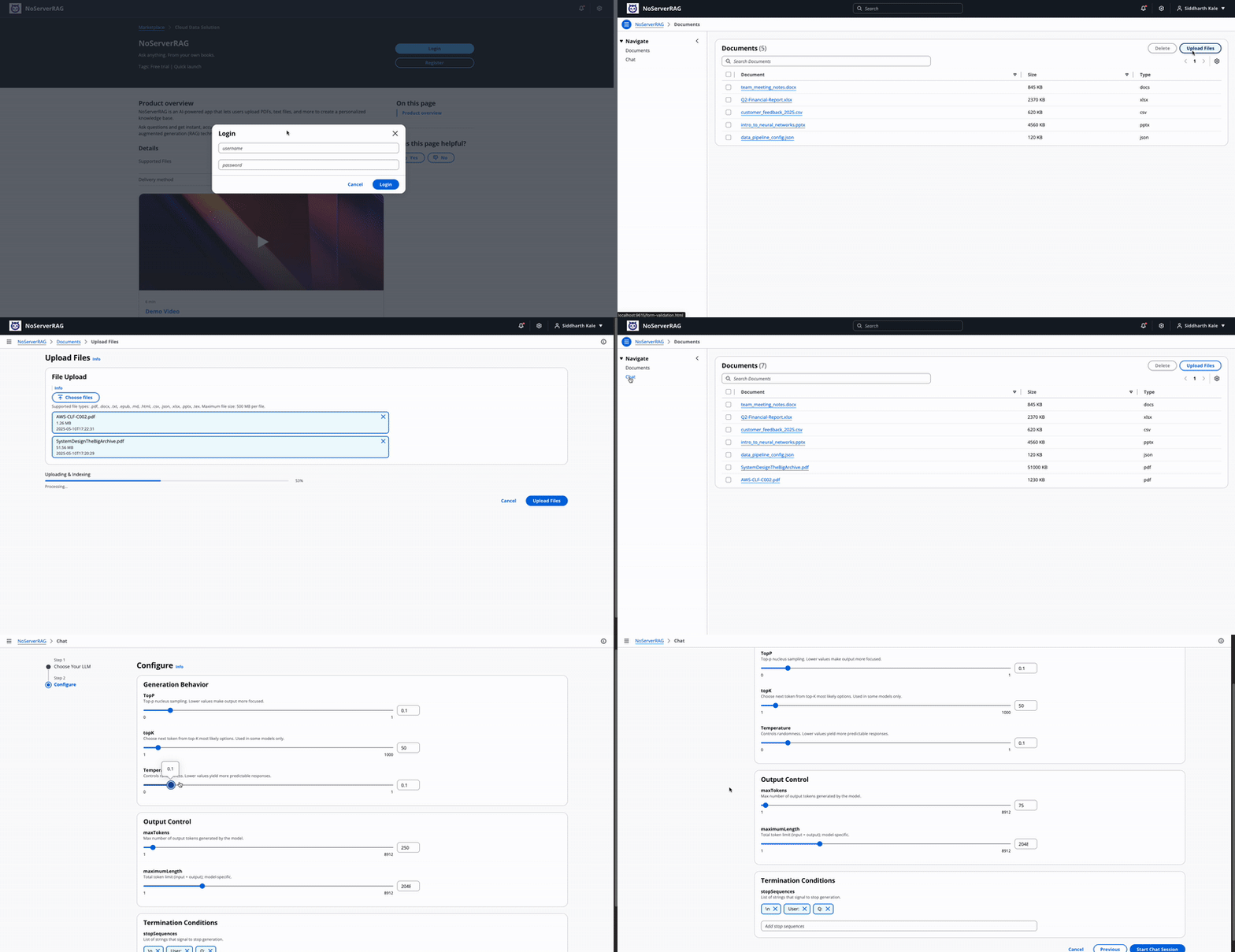
Building a DIY Teamcenter AI Chat–like experience using serverless cloud (AWS/Azure)
Working on Teamcenter AI Chat gave me deep exposure to enterprise-grade RAG systems. Naturally, the next step was asking:
Can we build a lighter, affordable, DIY version of this system using serverless cloud services?
The answer was yes.
By leveraging:
- Serverless compute (AWS Lambda / Azure Functions)
- Managed vector stores
- Cloud-native document pipelines
- Pay-as-you-go LLM APIs
It’s possible to recreate a Teamcenter AI Chat–like experience at a fraction of the cost — suitable for:
- Smaller enterprises
- Internal tools
- Proofs of concept
- Innovation teams
This DIY approach retains the same architectural principles:
RAG-based grounding
Strong indexing
Safe and scalable design
…but without the heavy enterprise overhead.
Disclaimer
This is a research exploration by the Simcenter Technology Innovation team. Our mission: to explore new technologies, to seek out new applications for simulation, and boldly demonstrate the art of the possible where no one has gone before. Therefore, this blog represents only potential product innovations and does not constitute a commitment for delivery. Questions? Contact us at Simcenter_ti.sisw@siemens.com.
Closing thoughts
Teamcenter AI Chat showed me how powerful LLM + Retrieval can be when applied to real enterprise problems. Moving from that experience to building a custom, serverless RAG system reinforced an important lesson:
The real value of AI isn’t the model — it’s the system design around it.
If you get the architecture right, the rest scales naturally.