Discover what’s new in Tecnomatix 2606 (June 2026)
Digitalization for advanced manufacturing.
The Tecnomatix® portfolio delivers advanced digital manufacturing software to empower businesses across diverse industries and sizes. Tecnomatix 2606 launched in June 2026 with several exciting new advancements in AI-driven robotic programming workflow, robotics simulation, human modeling, virtual reality, and enhanced collaboration capabilities.
In this blog, we explore how the Siemens Xcelerator portfolio, including Tecnomatix digital manufacturing software, helps companies minimize manufacturing risks and improve their production operations. Siemens Xcelerator is an open digital business platform that enables customers to accelerate their digital transformation easier, faster and at scale.
We are excited to bring these latest enhancements to you.
You don’t have Tecnomatix software?
See the highlights from Tecnomatix 2606:
Process Simulate X: scalable solutions for your manufacturing simulation needs
Process Simulate X is Siemens’ cloud-enabled digital manufacturing solution for simulating robotic, automated, and human operations in a virtual environment. Designed to give manufacturers greater flexibility, scalability, and collaboration, Process Simulate X helps teams validate production processes, optimize workflows, and reduce risk before physical implementation with cloud licensing to easily deploy for easy IT management and enhanced collaboration.
Whether you’re getting started with simulation or expanding an established digital manufacturing strategy, Process Simulate X offers plans to match your needs, with the ability to add advanced capabilities as your projects evolve. Interested in comparing the different Process Simulate X products? Compare plans & pricing.
Learn more about the solutions and find the right solution for your organization:
- Process Simulate X Essentials – An accessible entry point for foundational simulation and validation workflows.
- Process Simulate X Standard – Expand your capabilities with advanced simulation tools for more complex manufacturing scenarios.
- Process Simulate X Advanced – Unlock the most comprehensive feature set for sophisticated automation, robotics, and digital manufacturing projects
Flexible Licensing with Value Based Licensing (VBL)
Need advanced functionality only for specific projects? Process Simulate X Value Based Licensing (VBL) provides on-demand access to specialized Process Simulate X applications through a shared token pool. Instead of purchasing dedicated licenses for every module, multiple users can access advanced applications as needed. Tokens are consumed only while an application is in use and automatically return to the shared pool when it’s closed, helping maximize software utilization while reducing costs.
Available in 25-, 50-, and 100-token packs, VBL enables organizations to scale their capabilities without overcommitting to permanent licenses.
With VBL, you can access advanced applications including:
- AI Simulation Copilot
- Robotic Assembly
- Automatic Path Planning
- Human Simulation & Motion Capture
- Offline Programming
- Controllers
- VR Analysis
- Commissioning
You can also expand your digital manufacturing workflows with optional high-value add-ons such as:
- Point Cloud
- Safety Robots Manager
- NVIDIA Omniverse Connector
- Augmented Reality (DTA)
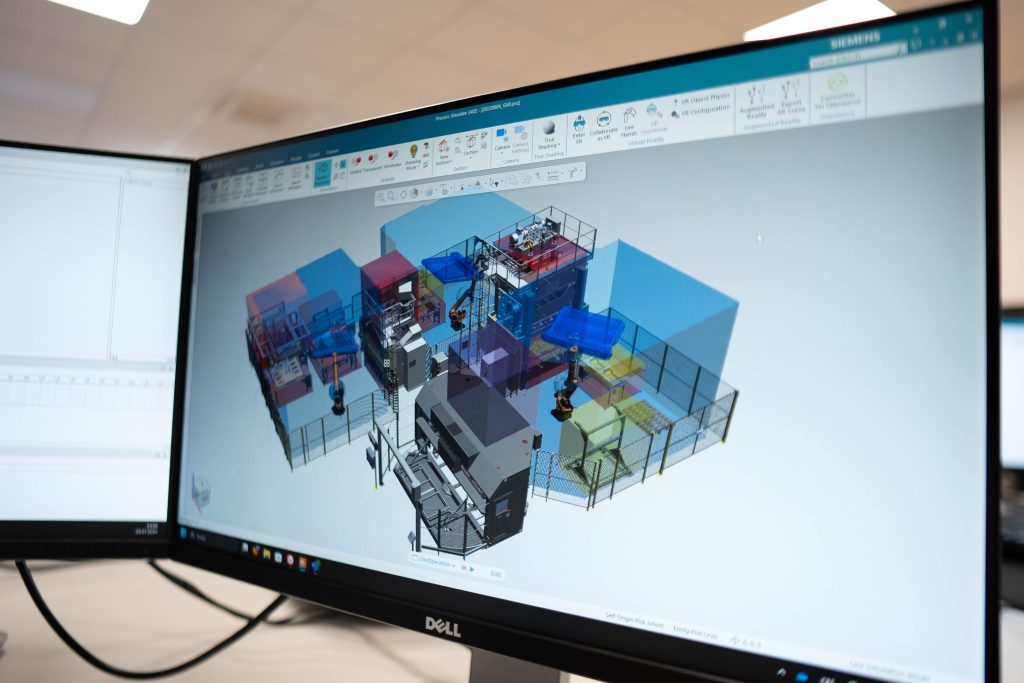
Process Simulate Copilot
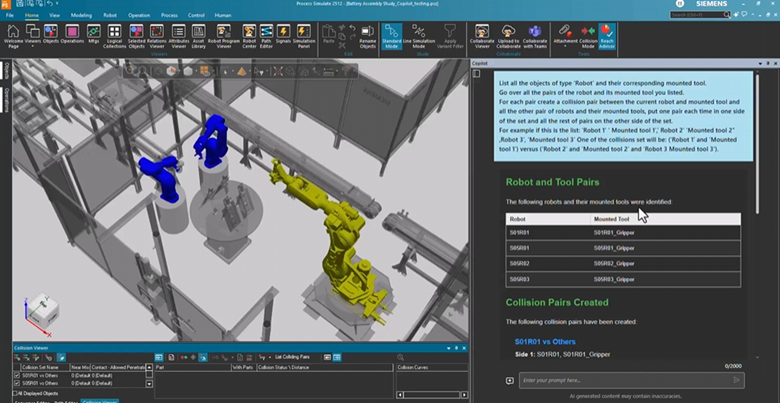
The Process Simulate Copilot continues to evolve as your onboard AI assistant, now with expanded capabilities that transform how engineers interact with simulation data. In 2606, simulation agents automate complex tasks, empowering engineers to focus on innovation rather than repetitive workflows.
AI Tools Catalog 2606
The comprehensive AI tools catalog provides direct access to powerful automation capabilities through the Copilot interface. These tools span multiple categories:
- Object Management: Retrieve, analyze, and manipulate objects with natural language commands. Functions include getting object information, measuring distances, setting colors, and relocating components with precision.
- Visualization: Control study visibility, manage graphics display, and enhance visual feedback for better analysis and presentation.
- Positioning: Automate component placement, validate layouts, and optimize spatial arrangements using intelligent algorithms.
- Data & Documentation: Export simulation data, query internal databases, and access comprehensive documentation directly through the Copilot interface.
Automatic Path Pattern Implementation
Process Simulate Copilot now supports automatic path pattern implementation with reusable prompts. Engineers can propose, validate, and implement complex patterns like spiral paths with simple natural language commands. The system automatically generates optimized waypoints with configurable efficiency settings, dramatically reducing manual path creation time.
Reduce engineering effort, ensure consistent error-free path generation, and simplify maintenance with easy updates when layouts change.
Interested in trying the AI powered Copilot? Launch the Process Simulate X trial for free
2D Sketch to 3D Layout Conversion
Automatically interpret 2D sketches and convert them into fully functional 3D layouts. The system intelligently positions, rotates, and validates components in the 3D scene, applying placement logic and coordinate systems automatically.
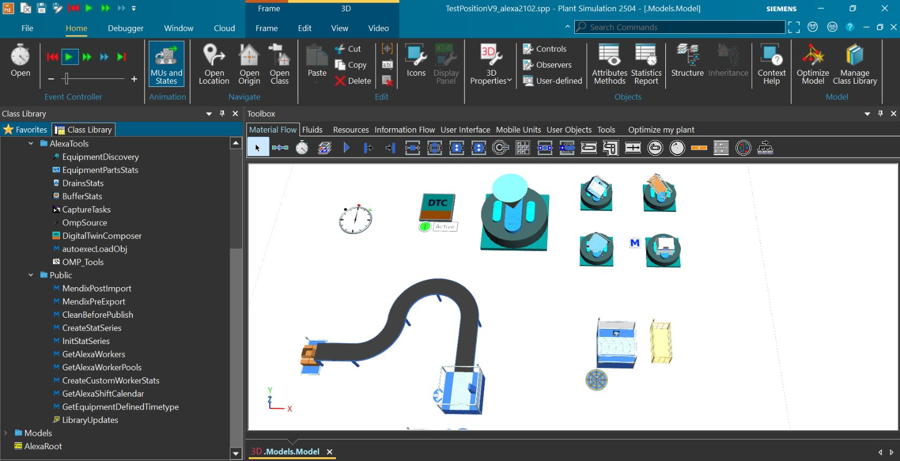
Robotic Path Creation Automation
Copilot automates the entire robotic path creation workflow, from location generation and sequencing to OLP command insertion and process-aligned trajectory creation. This comprehensive automation significantly reduces the technical barrier for creating executable robot operations.
General enhancements
Cable usability
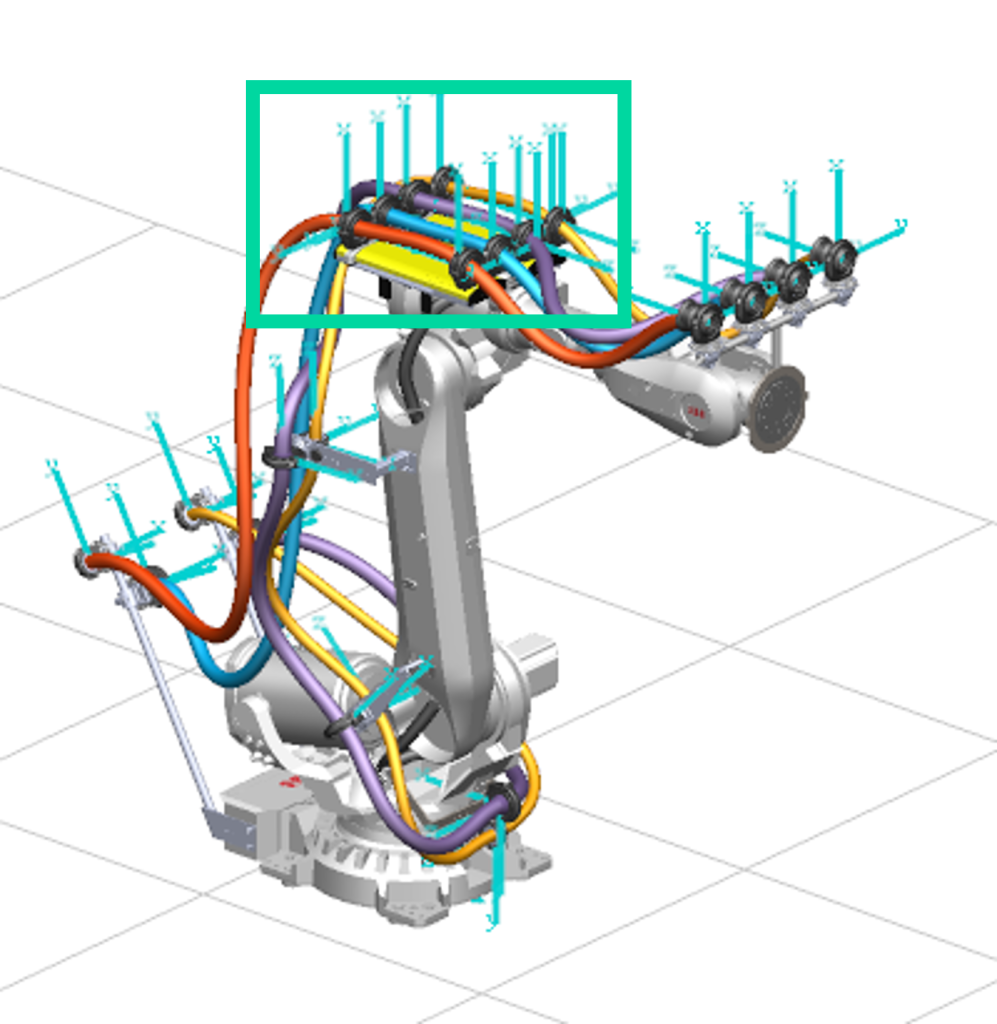
Process Simulate Cables introduces several usability enhancements that simplify cable management and improve workflow efficiency. Users can now regenerate all cables in a loaded study with a single command, while improved default maximum tension settings reduce the likelihood of newly created cables being marked as invalid. Invalid cables are also displayed with clearer visual highlighting instead of the previous diamond-shaped representation, making issues easier to identify and resolve. Together, these enhancements reduce setup time, improve cable visualization, and streamline the management of complex cable studies.
Cloning components
Simplify component reuse by allowing users to quickly create independent copies of existing resources and study parts. Multiple single resources can be duplicated under a selected compound resource or compound equipment, while multiple study parts can be cloned under a selected compound study part, preserving both revision and occurrence information. Available in both Process Simulate on Teamcenter and Process Simulate on Teamcenter Standalone, this capability significantly reduces the effort required to create design variations and expand existing models. By eliminating repetitive manual component creation, it accelerates design iterations, increases productivity, and streamlines engineering workflows.
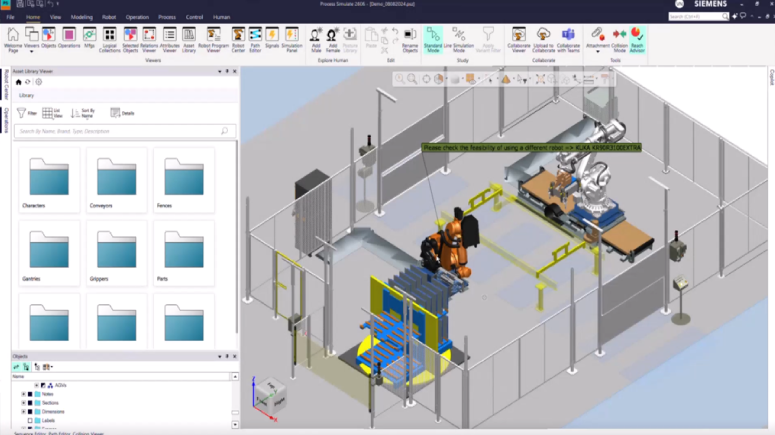
Asset library
The new Asset Library makes it easier to find and reuse assets when building or enhancing Process Simulate studies. Users can browse assets from local or cloud repositories, quickly locate the right content using integrated search and filtering, and leverage Copilot integration to accelerate asset discovery. Assets can be added directly to the appropriate location in a study, reducing the effort required to create new cells or extend existing ones. The result is a faster, more intuitive workflow that simplifies cell creation and improves engineering productivity.
Robotics and offline programming
Process Simulate Robotics helps you program and validate your robotic processes in a dynamic 3D environment. It includes robotics applications for spot welding, metal processing, drilling and riveting, surface treatment, and assembly.
The following new capabilities were released in Tecnomatix 2606:
Arc weld trace and application
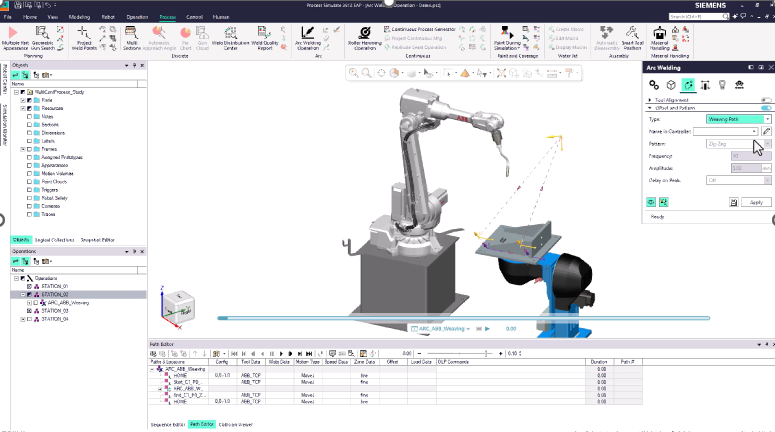
Arc Welding now supports multiple seam execution strategies, including Multi-pass, Skip Weld, Weaving, and Multi-pass + Weaving (Preview), allowing users to select the best approach for each application. Native weaving cycles can be selected, created, and edited directly for supported controllers, while user-defined weaving cycles provide equivalent functionality for controllers without native support. This enables path simulation, accurate cycle time estimation, and the generation of executable motion paths across a broader range of controllers. The result is greater flexibility, a more consistent programming workflow, and support for a wider variety of real-world welding processes.
Arc Welding supports ABB controller-compatible Weaving operations, enabling more accurate simulation of weaving welds. Users can configure the weaving path in the Strategy tab, define ABB-compatible weaving parameters in the Weave Condition dialog, and validate the resulting motion in the Path Editor. The workflow mirrors ABB controller behavior while allowing users to create and edit weaving cycle data directly within the controller format. This delivers more accurate weld path simulation, reliable cycle time estimation, and greater confidence that simulated programs will execute as expected on ABB controllers.
Material handling application
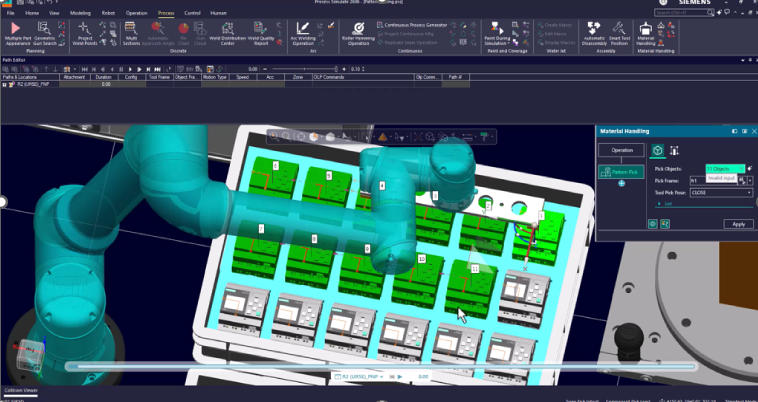
Material Handling introduces new Pattern Pick and Pattern Place capabilities, making it faster to create pick-and-place applications for trays, pallets, and other patterned layouts. Users can select multiple parts or locations, apply rules across an entire pattern, define structured placement layouts, and leverage Inline AI to optimize picking sequences using built-in or custom strategies. Additional enhancements, including Follow Mode, ghost visualization, automatic saving of unapplied changes, and support for Part Appearances as pick objects, improve usability and streamline workflow creation. These improvements enable users to go from concept to a running simulation in minutes while creating and editing complex multi-part pick-and-place operations with greater speed, flexibility, and confidence.
SCL Editor
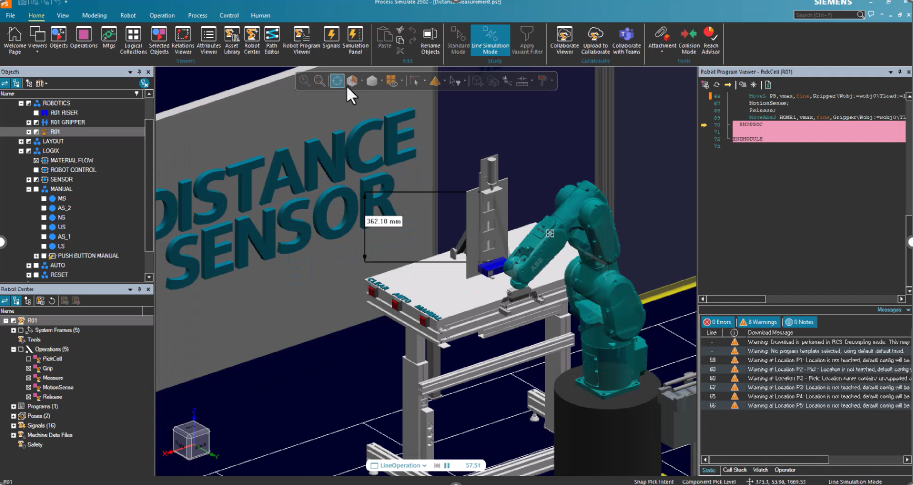
The SCL Editor has been modernized with a new editing engine, delivering a faster, more stable, and professional scripting experience for Virtual Commissioning. Enhancements include intelligent code completion, improved validation, foldable code regions, advanced search, enhanced syntax highlighting, and full support for special characters, making it easier to develop and maintain SCL scripts. The Distance Sensor functionality introduced as a beta in version 2502 is now fully released, enabling SCL scripts to measure distances to Part Appearances and use the results in robotic motion and other automation processes. Together, these improvements streamline scripting workflows, improve code quality, and accelerate Virtual Commissioning development.
Human simulation and virtual reality
Process Simulate Human helps you to eliminate any risk to operators with walk path analysis, reachability tests, vision analysis and ergonomics assessments.
Process Simulate Virtual Reality delivers an immersive environment for better engineering reviews, staff training and realistic process validation.
The following new capabilities were released in Tecnomatix 2606:
Explore human option
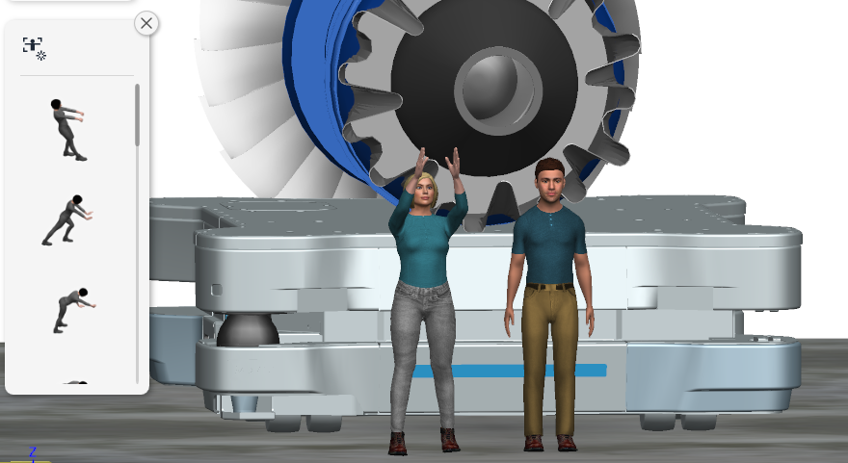
Sample human models in their studies without requiring a Human license. Users can create male and female figures, position them within the study, and apply postures from the Posture Library to visualize human interaction during planning and design. This provides an easy way to evaluate the value of human-centric manufacturing concepts early in the process before investing in advanced human simulation capabilities. Additional Human licenses are required to access advanced functionality such as figure customization, scaling, simulation, and ergonomic analysis.
AI Copilot for ergonomic analysis in TSB
Process Simulate Human introduces Copilot support for ergonomic analysis in Task Simulation Builder (TSB), making it easier to interpret simulation results and assess human workload. Users can ask Copilot questions about their TSB simulations, including the maximum loads a human can safely manage for each task, reducing the effort required to analyze ergonomic data. By combining AI-assisted insights with simulation results, engineers can evaluate tasks more efficiently and make informed decisions earlier in the design process. This enhancement streamlines ergonomic analysis, improves productivity, and helps organizations accelerate human-centric manufacturing planning.
Interactive human posturing
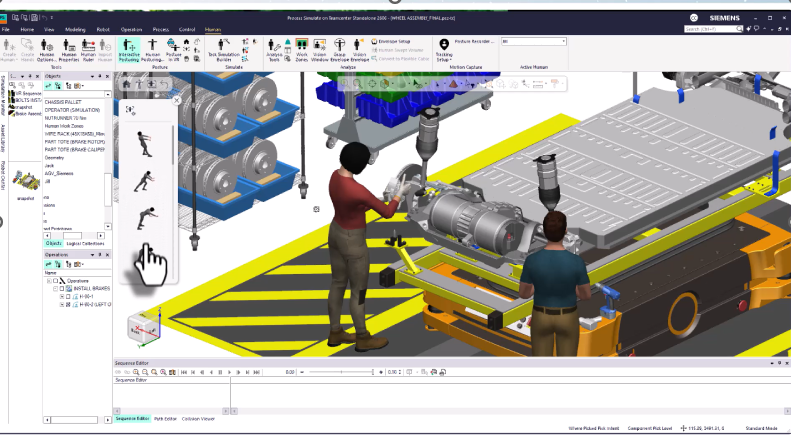
With interactive human posturing, gain a faster and more intuitive way to position Jack and Jill directly within the graphics viewer. Users can interact with the human figure using on-body controls to adjust and lock individual body parts, automatically grasp objects, and quickly access posture libraries without leaving the workspace. This new workflow reduces the effort required for one of the most common human simulation tasks while making posture creation more natural and efficient. The result is faster human modeling, improved usability, and a more interactive experience for ergonomic planning and validation.
Collision notifications using haptics and object ghosting
Enable collision notifications through haptic feedback and visual object ghosting, making object interactions more intuitive and easier to validate. When manipulating objects in VR, users receive tactile feedback through supported hand controllers along with visual collision indicators in the scene, helping them immediately identify when and where collisions occur. Collision notification preferences can also be configured directly from within VR using the new immersive preferences menu, eliminating the need to exit the experience. These enhancements provide greater confidence when validating assembly and disassembly operations by making accessibility and interference issues easier to detect in an immersive environment.
PICO Headset Support
Virtual Reality now supports the PICO 4 Ultra headset, expanding the range of hardware options available for immersive simulation. Users can choose the VR headset that best meets their technical requirements, deployment needs, and budget while maintaining the same Process Simulate VR experience. This additional headset support provides greater flexibility when selecting VR hardware for engineering teams and organizations. By supporting more devices, Process Simulate makes immersive validation more accessible across a wider range of use cases.
These are just highlights of the advancements delivered with the latest Tecnomatix release. For complete details on the new features of Tecnomatix 2606 and its supporting releases, please refer to the release notes and new features presentations offered with the software download.
Do not forget to join the Tecnomatix public community and to explore our website for even more exciting developments in digital manufacturing.