Robotic Painting for the Aerospace Industry using Process Simulate software
Explore how advanced path planning, coverage simulation and thickness control technology enable powerful capabilities to assess, update, and validate robotic painting station before physical implementation, improving product quality while reducing costs and paint waste.
Robotic painting is an automated process that uses programmable robotic arms to apply paint to surfaces with precision and efficiency. It is widely used in industries such as automotive, aerospace and consumer goods manufacturing where robotic painters can adapt to complex shapes, adjust spray patterns, and optimize paint application. Robotic painting technology enhances product quality, minimizes defects, and improves workplace safety by reducing human exposure to hazardous fumes and chemicals.
However, robotic painting presents multifaceted challenges. First, efficient path planning is needed to ensure that the robot paints all parts of a surface without wasting time or paint. Achieving the optimal path is crucial to reducing cycle time and improving quality. Another challenge is achieving uniform coverage. Robots need to be precise in their movements, and even slight variations can cause uneven paint application. Lastly, managing paint thickness presents another challenge, as it is crucial to ensure the right paint thickness. For example, too much paint can cause runs or drips, while too little might leave patches or undercoating.

Design, deploy and optimize robotic painting
To begin, let’s explore how Process Simulate software can help address these industrial challenges, allowing manufacturers to plan, test, and fine-tune robotic painting processes before applying them to production.
Path Planning and Movement Optimization
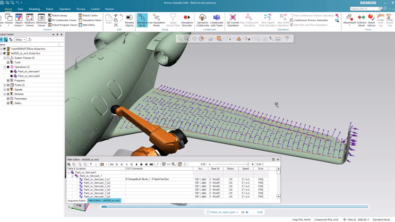
In robotic painting, Process Simulate helps create and optimize path planning, ensuring smooth and efficient robot operation. By simply picking the faces to be painted, you can quickly generate continuous trajectories that are adapted to plane curvature, enabling the robot to follow surface geometries smoothly without abrupt stops or unnecessary reorientations. Both robot motion and process parameters can be easily fine-tuned to optimize transitions between painting areas, minimizing idle time and avoiding path deviations that could lead to overspray or uneven coating.
Additionally, Process Simulate helps reduce programming effort by standardizing robot motion. For example, you can define pre-configured movement patterns, such as inserting approach and retract location, upon a single click of button. The system also accounts for robot kinematics and joint limitations, ensuring that the generated paths are not only optimal for paint coverage but also feasible within the robot’s operational constraints.
For example, the video below demonstrates robot path planning in the aerospace industry. Aircraft parts often have large and curved surfaces, making it difficult to maintain consistent gun-to-surface distance and orientation which are critical factors for even paint application. Additionally, with low production volumes and frequent part variations, paths often need to be reprogrammed or fine-tuned for each job, which adds to the engineering effort. – These challenges can be effectively addressed using Process Simulate: The path planning and movement optimization in Process Simulate helps enhance painting efficiency, minimize cycle time, and improve coating quality by ensuring smooth, precise, and controlled robotic motion throughout the process.
Achieving Uniform Coverage
After generating a nominal robotic path, the user needs to verify that the entire surface is covered, ensuring no unpainted areas remain. If the goal is to apply multiple layers, it’s also important to confirm that the number of layers is consistent across the entire geometry.
Process Simulate provides paint coverage simulation through color-coded visualization, indicating the number of paint layers applied to each seam location on the surface. As the robot follows its programmed path, the system dynamically calculates the coverage area and updates the coverage display, showing which regions have been coated and identifying any gaps or overlaps. This configurable real-time feedback allows users to refine the painting trajectory and parameters to achieve complete and uniform coverage.
Simulating paint coverage with color visualization provides a clear and immediate way to assess the effectiveness of a painting process before real-world execution. By using color mapping, users can identify areas where coverage is insufficient, excessive, or uneven. This allows engineers to fine-tune spray angles, robot trajectories, and process parameters to achieve optimal results.
Below is another example of robotic painting in the aerospace industry. Aerospace presents unique painting challenges as inconsistent coverage can impact weight, aerodynamics, and corrosion protection. Additionally, features like seams and panel joints create small areas that are prone to undercoating or overspray. Process Simulate helps address these challenges by simulating and validating the paint process in a 3D environment: Optimizing paint coverage in simulation reduces trial-and-error in production, leading to shorter setup times, lower costs, and increased efficiency. By refining the painting process digitally, manufacturers can enhance overall throughput while maintaining high-quality finishes.
Controlling Paint Thickness
It is crucial to control robotic painting thickness which allows to ensure consistent quality, prevents defects, and optimizes material usage. In Process Simulate, the simulation of paint thickness is achieved by accurately modeling the interaction between the robot’s movements, the paint spray, and the surface being painted. The system uses a sophisticated calculation algorithm by taking into account various key process parameters such as robot’s speed, direction, surface distance, and spray attributes, including nozzle geometry, to ensure an accurate and representative simulation.
To calculate paint thickness, the simulation continuously assesses the amount of paint applied over time as the robot progresses. The result can be visualized either via configurable colors representing different thickness ranges, or via accurate values by hovering over the painted area in concern. Additionally, the simulation calculates not only paint thickness but also coverage area and paint consumption, with any parameter changes updating the results in real time. This allows users to monitor the consistency of the paint application and make adjustments to the spray parameters, robot path, or other variables to ensure an optimal and uniform coating.
To achieve even more accurate paint thickness calculations and accommodate a broader range of application scenarios, Process Simulate provides advanced paint thickness customization capability. While the legacy bell paint function takes key out-of-the-box process parameters into account, users can customize the paint algorithm by specifying a new thickness equation or defining additional parameters for the calculation. Additionally, the tool enables simulating the painting process on moving parts or parts with masking tape, thus expanding the scope of applications. Both bell and elliptical spray brushes are supported, with the algorithm considering varying paint angles. Users can create complex thickness equations or define external functions to meet the unique requirements of specific painting applications.
The successful implementation of robotic painting is essential for manufacturers across industries to ensure consistent quality, while reducing costs and paint waste. Process Simulate enhances robotic painting by optimizing path planning, improving paint coverage, and ensuring accurate thickness calculations, which ultimately boosts efficiency, quality, and process control.