What’s new in Teamcenter Product Cost Management 2612: AI-assisted costing, 3D model-to-cost and faster quoting

Cost engineers, quotation teams and procurement specialists face the same challenge every day: delivering accurate cost estimates faster, with less manual effort and more confidence in the data behind them. Teamcenter Product Cost Management release 2612 addresses this challenge with AI-assisted costing, automated 3D CAD analysis, a faster quoting process, many usability improvements and continuously updated reference data.
In this blog post, we take you through the most important new features in Teamcenter Product Cost Management release 2612 and explain how they help you speed up should costing, quotation calculation and product carbon footprint analysis.
AI-assisted costing for Teamcenter Product Cost Management
Release 2612 brings AI directly into the costing workflow. With AI-assisted costing for Teamcenter Product Cost Management, you can find matching parts and their calculations, automatically create bill of materials (BOM) and bill of process (BOP) structures, update calculations instantly with your latest inputs and receive instant analyses, summaries and recommendations to support your decisions.
A model-agnostic MCP server connects your AI to product costing
At the heart of the AI-assisted costing for Teamcenter Product Cost Management is a new MCP server. Based on the standardized Model Context Protocol (MCP), it provides an interface between AI systems and Teamcenter Product Cost Management. Connected AI systems can interact with the solution and execute supported costing operations, which helps to accelerate and automate parts of the costing workflow.
The MCP server does not provide the AI model itself. Instead, it makes the costing capabilities available to the AI and agentic systems you already use. This model-agnostic approach gives you full flexibility: you can connect any large language model (LLM), whether it is Microsoft Copilot, your company’s own AI or your existing agentic landscape. This creates the foundation for AI-supported costing use cases tailored to your individual needs.
AI support across the entire costing workflow
The AI-assisted costing for Teamcenter Product Cost Management is designed around the typical costing workflow, from finding and reusing existing data to calculating, reviewing and summarizing results. With release 2612, the MCP tool capabilities cover the following key steps:
- Find and reuse: Search for existing parts, regions, machines and other relevant calculation data.
- Bill of materials creation: Create new parts or bills of materials and reuse existing calculations.
- Define process: Create calculations and modify detailed manufacturing step data.
- Machines and labor: Find and add relevant machines and calculation data.
- Set master data: Modify existing part calculation data, bills of materials and bills of process, and identify improvement potential.
- Review and summarize: Get detailed information and summaries for parts and bills of materials.
AI-assisted costing use cases in practice
What does this look like in day-to-day work? Imagine a benchmark scenario in which a user – whether in cost engineering, procurement or quotation – has little or no data available. The user provides an image of a product to the AI and asks it to create a new bill of materials. The AI analyses the image, reasons about the task and calls the required tools in Teamcenter Product Cost Management. After about two and a half minutes, the complete bill of materials and bill of process are created, including all necessary data.
Further use cases include:
- BOM creation from any source that the AI model can process, such as images or Excel files.
- Cost optimization recommendations based on your Teamcenter Product Cost Management data.
- Engineering change management: When a bill of materials changes, the AI can update part data such as quantity, designation and structure, keeping your BOM and BOP up to date.
The result: AI speeds up the work of cost engineers, procurement specialists and quotation teams, leaving more time for the tasks that create real value.
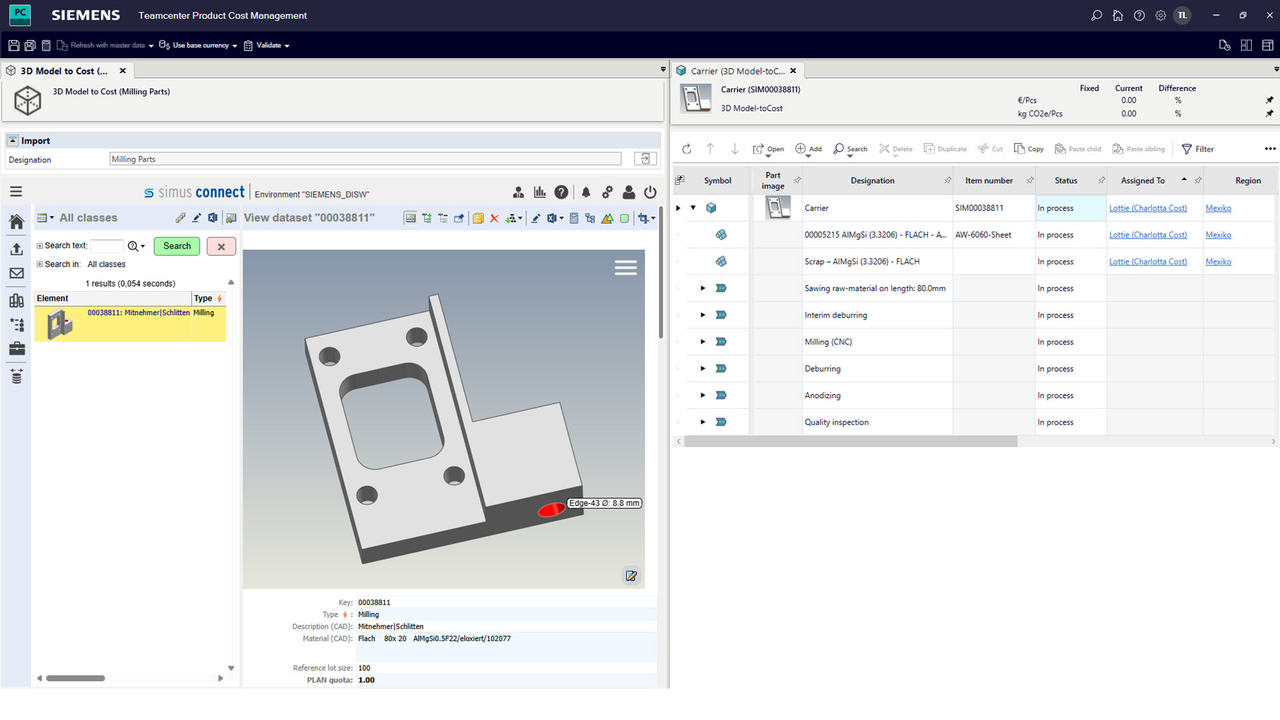
3D model-to-cost: turn a 30-minute task into a 1-minute result
Analyzing a part manually often takes 30 minutes or more: measuring the geometry, identifying the manufacturing steps and calculating machining times by hand. With 3D model-to-cost in Teamcenter Product Cost Management, this step is automated. The system analyses the 3D CAD model, generates the manufacturing steps and provides cycle-time insight in about one minute.
This speeds up your calculations from 3D CAD files, and you do not need extensive manufacturing expertise to use it:
- Reduce manual input: Use data directly from 3D CAD models and streamline your workflows.
- Automatic feature recognition: Identify manufacturing features, tolerances and surface qualities automatically from the CAD files.
- Minimize errors: Rely on precise data extracted directly from the 3D model instead of manual transcription.
- Focus on what matters: Spend less time on calculation mechanics and more time on analysis and decision-making.
Faster quotation calculation with enhanced multi-year lifetime logic
For quotation calculation, new product development and introduction (NPDI) and profitability tracking use cases, release 2612 speeds up the entire quoting process. Whether you are evaluating a three-year contract or a ten-year customer relationship, you can now:
- Calculate multi-year lifetime scenarios quickly to support informed business decisions.
- Complete tasks easily with simplified and streamlined workflows.
- Use manually added price layering in your multi-year lifetime calculations.
- Access the latest approved OEM cost breakdown versions to generate quotations quickly.
Release 2612 also adds smaller enhancements that give you more flexibility in project assumptions, including price layering for standard prices without material master data, the selection of material classification and price currency directly in project assumptions, and new REST APIs to automate project assumption updates.
Improved user experience: view and edit calculation data efficiently in the table editor
The integrated table editor lets you view and edit calculation data in one place. You can build new calculations faster by dragging existing data into the calculation document, and an improved user experience streamlines navigation and editing in the table editor. Release 2612 adds several enhancements that make everyday work faster and collaboration easier:
- Refresh BOM data to see changes made by other users: A new refresh command reloads the latest BOM data at any time, without closing and reopening the table editor. The current expand and collapse state of the structure is preserved, so you keep your position.
- Drag and drop from the explorer is back: Release 2612 restores drag and drop between the explorer and calculation documents for materials, manufacturing steps, activities, direct labor, production systems, and tools and devices.
- Open the table editor with a double-click: A new system setting lets you define a default table editor configuration that opens directly with a double-click in the explorer. The context menu still allows you to open the calculation document or select another configuration.
- Fixed values for each BOM item: The fixed price and fixed carbon footprint properties are now available as columns in the table editor configuration, so you can easily visualize the impact of changes across all BOM items. Fixing these values for the whole BOM is done efficiently via bulk data change, and column names can be renamed to match your company’s terminology.
- Direct input of carbon footprint overheads: You can now enter and edit other carbon footprint, packaging and carrier carbon footprint, and transport carbon footprint overheads directly in the table editor, where you perform your BOM analysis.
- Expanded BOM and BOP structures are preserved: When you switch between table editor configurations, such as material, manufacturing or cost views, the structure no longer collapses. This is particularly helpful for large, deeply nested BOMs.
Regularly updated reference data for should costing and product carbon footprint
Accurate cost calculations depend on reliable data. The reference data for Teamcenter Product Cost Management is updated regularly. In 2026, five reference data releases (2602, 2603, 2605, 2608 and 2611) provide cost value engineering and procurement teams with continuously updated commercial and technical data:
- Production site data: The annual update includes new labor wage and labor burden data for 67 countries and more than 450 regions. Labor wages are available for 19 skill levels, and labor burden data covers one, two and three production shifts. More than 800 new cost details cover office and production space costs, electricity and natural gas prices, and interest rates.
- Machines: The 2608 release added 106 new machines for categories such as thermoforming, injection molding and turning, as well as the first machines for new knowledge domains, including paint lines, electroplating and electric motors. Following a full machine database update, no machine has price data older than 2020.
- Material prices: Quarterly updates cover 10,000 materials across four regions (EMEA, Americas, APAC and a world average price), seven semi-finished product types and five yearly order quantities. This gives procurement a strong basis for supplier negotiations and sourcing decisions.
- Overhead rates: Yearly updates cover material overhead, research and development, residual manufacturing, and sales and general administration costs.
- Carbon footprint values: Updated twice a year, in May and November, CO2e data covers five semi-finished product types and 57 countries and regions per material, as well as energy mix data for 57 countries and primary energy data for oil and natural gas. This helps you calculate Scope 2 and Scope 3 emissions for your products. The data can be used for reports based on ISO 14067, ISO 14040 ff., the GHG Protocol and PAS 2060, and the calculation methodology is validated by GUTcert (ISO 14064-3).
- Tool costing: The 2611 update refreshes tool steel, electrode and spring prices to improve the accuracy of tooling cost estimates.
FAQ: Teamcenter Product Cost Management release 2612
What are the key new features in Teamcenter Product Cost Management release 2612?
The highlights are the AI-assisted costing for Teamcenter Product Cost Management with a model-agnostic MCP server, 3D model-to-cost for automated costing from 3D CAD files, enhanced multi-year lifetime logic for quotation calculation, more flexibility in project assumptions, many table editor improvements, and regularly updated reference data.
Which AI models can I use with the AI-assisted costing for Teamcenter Product Cost Management?
The MCP server is model-agnostic. You can connect any LLM, such as Microsoft Copilot or your company’s own AI, as well as your existing agentic workflows.
Can I control what the AI is allowed to do?
Yes. A role and permission system is in place, and you decide exactly what the AI can do for each user.
How does 3D CAD costing speed up should costing?
3D model-to-cost automatically analyses the 3D model, identifies manufacturing features, tolerances and surface qualities, and generates the manufacturing steps. A part analysis that typically takes 30 minutes or more manually takes about one minute.
Calculate faster, quote with confidence, decide smarter: costing reimagined with release 2612
Teamcenter Product Cost Management release 2612 helps you calculate faster, quote with more confidence and base your decisions on current data. AI-capabilities automate key steps of the costing workflow, 3D model-to-cost turns CAD data into a reliable starting point for your calculation, and enhancements in quoting, project assumptions and the table editor reduce manual effort every day. Combined with regularly updated reference data, you get the speed and intelligence you need to stay competitive across cost engineering, procurement and quotation calculation.
Want to learn more?
Check out the release letter in the Support Center (access only for customers) for full details on all new features and data updates in Teamcenter Product Cost Management release 2612, or contact your Siemens representative for a personal demo.
Further information
- Product webpage: Teamcenter Product Cost Management
- eBook: Optimizing costs, profitability and sustainability
- Fact sheet: Reduce your costs and carbon footprint with Teamcenter X Product Cost Management
- Migration guide: Transform to the cloud with Teamcenter X Product Cost Management
- Fact sheet: Transform tool costing with precision and transparency
- Customer success: Combining parametric and bottom-up approaches to reduce the time for cost calculations by 95 percent
- Trial: Try Teamcenter Product Cost Management now – 30 days free trial