What’s new in Teamcenter Quality 2506

💻 Explore the latest capabilities of Teamcenter Quality 2506
Are you looking for a solution that supports a closed-loop quality management approach from design to manufacturing? Get inspired by Teamcenter Quality 2506 software!
Built on the Teamcenter product lifecycle management (PLM) backbone, you can use Teamcenter Quality to leverage product and process information as well as share cross-departmental workflows to streamline core quality management processes. Teamcenter Quality 2506, which is part of the Siemens Xcelerator business platform, works in the Active Workspace Client of Teamcenter.
Teamcenter Quality version 2506 features several enrichments to the quality management system (QMS) modules, which were designed to improve software capabilities and usability. The Teamcenter Quality Training and Qualification module is part of the latest software release and delivers an advanced set of capabilities to streamline quality compliance management.
Take advantage of a comprehensive quality and compliance solution and explore the software release notes to learn more.
⚠️ Boost risk assessment and lessons learned
Failure Mode and Effects Analysis (FMEA) is a methodology that allows companies to assess potential risks associated with product and process failures. Teamcenter Quality FMEA version 2506 includes several improvements to boost the consistency of methodology application while maintaining clear connections between quality initiatives.
- Enhanced structure generation: When setting up the FMEA system structure, users can choose between a hard-link, soft-link or no-link reference type between the bill-of-materials (BOM) or bill-of-process (BOP) and the corresponding FMEA.
- Optimized mechanism to change element sequence: New commands offer a more efficient way to adjust the sequence of elements in the tree structure without the need for manual editing of sequence numbers. FMEA objects can be shifted upward or downward within the same structure level.
- Comprehensive risk visualization for strategic decision-making: Depending on the industry guidelines, the software features several dashboards, providing a comprehensive overview for each system element. Users can view the action priorities (AP), or the risk priority numbers (RPN) for each system element, showcasing all failure causes with associated risks (initial or revision action group). Additionally, a new dashboard offers a comparative overview for each system element, which illustrates the progression of risks from initial assessment to successive optimization, demonstrating the improvement over time.
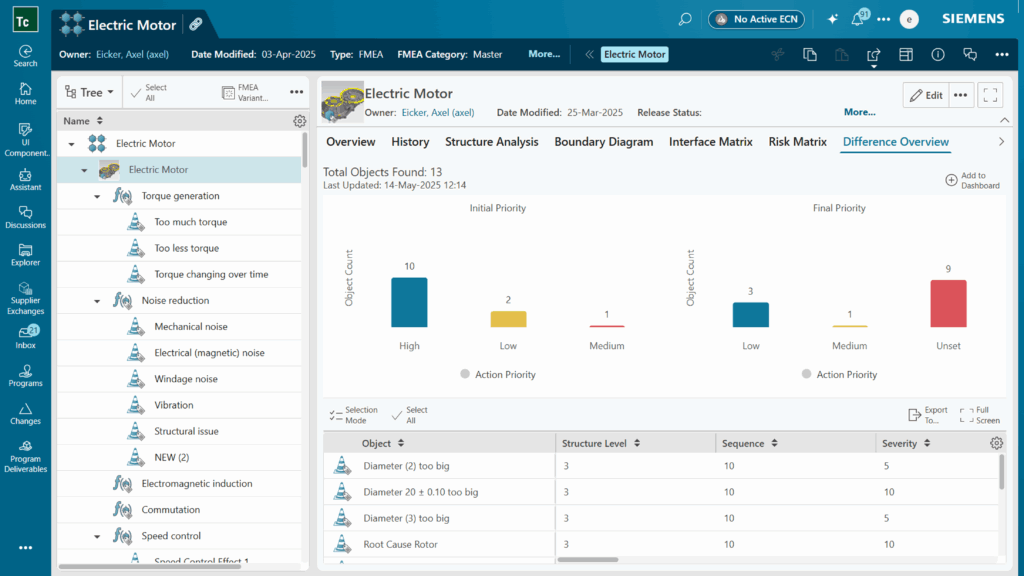
- Advanced risk matrix: Internal and external failures that pose a risk are displayed within the risk matrix.
- Quality project integration supports seamless alignment: A new quality project tab is available at the FMEA header level, showcasing the name of the associated object from the quality project when the FMEA is designated as a deliverable within a program, project, event, or checklist.
- Systematic knowledge capturing for lessons learned: The FMEA object can be added as a reference element in the problem-solving process, enabling seamless integration across Teamcenter Quality modules.
- FMEA initiator assignment: new functionality lets you formally assign the initiator to the analysis, supporting better compliance with standardized methodology.
- Additional interface usability improvements: To enhance usability and reduce clicks, the boundary diagram and interface matrix are permanently visible in separate tabs within the design FMEA. Similarly, in the process FMEA, the process flow chart is always visible in a dedicated tab, providing quick access to essential documentation.
📋 Simplifying quality project management
Significant enhancements have been implemented across Teamcenter Quality 2506, focusing on the project management module while also expanding cross-application functionality within the Teamcenter Quality Audit & Assessment module:
- Save as function for copying checklists: Users can selectively copy attachments, checklists with deliverables and results when duplicating projects, maintaining historical data and allowing teams to preserve necessary documentation.
- Support multiple objects in the calendar: The new calendar view enhances schedule supervision by connecting different modules, such as Teamcenter Quality Audit & Assessment, Teamcenter Quality Project Management, Teamcenter Quality Action Management, and checklists functionalities.
- Audit terminology alignment: The term audit plan has been updated to audit program across all properties and functions, ensuring consistency with industry norms and standards.
📊 Introducing smart quality checklists
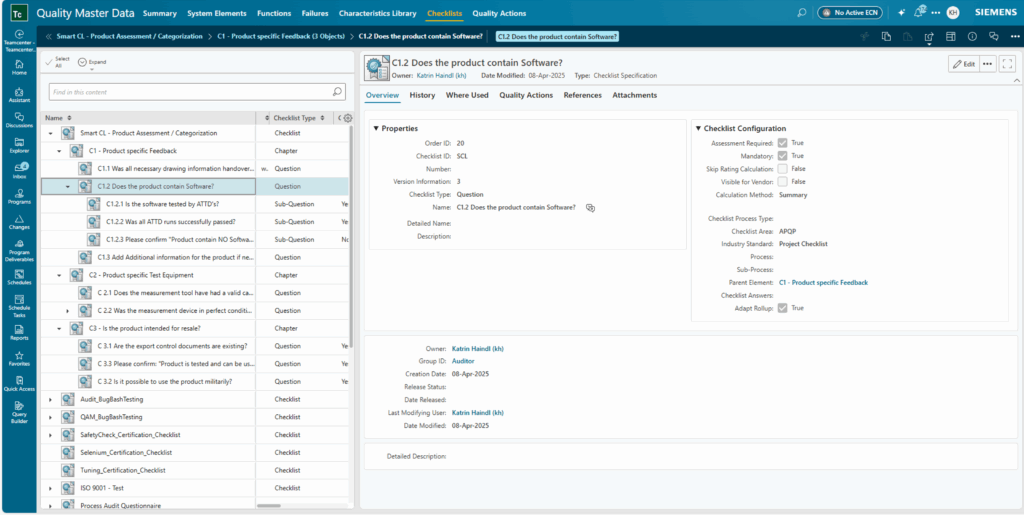
Teamcenter Quality 2506 introduces enhanced smart checklists with dynamic content control and comprehensive tracking capabilities. The update includes new master data properties for improved checklist configuration across quality programs, audits, and other part approval processes.
- Adopt rollup: A new property introduces smarter assessment handling in checklists through the adopt rollup setting. This feature lets users control how the system manages assessment requirements for related questions. When enabled, sub-question responses automatically determine the main question’s assessment. When disabled, main questions require separate evaluation, independent of sub-question responses.
- Checklist answer control: Users can select values aligned with rating rule configurations, triggering additional checklist items for better usability. When no released quality checklist exists, users receive a direct link to quality master data. Large checklist visibility is improved by showing master checklist references and direct parent relationships in realized checklists.
🔎 Speed up quality inspection by reusing manufacturing data
Teamcenter Quality Control and Inspection Planning module now delivers a stronger connection to the manufacturing environment.
- Assigning a project to data protection: Integrating data protection projects now extends to characteristic groups within the master data and the control and inspection plan. Assigning a project enables restricting selected data visibility to specific user groups.
- Streamline collaboration between process planning and quality team: Teamcenter Quality 2506 introduces bidirectional linking between control plans and BOP (Bill of Process). Process planners can now establish direct connections for inspection definitions within work packages, whether automatically transferred or manually added. Quality engineers benefit from a new reference display in control plans, allowing direct BOP access, which streamlines collaboration between process planning and quality teams.
- NX Inspector: notifies users of changes to NX 3D models linked to the control plan. As a control plan user, you can receive automatic notifications from NX™ Inspector software whenever changes occur within an NX revision. The system alerts you when product manufacturing information (PMI) is modified or deleted within inspection definitions.

- Configurable DPV workbook: The Dimensional Planning and Validation (DPV) workbook creation is now file-configurable, allowing customized property assignments from characteristic specifications, inspection definitions, or IPXML files to specific workbook columns. The system maintains existing workflows while supporting user-specific requirements, including coordinate data (X, Y, Z) transfer.
- Additional enhancement for PMI use: The enhanced PMI functionality features a new reference tab showing parts already linked to the control plan, streamlining part selection while maintaining JT™ data format and IPXML requirements. Users can still access traditional search options. The inspection definition’s PMI tab offers improved usability with flexible 3D/2D viewing options, color-coded tables, and detailed characteristic popups.
⚙️ Enhanced root-cause analysis and document management
The latest Teamcenter Quality 2506 Problem Solving and Quality Issue Management modules include some usability improvements and new capabilities for more detailed documentation and reporting.
- Optimized workflow and participant assignment: Users can now efficiently manage quality issues and problem-solving processes with enhanced workflow capabilities for selecting the desired role and assigning appropriate team members.
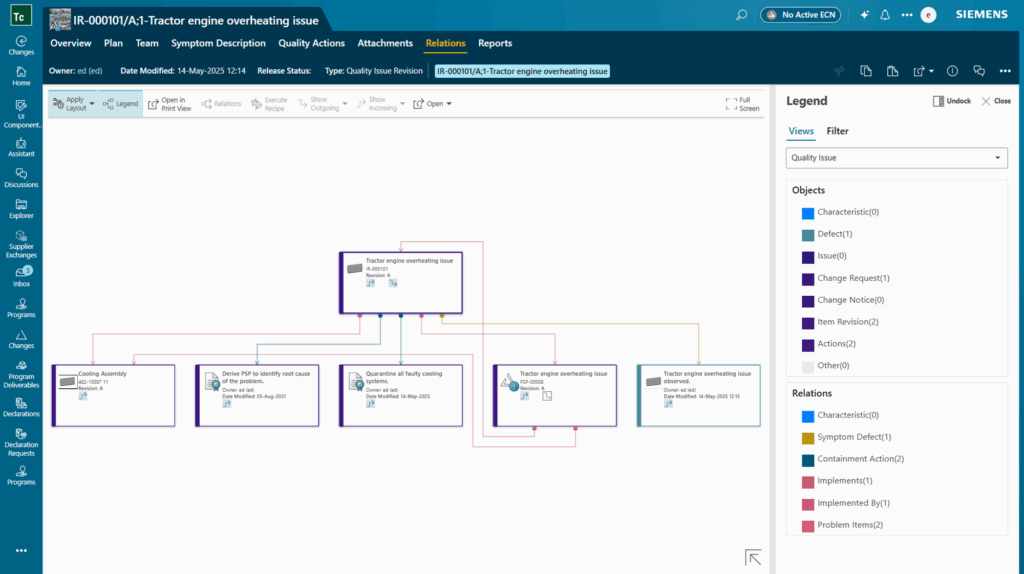
- Relation browser for quality issue management: The relation browser offers a one-page schematic overview of quality problems to aid users in understanding and navigating quality issue functions. Users can use the filter function, accessible via actions, to display specific elements on the screen in addition to the legend.
- Additional improvements in RCA tree: Teamcenter Quality Problem-Solving introduces enhanced visualization with an improved root-cause analysis (RCA) tree interface. Users can navigate expandable tree structures, edit cells directly, and view attached files through paperclip indicators. The update allows simultaneous evaluation of multiple defects and displays problem-solving connections through flexible viewing options for better information visibility.
- Additional improvements in usability: New saving functionality enables users to preserve their progress and resume work later. Additionally, attachments and actions are accessible in the overall files section’s attachments tab.
📝 Seamlessly create and perform quality actions
Teamcenter Quality 2506 offers quality action management capabilities for creating and performing tasks in different modules or as a standalone system. This latest release introduces enhancements, featuring streamlined workflows and effective review processes.
- Effectiveness review for all quality actions: A new effectiveness check feature enhances all quality actions, enabling users to visually indicate progress with five-point increments.
- Introduction of the table view: Using Teamcenter Quality Action Management and related master data now supports a flexible table view interface. Users can easily switch between list and table views, using filter and sorting options, enabling better organization of data.
- New report: monitor all overdue actions. This enhancement improves tracking of quality actions, primarily focusing on overdue actions. It displays, for example, actions that will be overdue in the next five days or checklists due in 10 days.
- Reminder and escalation management improvements: Teamcenter Quality 2506 now supports null values for properties, effectively managing missing data. The empty checkbox can be used to identify any object with null content, not just checklists. Reminder and escalation profiles have been optimized for better usability. Users can easily view, read and edit profile entries across different versions. Email notifications have been streamlined, too. Recipients can receive direct links to specific tasks, such as quality actions, enabling immediate access with a single click. Administrators can configure whether users receive emails with or without direct links.
🎓 Streamline company-wide compliance management
Teamcenter Quality 2506 supports quality compliance assignments. The Teamcenter Quality Training and Qualification module, now part of the quality management portfolio, helps you streamline employee training and qualifications for each position and department while managing document and certification requirements.
Here’s an overview of key capabilities:
- Streamlined employee training and qualifications through systematic planning and execution of courses
- Proactive skill gap identification combined with comprehensive tracking of training records and employee competencies
- Configured role-based security while managing trainee profiles for active and expired qualifications
- Enhanced compliance through qualification matrix to monitor and maintain required skills
- Centralized control of quality documentation for consistency and accessibility across the organization
- Supported documentation management with targeted distribution and version control mechanisms, allowing relevant personnel to access the right documents at the right time
🏆 Benefits of the unique Teamcenter Quality 2506 capabilities
- Improve the lessons-learned process to support better knowledge sharing and preserve company know-how
- Enhance project management capabilities for simplified project workflows
- Reduce complexity while increasing productivity by reusing manufacturing information
- Combine enhanced root-cause analysis features and flexible document management
- Ensure consistent follow-up and appropriate escalation for proactive quality action management process
- Streamline company-wide training, qualifications and quality document management
📢Experience the advantages of the closed-loop quality
Interested in discovering more about the comprehensive quality core processes offered by Teamcenter Quality? We invite you to explore the Teamcenter Quality 2506 software release notes for a detailed list of enhancements and features.
Explore our Quality Management Software solution components
Take a deep dive into them by reading these product fact sheets:
- Teamcenter Quality Project Management
- Teamcenter Quality – Failure Mode and Effects Analysis
- Teamcenter Quality – Control and Inspection Planning
- Teamcenter Quality – Problem Solving
- Teamcenter Quality Action Management
- Teamcenter Quality – Audit & Assessment
If you would like to learn about Teamcenter X Quality, as cloud-based quality management software as a service (SaaS), please have a look at our infographic!
Find out more about quality management and compliance on our website!
Table of Contents