Unlock hidden knowledge with Teamcenter Copilot

💡 A guide to Teamcenter Copilot’s document chat capability
Every engineering organization has knowledge it depends on – decades of standards, lessons learned, and best practices, but much of it is locked away in documents that are hard to find and harder to use. When experienced employees retire, that knowledge becomes even harder to access. Meanwhile, new team members waste hours searching for answers that already exist, and critical details stay buried in “dark data” like scanned PDFs or legacy files.
Teamcenter Copilot changes that. By making your PLM data conversational, it turns static documents into living knowledge. Instead of digging through folders or asking around, you can simply ask questions in plain language and get answers that are grounded in your own data, traceable to the source, and available instantly.
The result? Faster decisions, fewer errors, and a way to preserve institutional knowledge. Let’s explore what makes this possible and how you can start using Teamcenter Copilot today.
📚 What are knowledge bases
In Teamcenter, a knowledge base is a curated collection of documents already managed in your PLM system. You define the scope – maybe all regulations for a product line, or all work instructions for a manufacturing process, and Teamcenter keeps that collection up to date.
The point of using knowledge bases is control: you decide which files are “in‑bounds” for a given conversational session, and Teamcenter Copilot restricts its grounding context to that data. Responses are returned with citations to the specific Teamcenter files used, so you can click through to validate and dig deeper.
Knowledge bases are query‑backed and stay current as content is added, modified, or retired. Access policies are enforced at retrieval time, so a user only gets context from documents they’re entitled to – no special configuration needed beyond your existing Teamcenter permissions model.
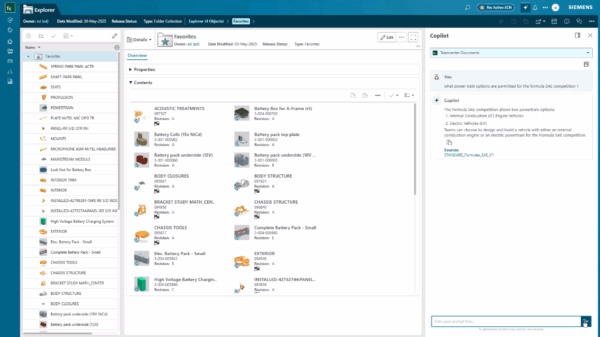
🔍 How Teamcenter Copilot’s chat with knowledge bases works – at a high level
User flow:
select a knowledge base → ask a question → receive an answer with citations
From the user’s perspective, it’s simple: pick a knowledge base, ask a question in plain language, and get an answer with citations. Behind the scenes, two core services make this possible:
- the embedding service, which prepares and indexes data
- the inference service, which handles the question-answering process
These services work together in a retrieval‑augmented generation (RAG) architecture.
🧠 What is Retrieval-augmented generation (RAG)
General‑purpose chatbots can be helpful, but their knowledge is limited to their training data and what’s available on the internet. They don’t have access to your PLM system of record, so they can’t accurately represent your data. And if you do share your organization’s data with one of these general-purpose chatbots, you run the risk of data leakage.

RAG was designed to solve just this problem. It’s a design pattern that adds an information‑retrieval step between user input and response generation, with indexing, security, and refresh cycles.
RAG in one line:
LLM fluency + your PLM data + permission checks = reliable answers you can trust
With Teamcenter Copilot’s RAG architecture, the LLM provides language and reasoning – but the knowledge comes from your PLM data.
And since Teamcenter Copilot is integrated with your PLM system of record, it’s grounded in your continuously updated data and context, enforces access controls, establishes guardrails, and protects your data.
⚙️ How Teamcenter Copilot’s chat with knowledge bases works – in detail
We’ll explain this by walking through the three main components of Teamcenter Copilot’s architecture:
- the AI stack
- the embedding service
- the inference service
🧩 AI stack
Teamcenter Copilot utilizes advanced AI technologies to enable conversational chat with documents:
Embedding model
Converts text into dense vectors that capture meaning. This enables semantic search, so Teamcenter Copilot can find relevant content even when phrasing differs.
Vector database
Stores embeddings and supports similarity search. Instead of scanning entire documents, Teamcenter Copilot retrieves only the most relevant chunks, making responses fast and focused. It’s continuously being updated with new and modified data.
Large language model (LLM)
Generates the final answer in natural language. The LLM doesn’t “know” your data by itself, it relies on the retrieved context to ground its response.
✔️ Embedding service
The embedding service manages the flow of data and coordinates the different steps involved in vectorizing Teamcenter data. It also ensures knowledge bases are continuously updated with documents you’ve added, removed, or modified. Transforming files from your Teamcenter instance into embeddings in a vector database is a multi-step process:
Extract and transform
Teamcenter runs an extract, transform, load (ETL) process on the documents in your knowledge base, extracting text and breaking it into smaller passages (“chunks”) suitable for semantic search. Text is extracted from common formats like PDF, Word, Excel, and PowerPoint using Apache Tika, and OCR is applied to image‑embedded text (e.g., TIFF/JPEG scans). It also indexes structured information from NX/Solid Edge drawings, Teamcenter Requirements, and Teamcenter Requirement Specifications.
Chunk and embed
Each chunk is converted into a vector embedding by an embedding model. These embeddings capture semantic meaning, so similar concepts can be matched even if the wording differs.
Store for retrieval
The embeddings are stored in a vector database, optimized for fast similarity search. As documents change or you add/remove files, the embedding service updates the index so your knowledge bases stay current.
💬 Inference service
The inference service handles the flow of data and coordinates the different steps involved in the question-answering process. When you ask a question of one or more knowledge bases, the inference service takes over. Here’s what happens:
Vectorize the query
Your question is converted into an embedding using the same model that processed your documents. This ensures both queries and content live in the same semantic space.
Retrieve relevant context
Teamcenter Copilot searches the vector database for chunks most similar to your question. This isn’t keyword matching, it’s semantic retrieval. So, “heat treatment guidelines” will find relevant specs even if the document says “thermal processing.”
Apply access controls
Before anything moves forward, Teamcenter enforces your existing permissions. If you don’t have access rights to a document, its content is excluded from the response.
Generate the answer
The retrieved context and your question are combined into a prompt for an LLM. The LLM uses this context to generate a natural language answer – augmented by your data, not the internet. Teamcenter Copilot then returns the answer along with links to the source files.
🚀 Getting started
Getting started with Teamcenter Copilot is straightforward once you understand the building blocks. The steps below outline the process:
- Choose your AI platform
Teamcenter supports leading options like AWS, Microsoft Azure, or Meta Llama for on-prem deployments, providing flexibility while keeping your data under your control. - Set up the AI stack
Follow the deployment guides for your chosen platform to configure the core components: the embedding model, vector database, and LLM that power Teamcenter Copilot’s conversational capability. - Install Teamcenter AI
This step ensures all services are properly integrated with your Teamcenter environment. Use Deployment Center for a guided installation. - Configure knowledge bases
Scope your knowledge bases with the document collections you want Teamcenter Copilot to use. Share the exciting news with your colleagues and start chatting!
🔓 Unlock the hidden knowledge in your enterprise
Don’t let your organization’s knowledge stay hidden. With Teamcenter Copilot, you can preserve institutional expertise, accelerate decision-making, and empower every team member with instant access to the answers they need.
Contact us today to learn how you can get started with Teamcenter Copilot and unlock the hidden knowledge in your organization’s data.
Read our other blogs to learn more about the power of Teamcenter AI.
Start fast and grow with Teamcenter X | Make smarter decisions with AI-powered PLM
Table of Contents