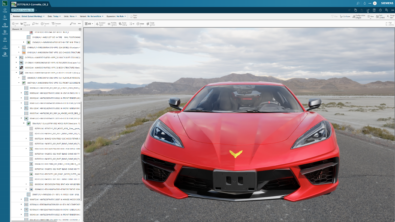
💡 What’s PLM Vis Web?
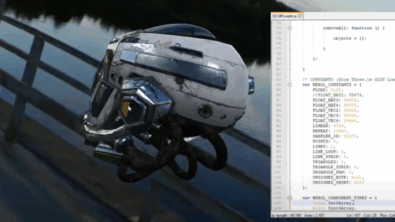
If you need 3D visualization in your web app — without spinning up a custom engine or managing installs — use PLM Vis Web.
It’s a lightweight, browser-based JT toolkit that handles rendering, measurement, markup, and collaboration out of the box.
📽️ Want to see it in action? YouTube video series
Created by Siemens expert Mike Becker, the series shows how PLM Vis Web brings 2D/3D product visualization directly in the browser.
👁️ Bring 3D visualization to your web apps
PLM Vis Web is a web-based JT (ISO-standard lightweight 3D format) visualization toolkit that makes it simple for independent software vendors (ISVs) and developers to embed interactive 3D visualization into their own applications. Instead of building complex visualization engines from scratch, you can use PLM Vis Web to deliver rich 3D experiences directly in a browser.
No client install, no plug-ins, no hassle.
Key features include:
- Interactive 3D viewing – supports JT files and assemblies with rendering modes like shaded, wireframe, and hidden line
- Measurement tools – distance (edge-to-edge, point-to-face), bounding boxes, and radius calculations for circular or toroidal surfaces
- Markup & collaboration – annotate models and share insights instantly
- Cross-platform access – works on any device with a browser, ensuring mobility and flexibility
- Secure data handling – original CAD data stays protected — only visualization data is shared
❤️ Why developers love it
Building 3D visualization from scratch can be a huge drain on time and resources. PLM Vis Web makes it easy by giving you everything you need in one toolkit:
- Faster development: Skip building visualization from scratch and get to market quicker.
- Easy integration: Works with standard web technologies like JavaScript, so you can plug it into your existing stack without headaches.
- Customizable: Tailor the experience to your app’s workflow and branding for a seamless user experience.
On top of that, PLM Vis Web runs entirely in the browser — no plugins, no downloads — and keeps your data secure by sharing only visualization data, not full CAD files. It’s scalable, lightweight, and designed for developers who want flexibility without complexity.
🔗 Why it matters
PLM Vis Web isn’t just for engineers — it’s a versatile toolkit that fits into a wide range of applications. Here are some examples:
- Online spare parts catalogs
Show customers 3D models of parts so they can confirm what they need before ordering - Service & maintenance portals
Equip technicians with interactive 3D visuals on mobile devices so they can troubleshoot faster and reduce downtime - Assembly instructions
Combine step-by-step guides with interactive models to make complex processes clear and intuitive - Custom PLM extensions
Enhance your PLM solution with embedded visualization for BOM reviews, design validation, or supplier collaboration — all inside the browser
🎥 Watch the series
Want to see it in action? Check out the full playlist:
From logging in to navigating the UI and managing reviews, each video gives you a hands-on look at how PLM Vis Web works across real scenarios.
📢 Spread the word
PLM Vis Web gives developers and ISVs a fast, flexible way to add interactive 3D visualization to their web applications — without the complexity of building it from scratch.
No install. No friction. Just a clean, browser-based API – to deliver powerful 3D experiences faster!
Watch the videos, share with your team, or reach out if you’d like to collaborate on a use case or customer story.
Start fast and grow with Teamcenter X | Make smarter decisions with AI-powered PLM
Table of Contents