⛓️💥 Why CAD BOM separation?

🧩 Parts distinct from design
Have you heard of EBOM before? The engineering bill of material (EBOM) for a product is a list of physical parts and assemblies designed and released by product engineering. CAD BOM (aka design BOM or DBOM) describes the product from a geometrical perspective.
CAD BOM primarily deals with design structures linked with 3D CAD data. Design structures typically store the position information and contain engineering-specific data, often termed non-BOM data. In modern Teamcenter deployments, this design structure is not just working data, but a governed, change-managed representation of design intent that participates directly in the digital thread.
Historically, manufacturing and business parts originated and were managed in ERP or homegrown BOM systems, while design structures were managed in CAD environments . However, today’s PLM-centric approach positions Teamcenter as the system of record for both Design BOM and EBOM, allowing ERP systems to consume released, validated product definitions downstream.
Engineering communities have long debated the need to manage parts distinct from design. Managing parts distinct from design provides lifecycle independence and flexibility for stakeholders to author, mature, and release design and product data independently while remaining coordinated. This separation is now widely recognized as foundational to multi‑disciplinary and model‑based product development.
👇 Single BOM comes with limitations
Managing design (CAD) and part content definition as a single integral item enforces a single lifecycle for both design and product data. There is no difference in the breakdown or organization of design and part structures, forcing multiple groups to compromise.
Key milestones must be tightly synchronized across design, engineering, and manufacturing teams, and changes impacting only one domain often ripple unnecessarily into others. This becomes increasingly problematic as products incorporate software, electronics, and configurable variants that do not map cleanly to geometric structures.
🧑💻 CAD BOM separation
In today’s complex digital landscape, the evolution of a product involves orchestrated maturity of many individual disciplines: design, engineering, manufacturing, planning, and service. Each domain has its own way of viewing and organizing the product, along with specific attributes, behaviors, and lifecycle needs.
Efficiently managing this complexity begins with accurately aligning the evolving product design (Design BOM) and the engineering product definition (EBOM). Teamcenter supports this by maintaining separate but coordinated structures, each with its own ownership, lifecycle, and rules, while preserving traceability between them.
Our customers have been talking with us for a long time about their needs for having a different product design and product EBOM. While the product’s design and EBOM views are complimentary, they have other data structures and support various functions. Also, the way the design and EBOM evolve is quite different, with different business processes and different roles in the company taking part in them.
For example, designers, research & development, and the different engineering disciplines use various design tools to author, innovate, and create a rich set of designs to be inserted into a design definition. On the other hand, product engineers, purchasing, regulatory, and service must define and manage cost, logistics, opportunities, operations, regional availability, and rules in what constitutes the product EBOM.
For another example, in some companies, design tends to take the lead. Design systems and components evolve first, and much of the EBOM tends to resemble the design structure, with some additions in the EBOM from product engineers. However, in other companies, the EBOM takes the lead. The product engineer defines the assemblies and parts to be designed, and the design structure tends to resemble the EBOM.
🔑 Key drivers for CAD BOM separation
- Different lifecycles for design and part data over the program’s life allow the data to mature independently. This lifecycle independence is foundational for enabling parallel work across design, engineering, and manufacturing while avoiding unnecessary coupling of release milestones.
- Part of designing cardinality criteria:
- A single design represents multiple parts, e.g., color parts. This one‑to‑many relationship allows a single geometric definition to support multiple business realizations without duplicating design intent.
- A single part represents multiple designs, e.g., flexible hose that can be routed in multiple ways. This supports reuse of business parts across alternative design solutions while preserving functional equivalence.
- Purchased part assembly listed as a single part in EBOM that has a design structure. This allows detailed supplier or reference design data to be maintained without forcing EBOM complexity or restructuring.
- The breakdown/organization of design and part data is optimized without one group compromising the other. Each domain can structure data according to its own optimization criteria while remaining traceable and coordinated.
- Design data can be organized in a different way than how EBOM is organized. For example, zones can arrange design, and EBOM can be managed by functions or modules. This enables design‑centric decomposition without constraining how engineering defines buildable systems or assemblies.
- The design structure may have a dummy or reference data that is not relevant in the EBOM. Examples include envelopes, skeletons, placeholders, and reference geometry that are critical to design intent but not to product definition.
- Changes can impact design, EBOM, or both, and there is a need to isolate change to design or EBOM when necessary. This isolation reduces unintended downstream impact and supports more targeted, role‑specific change processes.
🤝 Automated alignment creation and maintenance
However, achieving the things I mentioned above implies keeping two separate evolving structures in sync with alignment. For even mildly complex products, this is a difficult task that requires a heavy administrative overhead and often is unattainable. Manual or loosely governed alignment approaches do not scale with product complexity, variant proliferation, or multi‑domain content.
CAD BOM/design to EBOM alignment is a crucial underpinning for achieving high concurrency between design, engineering, and manufacturing domains where alignment provides the needed dependency among the different disciplines while allowing each part with its own set of data and processes to mature at its own pace. Alignment establishes controlled dependency rather than structural dependency, enabling concurrency without loss of control.
There are only incremental improvements to reduced process time, increased quality, and decreased costs with loose and manual alignment. However, with automated alignment, a company can realize significant time collapse in the product engineering process, improve the quality of deliverables, and reduce development costs. System‑aided automation transforms alignment from an overhead activity into a continuous, value‑adding capability.
🔄️ What is Teamcenter Design EBOM alignment?
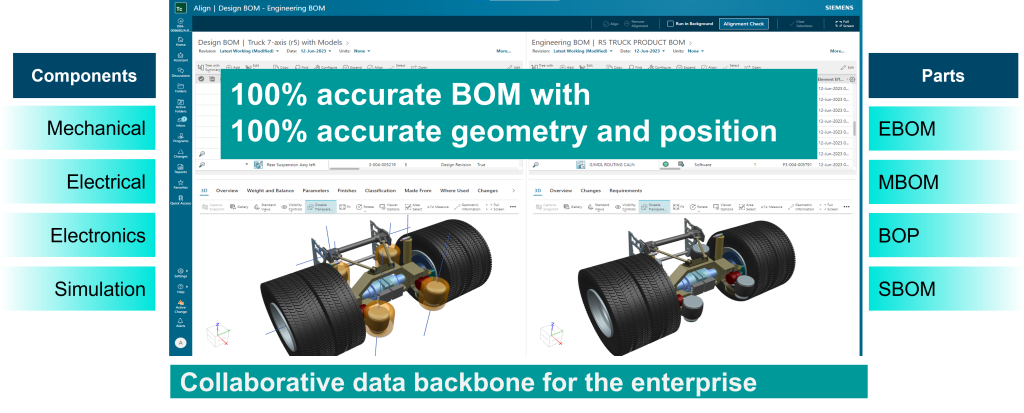
Most customers have also expressed a strong desire to keep their design and EBOM in a single system to get a richer, more complete view of how a design can potentially impact engineering and manufacturing. A single PLM environment provides a shared context while still preserving domain‑specific ownership and lifecycles.
This will enable customers to manage an overall change process that incorporates design and engineering changes and even downstream to manufacturing. Change can be authored once and propagated appropriately across aligned structures based on scope and intent.
Engineers would gain the ability to visualize their product configurations with real-time design data, enabling a collapse in collaboration time between design and engineering. This visualization capability improves understanding, reduces misinterpretation, and accelerates decision‑making.
Design EBOM alignment product helps enable the digital thread by auto-aligning the design structure with the engineering BOM throughout the product lifecycle, supporting engineers with auto-generation designs, parts, and structures, design through engineering product traceability, and 3D EBOM visualization. This continuous alignment ensures that the digital thread remains intact as products evolve.
Design EBOM alignment provides:
- Aligned multi-domain data (mechanical, electrical, software) in separate but coordinated EBOM and design structures. This supports true mechatronic and software‑inclusive product definitions without forcing all content into a single structure.
- Interactive design and EBOM alignment authoring supplemented with visual accountability checks, embedded 3D BOM visualization, and cross probing support. Users can validate alignment decisions in context and detect discrepancies early.
- Automated alignment of BOM generation capabilities that are executable using configurable workflows. Automation ensures consistency, repeatability, and scalability across programs and product families.
- Visibility from design through engineering to improve impact analyses and change management. This visibility enables faster, more accurate assessment of change scope and downstream effects.
⏩ Digital product management with CAD BOM separation
To conclude, CAD BOM separation is needed to manage complex digital products, and alignment between CAD and EBOM is crucial for achieving concurrency between design, engineering, manufacturing domains. As products grow more configurable and multi‑disciplinary, this separation becomes a prerequisite rather than an optimization.
However, there is a need to remove the overhead of authoring and maintaining the alignment throughout the product lifecycle. Manual alignment approaches cannot keep pace with modern product complexity.
This is best addressed through system-aided automated alignment authoring and updates that our Design EBOM alignment product brings to the table. Automated alignment allows organizations to scale CAD BOM separation while preserving quality, traceability, and speed—forming a key pillar of the Teamcenter digital thread.
🧠 Make smarter decisions with AI-powered PLM
🚀 Start fast and grow with Teamcenter X
🚗 Take the Teamcenter X 30-day test drive
🌟 Learn more about Teamcenter solution
Table of Contents