What’s New in Teamcenter SLM 2512

The Fall 2025 release of Teamcenter Service Lifecycle Management (SLM) delivers major improvements across Service Planning, Service Asset Management, Product Support Data Management (PSDM), and Teamcenter SLM for Salesforce. Designed for clarity and efficiency, version 2512 gives you better control over service data, streamlines collaboration, and helps your teams work smarter.
Key updates include,
- AI-powered authoring for automated, error-free service plan creation
- Enhanced visibility of critical spare parts and regional availability, essential for a precise Service Plan definition
- New PSDM analytics with LSA report generation for optimized provisioning, repair, and failure analysis
- Improvements to the Teamcenter SLM for Salesforce app for accurate product configuration and faster quoting in Revenue Lifecycle Management
These enhancements bring more clarity, consistency, and flexibility to every stage of your service lifecycle, empowering your teams to deliver better results.
Service Plan and SBOM
Streamlined configuration and display options
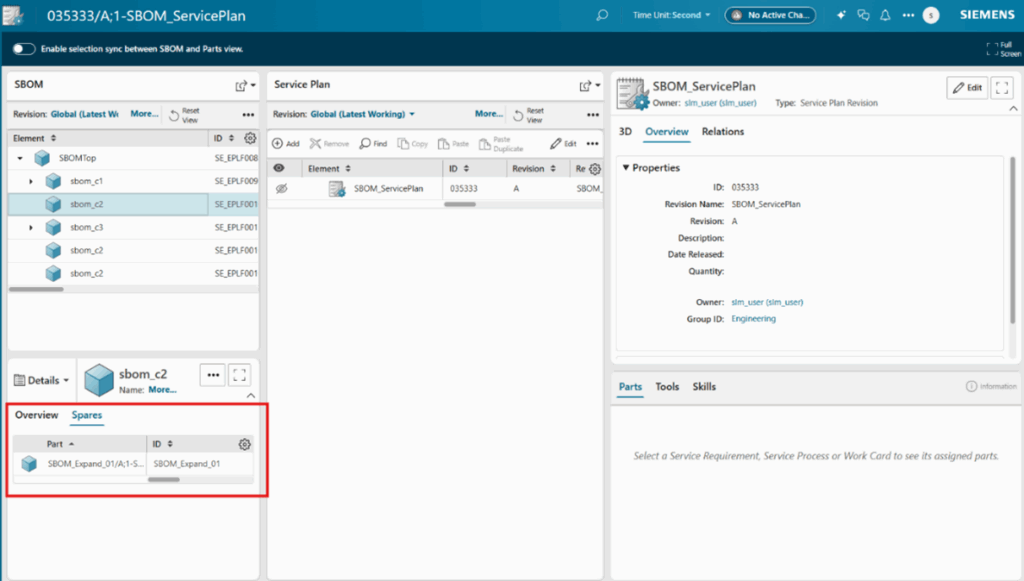
The latest Teamcenter SLM release puts flexibility front and center when configuring and displaying service plans alongside Service Bills of Materials (SBOM). Service planners now have the freedom to tailor how service plan is structured and defined with the Service BOM available side by side, giving teams the ability to adapt their workspace to unique needs, whether they follow standardized routines or require complex, asset-specific arrangements. Customizable preferences, such as hiding legacy notices and simplifying the interface, keep users focused on their most essential service activities.
Leverage AI to generate Service Plans from service documents
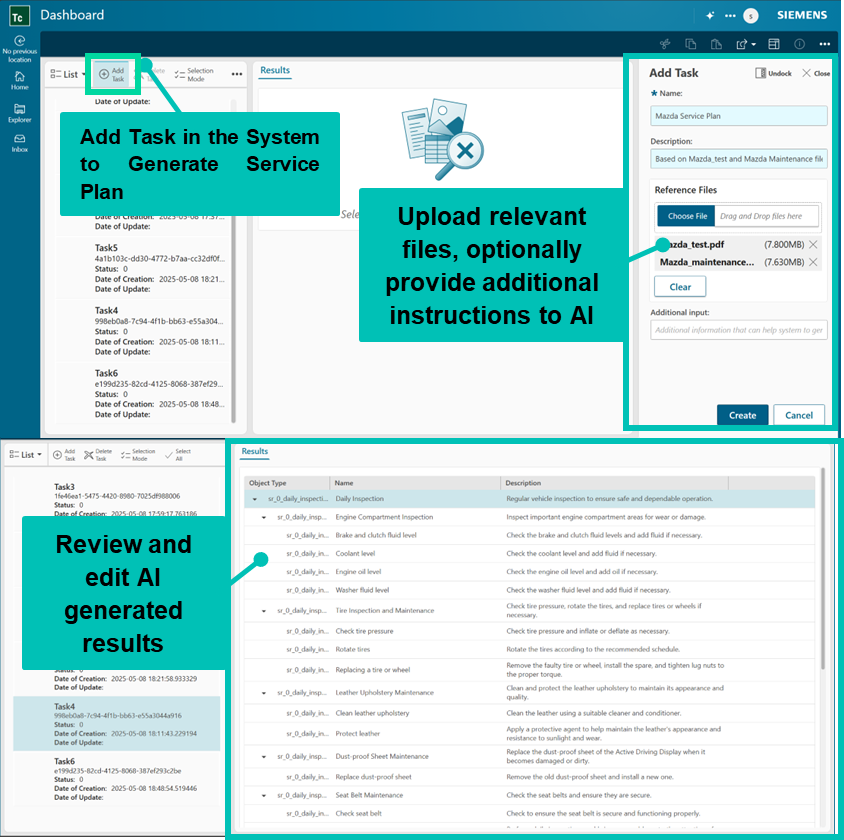
Crafting efficient, actionable service plans has never been easier. Upgraded authoring features, including AI-powered document analysis, enable teams to rapidly generate, edit, and deploy service plans directly from existing documents. Locating and managing parts is now seamless in both engineering and service BOM views. Thanks to advanced search features and direct access to the spares tab in the SBOM secondary work area, teams can quickly find components and plan maintenance tasks with greater speed and precision.
Service Asset Management
Reassign service discrepancies
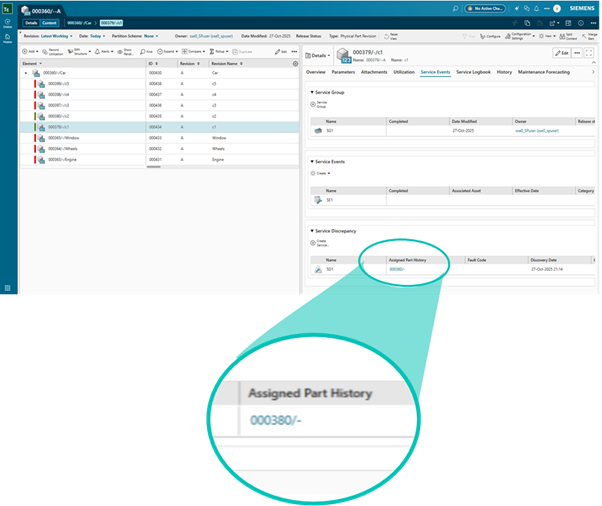
Field issues and service discrepancies receive a new level of traceability and control. The innovative Assigned Part History field records the original point of detection, ensuring that every reassignment or investigation remains grounded in a complete historical context. This upgrade accelerates troubleshooting while enhancing transparency across your entire service operation.
Manage product support data aligned with industry standards
Consistent, standards-aligned asset data is crucial for regulatory compliance and long-term support. In this release, Teamcenter SLM helps you manage product support data and quickly create important reports for easier provisioning. You can generate LSA-9 to list needed support items, LSA-36 for a summary of provisioning requirements, LSA-56 for an overview of failure analysis, and LSA-19 to support task analysis. Alphanumeric Logistics Control Numbers are now available to help you spot gaps and track items more easily. Additionally, integrating the Standard Numbering System into the Teamcenter core centralizes your numbering and enhances data accuracy across your entire organization.
Read more about PSDM on the Siemens Teamcenter community.
Service Event
Manage association and disassociation events for data accuracy and integrity
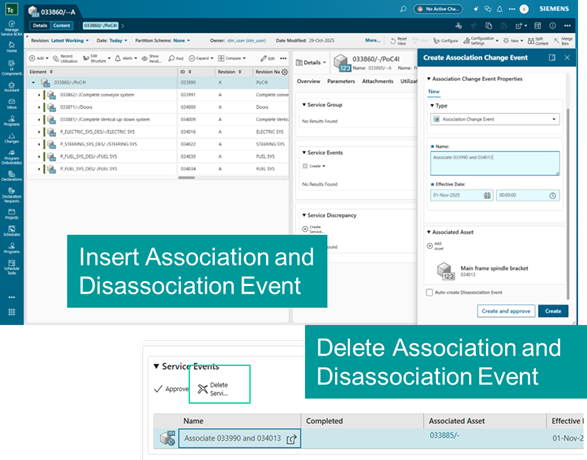
Maintaining reliable, high-integrity service histories is essential. Now, Teamcenter SLM 2512 provides complete control over association and disassociation event management. Teams can edit, delete, or insert these events across both current timelines and historical records. This ensures the digital thread between products and services is always accurate, enabling better analytics, ensuring regulatory compliance, and delivering transparent lifecycle reporting.
Teamcenter SLM for Salesforce
Leverage quotes in Salesforce powered by Teamcenter Product Configurator
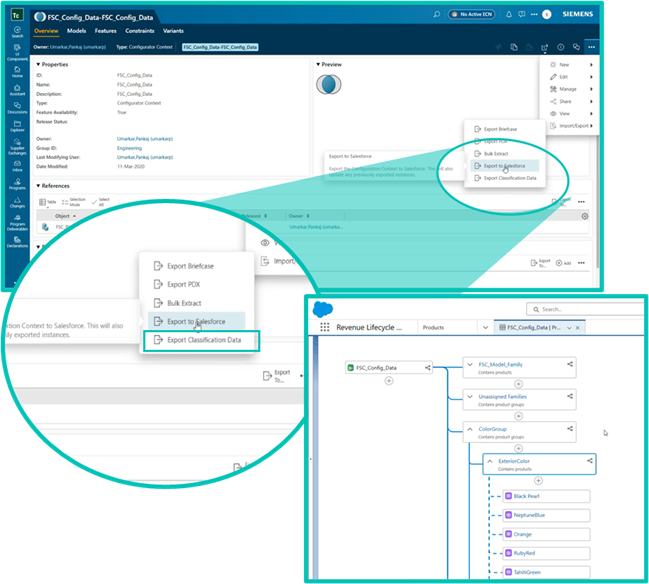
The boundary between engineering and sales has never been more fluid. With enhanced Teamcenter SLM for Salesforce app, validated product configurator data can be sent directly from Teamcenter to Salesforce Revenue Lifecycle Management at the push of a button. Sales teams gain immediate access to the latest, engineering-approved configurations, eliminating manual re-entry and potential errors. As a result, quotes are generated and updated with unprecedented speed, ensuring every proposal is current, accurate, and tightly aligned with production realities—supporting more responsive customer engagement.
Get started with Teamcenter SLM 2512
With its enhanced configurability, AI-driven service planning, and seamless Salesforce integration, Teamcenter SLM 2512 paves the way for more efficient, transparent, and connected service operations.
Upgrade to the latest version today to transform your service lifecycle and drive better results across your organization!
Check out the latest blog on how IDC Recognizes Servitization and SLM as Key to Aftermarket Business Success
Read more about Asset Monetization with Teamcenter SLM for Salesforce
Hear how Siemens customers leverage Teamcenter SLM for success
Watch the video to learn more about the role of SLM in service excellence