What’s new in Opcenter Execution Electronics 2510

Continued improved shopfloor user experience and expanded portfolio integration
Summary
Opcenter™ Execution Electronics (OC EX EL) software is a complete digital manufacturing solution for the electronics industry. It is built on an industry-leading manufacturing execution system (MES) platform for the electronics, medical device and semiconductor industries. Opcenter Execution Electronics is used in the electronics value chain for printed circuit boards (PCBs), mechanical and box-building processes.
The solution includes best-in-class manufacturing operations management (MOM) capabilities such as manufacturing execution, quality management, material management, planning and scheduling and manufacturing intelligence. This facilitates directly connecting to machines and production lines.
Electronics manufacturers can quickly execute new product introductions (NPIs) and reduce time-to-market, which increases their competitive advantage in a rapidly changing, consumer-driven marketplace.
Using Opcenter Execution Electronics 2510 in conjunction with Mendix™ Low-code platform, which are part of the Siemens Xcelerator business platform of software, hardware and services, helps deliver new enhancements to improve the application’s capabilities and security. The Mendix Low-code development framework and community of prebuilt marketplace components make it easy to create and deliver powerful, optimized and role-based apps.
Opcenter Execution Electronics 2510 provide new and enhanced Shopfloor UI´s, several functional improvements, improved shopfloor integrations and AI based features
Benefits
- Provide greatly enhanced role-based user experience
- Improved operator efficiency
- Improved shop floor integration
- On-premises telemetry and performance analytics
- Delivers advanced manufacturing functionality
Capabilities
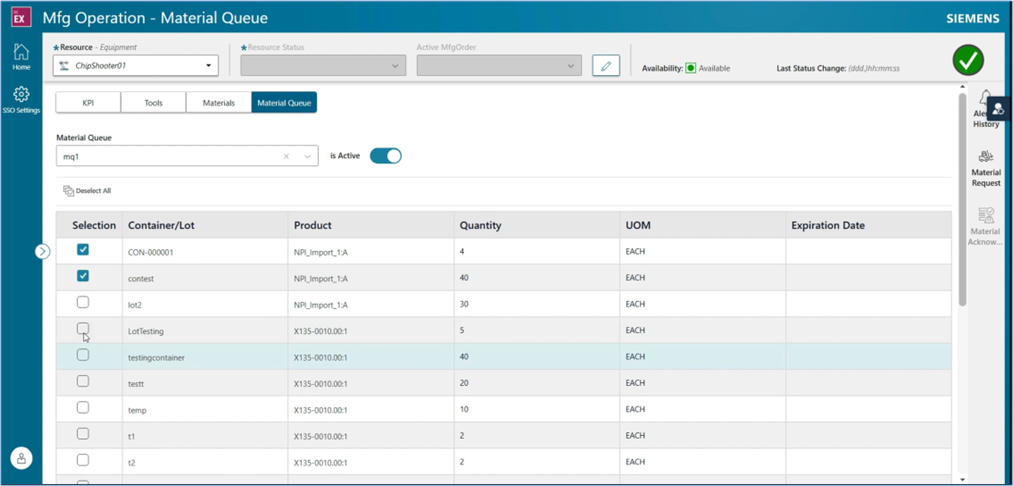
Real time manufacturing operation page, Material setup UI
- Material queue enhancement
- View the active Material queue on the resource
- Change and activate a new Material queue for the resource
- Perform material request and material acknowledgement for the active material queue
- Enhancement of the real-time SignalR implementation to improve performance related to both display of KPI and status messages from the resource
Hold management: Mendix module
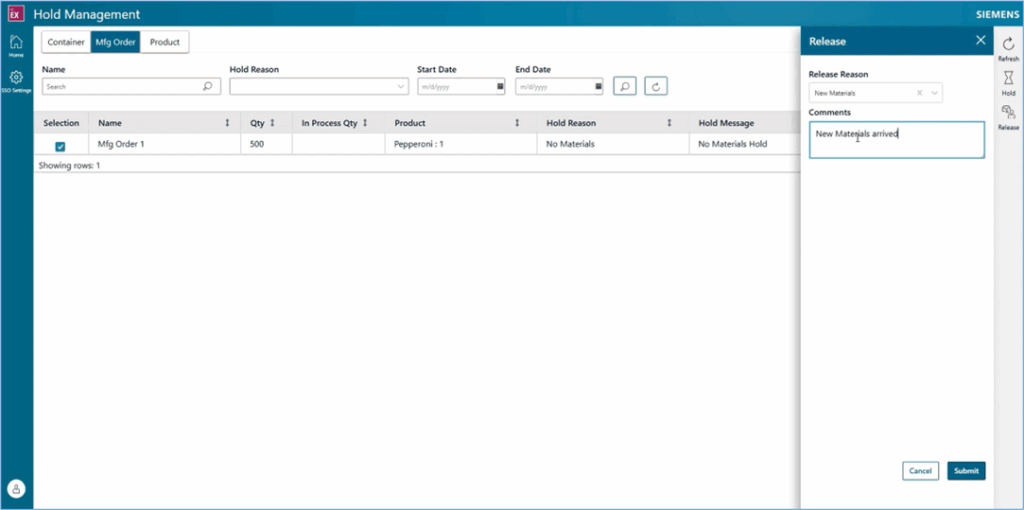
- Operator interface that allows initiating and viewing holds for the following items:
- Container
- Manufacturing order
- Product
- Supports optionally defining a custom hold message that is displayed to the operator when attempting to process a held item
- Provides the capability to search for items currently on hold and release one or multiple items in a single, streamlined transaction
Core Mendix UI enhancements
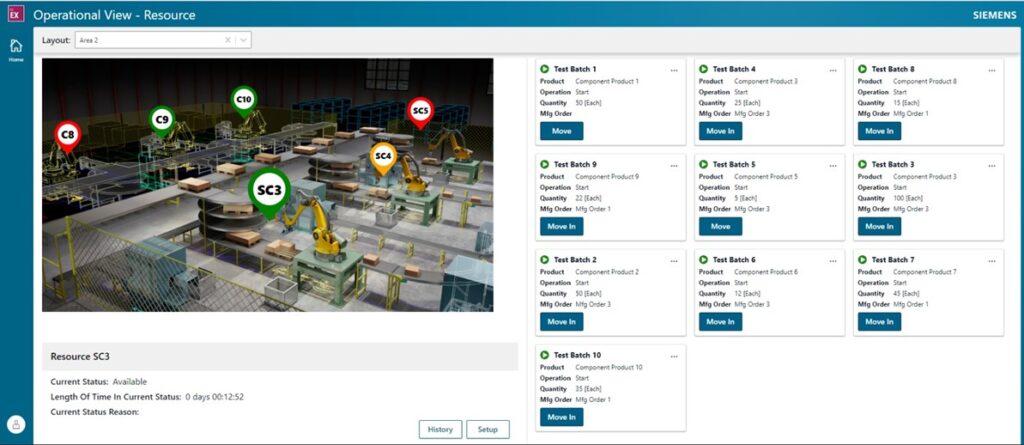
- Support in the operation view resource UI to support and display the electronics identifier (primary serial number)
- Support in the Eprocedure UI to support and display the electronics identifier (primary serial number)
- Mendix Single Sign On (SSO). Added support for Single Sign On
Defect management enhancements
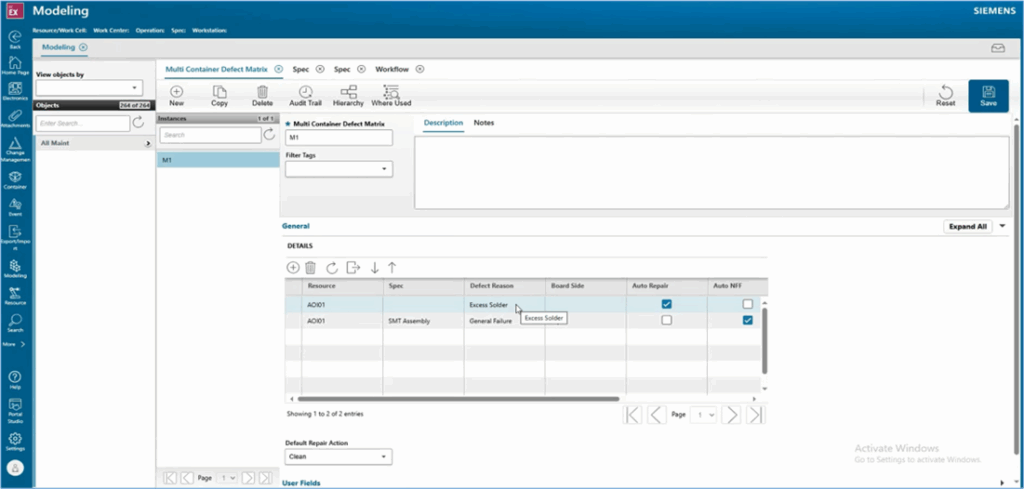
New multi container defect matrix modeling object that allows for defining rules that will be applied to defect data during the execution of the electronics multi container defect service
configuration rules for the following:
- Automatic Repair
- Automatic No Fault Found
- Preventing Movement
- Preventing Rework
Ability
- to perform only a change reason during the electronics multi container defect service
- log defects against all PCBs on a panel when the defect data does not include any PCB index information and only a panel identifier
- attach a URL document against individual defects
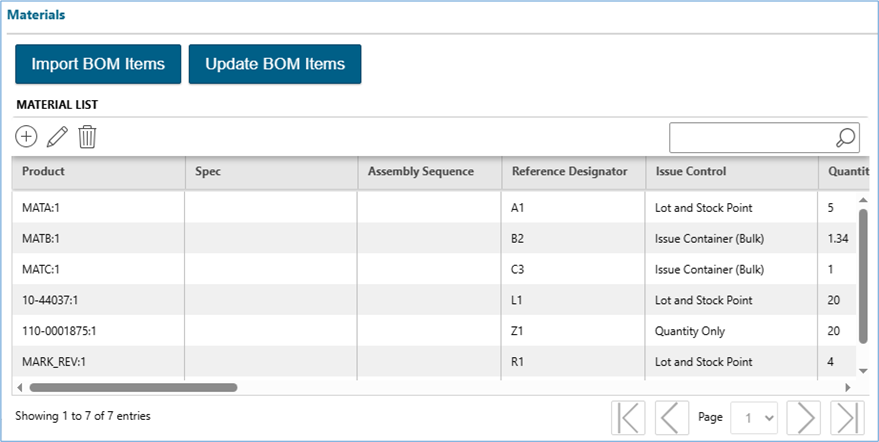
BOM/Material list modeling enhancements
- Added search functionality for a material list to search the following fields for any matching text
- Product
- Reference Designator
- Spec / ERP Route Step
- Issue Control
- Quantity
- Add a new update material Items popup that allows for making changes to multiple material items in a single action. The following fields can be modified for multiple items:
- Issue Control
- Product
- Spec
- Quantity
Valid substitutes enhancement
- New option to simplify the assignment of any revision of a product as a valid substitute
- The product modeling instances have a new option to mark that any revision of that Product can be a valid substitute
- The material list modeling instance has a new option allowing all revisions as substitute
- If either option is enabled, then any revision of the product is a valid substitute
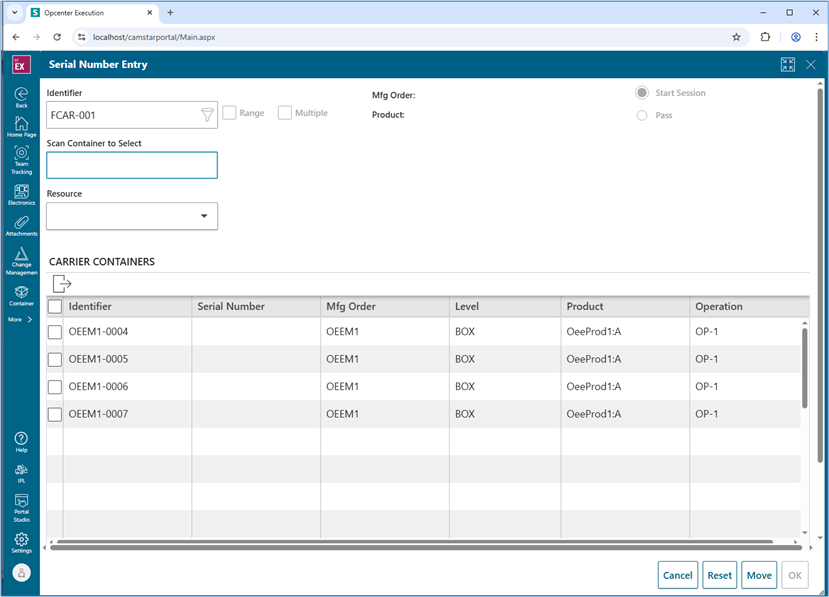
Production client carrier enhancement
- Serial number entry page detects that a carrier has been entered and displays a grid showing all containers loaded to the carrier
- Users can select one or more containers on the carrier and start a session
- Defects can be logged, viewed and repaired against multiple containers
- When done with the selected containers, the serial number entry page will re-display the carrier grid of containers allowing the operator to select other containers
- The ability to move the carrier is offered directly in the serial number entry page
NPI import enhancements
- Import process detect schematics in the ZIP file published by Process Prep and to automatically import the schematic and associate it with the PCB Products(s) created during the import
- Import option to control whether the CAD design name is used as the product name for the created PCB products
- Option to exclude specific items in the CAD from the BOM created during the import process
- Option to automatically set the spec on the material items of the BOM based on reading the Operation Plan that can be published with the NPI job
Virtual serial number support
- New functionality using the “Start with virtual serial number” option that can be configured on a manufacturing order or product
- When this option is enabled and an active manufacturing order has been assigned to a resource, when a transaction is submitted it will check the ES_Identifier value and if no container is found, it will dynamically create new container(s) using the ES_Identfier as the serial number for the top-level container
- Enable Opcenter Connect Electronics to use their “chain-trace” functionality and submit transactions when there is no physical barcode or reader able to get the real barcode
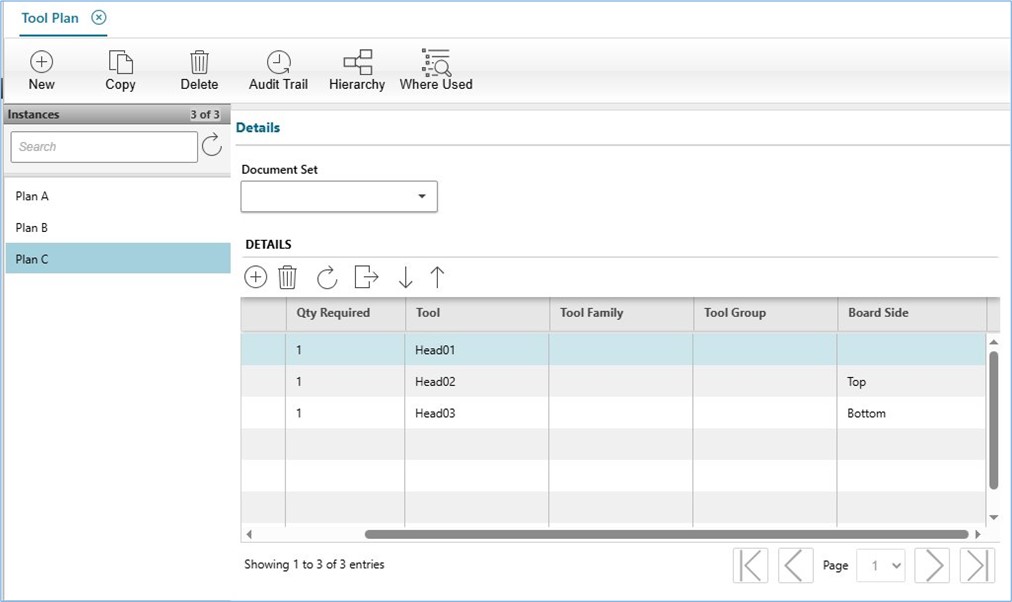
Tool plan enhancement
- Tool plan allows configuring a side for each tool plan entry
- The validation of the tool plan will compare the side of the tool plan item against the side configured on the spec and only validate the items that match or have no side configuration
- The thruput for the tools loaded to a resource are also updated to only increment when the side of the loaded tool matches the side of the spec
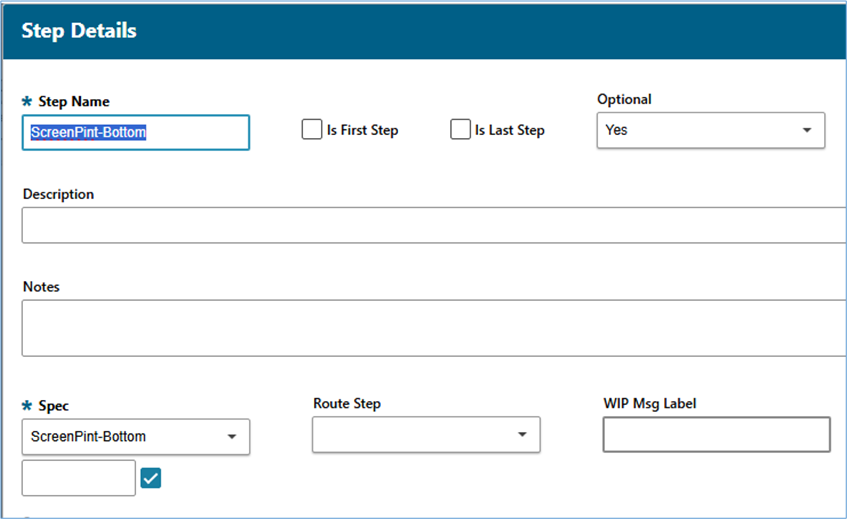
Optional workflow steps
- Add a new option on both the spec and workflow step instances to configure them as optional. The supported values are:
- Not Set
- No
- Yes
- The configured option on the workflow step takes precedence over the spec
Installer enhancements
- Option to specify the Opcenter Transaction Tester location when the installer is unable to detect if it is installed
- Option to automatically run the object ID migration utility after the installation has been complete
Cybord integration
- OC EX EL Cybord AI inspect the top and bottom component images collected from SMT and AOI machines and detect potential issues based on AI
- OC EX Cybord AI on-prem solution is seamlessly integrated to OC EX EL and enriches OC EX EL with quality data that cannot be detected with traditional methods
- Ensure traceability and compliance by comparing component marking data with traceability logs and AVL list
Power BI reports – new reports
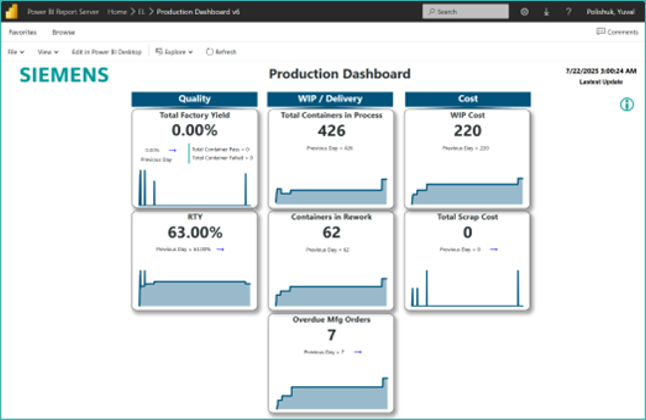
Production report, consolidate critical factory-level KPIs for quality, WIP, and cost.
Manufacturing order delivery dashboard provides detailed information about all active manufacturing orders
Additional enhancements
- Added defect reason group to log defect UI in production client to allow choosing a group to filter the defect reasons when no defect reason group is assigned to the operation
- New option for the manufacturing order reassign functionality to verify the product type of the container being re-assigned matches the product type for the new manufacturing order
- Option on resource to enable the ignore not required for a move in transaction to prevent an error when a move in is attempted but not required due to the operation not using a queue or a move in has already been performed
- Shopfloor document to product modeling instance that can be viewed directly inside the production client without the operator needing to manually open the document slide-out and select a document
- Implement draggable splitter bar in production client to resize viewing areas when viewing CAD, Schematic, BOM or product document. Position is maintained for the entire user session
- Enhance the material queue portal pages to display a “status” icon for the material loaded to the queue to easily identify if a material is no longer valid for issuing – for example if it has reached its expiration date
- Enhance the material queue to allow loading a carrier to the material queue and the containers loaded to the carrier will be used for performing the automatic issue
Core & technology enhancements
Dynamic purge tool – GA
- Supports purging data from the transaction database
- Can optionally archive it into a designated schema
- Provides the ability to restore the archived data based on
- Unique instance identifiers
- Batch execution identifiers
- Supports automation through Microsoft SQL Server agent jobs to enable scheduled purging and archiving operations
- Available for Microsoft SQL Server only
Simplified User Data Collection Definition (UDCD)
- Data Collection Definition for each Data Point is repetitive in existing Rest API. Specifically, battery industry has multiple data points for a single Data Collection Definition (DCD) and needs simplification.
- Enhanced the API to manage multiple data points in a single UDCD, in this release.
- User has an option to use existing Rest API or the simplified one, provided in this release. Examples provided in Rest API collections.
Entity Relationship Diagram (ERD) tool
- Tool which reads metadata from the Microsoft Access Database (MDB) file and assigns referential integrity relationships
- Generates entity relationship diagram of the Opcenter metadata
Observability
- Enables on-premises performance monitoring and observability through OpenTelemetry
Containerization
- Containerization, support open telemetry for Azure
- Mendix Portal support with containerization for Azure and AWS
- Create containerization images for 2510
Electronic procedures: Mendix module
- Redesigned and optimized operator terminal user interface
- Supports the most critical task types with electronic signatures
Rest API enhancements
- Extends action attributes to shop floor transactions
- Delivers an optimized Swagger schema
- Adds the ability to manage multiple data points in a single user defined data collection (UDCD)
Technology enhancements
- Chrome 140+
- Edge Chromium 140+
- Dynamsoft 10.4.3100
- TinyMCE 6.8.4
- Microsoft Access Database Engine 2016 replaced with Microsoft 365 Access Runtime
- Updated Progress DataDirect ODBC wire protocol driver for Oracle and SQL Server
- Mendix 10.24.4
Please see Opcenter Execution Core and Medical Device and Diagnostics and Opcenter Execution Semiconductor 2510 What’s New materials for more details on new core functionalities.