Experience the Smart Triad in Designcenter X NX: Your new favorite modeling tool

Say hello to your new best friend in 3D modeling: the Smart Triad, available in Designcenter X NX Essentials, and web editing in higher Designcenter X NX tiers. Whether you’re moving, copying, or rotating geometry, this intuitive tool is here to make your design workflow smoother, faster, and way more fun. Let’s break it down and show you how to unlock its full potential.
Most designers know how a triad works—click on one of its 3 axes to move in the XYZ directions or click on an arc/torus to rotate about XYZ. But did you know that the Smart Triad can do so much more?
Precision starts at the origin
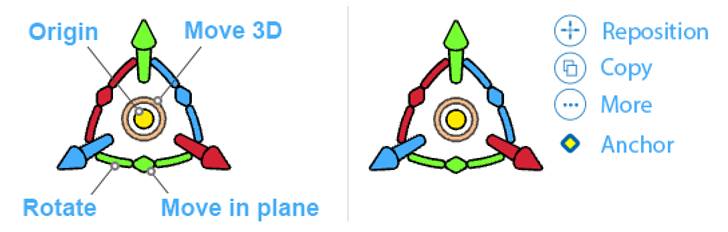
Most moves depend on the point you want to move from—click on the triad’s origin, that bright yellow dot and move it to your starting point. Want to rotate about or move from a specific point? Just click and move the origin to your desired location and go!
Move, rotate, and align like a pro
- Move freely: Use the ring around the origin to move your selection freely to any key point or anywhere in the model. You can tap X, Y, or Z to rotate while moving.
- Rotate with power: Click a rotate arc and the nearest axis will highlight indicating the starting point of the rotation. You can rotate by any angle value, or you can aim the axis and snap to any model key point.
- Move in plane: The squares nestled in the arcs let you freely move your selection within the plane of that arc.
Reposition the triad: Design with context
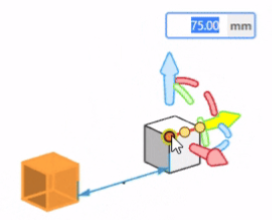
Reposition lets you move the triad without moving your selection—you can give a numeric offset or rotation,, or you can select a key point. It’s modeling that thinks like you do.
Copy with accuracy
Copy faces, features, bodies, and components. Click on the Copy button and then click on the triad to move or rotate your copy. You can also hold the [Ctrl/Command] key instead of clicking the Copy button to create your copy when you move or rotate your selection.
More options, more power
Click More to reveal extra commands tailored to your selection. It’s like a toolbox that adapts to your needs—dynamically adjusting based on where you are in the 3D environment and what you’re interacting with.
Meet the anchor: Your precision sidekick
The anchor is a powerhouse built into the Smart Triad—it’s a precision movement and measurement tool. You can grab and attach the anchor to reference points in your model or assembly. Use it to:
- Move and copy selections using quick measurements
- Align part features and holes
- Click a hole, and the anchor snaps to the center of the nearest one. From there, you can align, measure, and perfect your design with pinpoint accuracy.
- Measure distances in 1, 2, or 3 dimensions
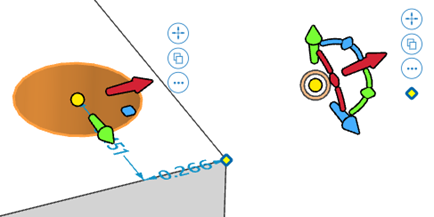
When you click a face, or feature, the anchor checks for a parallel face or nearby corners. If it finds one, it shows the dimensions. If not, the anchor appears in its default spot below the triad buttons—ready for action.
But don’t forget, the triad is great for moving features and components also.
The Smart Triad isn’t just a tool, it’s a game-changer. Whether you’re fine-tuning a model or building something from scratch, it gives you the control and flexibility to bring your ideas to life with confidence.
Ready to try-ad it out?
Learn more



Comments
Leave a Reply
You must be logged in to post a comment.
LTO Portal Registration For Motorcycle. Registering your motorcycle through the LTO Portal Registration For Motorcycle via the LTMS