Designcenter | Tips and Tricks | Steel Outfitting
Welcome! In this blog, we’ll show you how Structure Designer lets you build vital steel structures for ships and industrial projects with confidence and ease. You’ll discover how to move from your first sketch to a complete 3D platform, and add important safety features like handrails, all within a smooth workflow.
Whether you are tackling a shipyard project or setting up equipment in an industrial plant, Structure Designer gives you practical tools to create sturdy, efficient steel outfitting. Watch the video below or read on to find out how to make your outfitting designs smarter and your process even more efficient.
What is Steel Outfitting and how does Structure Designer fit in?
Steel outfitting refers to the collection of steel structures and fittings added to a vessel after the main hull takes shape. These elements include platforms, ladders, railings, hatches and equipment foundations. Each piece works together to create spaces where crews can move safely, perform maintenance or access different areas. Outfitting fills the gap between basic shipbuilding and a fully usable, efficient vessel.
Structure Designer simplifies this process. The application provides tools that let you sketch projects, visualize layouts and model components for secondary steel work. By starting with sketches and building up digital models, you can plan maintenance platforms, safety features or custom fittings in advance. This approach reduces guesswork and speeds up the design phase.
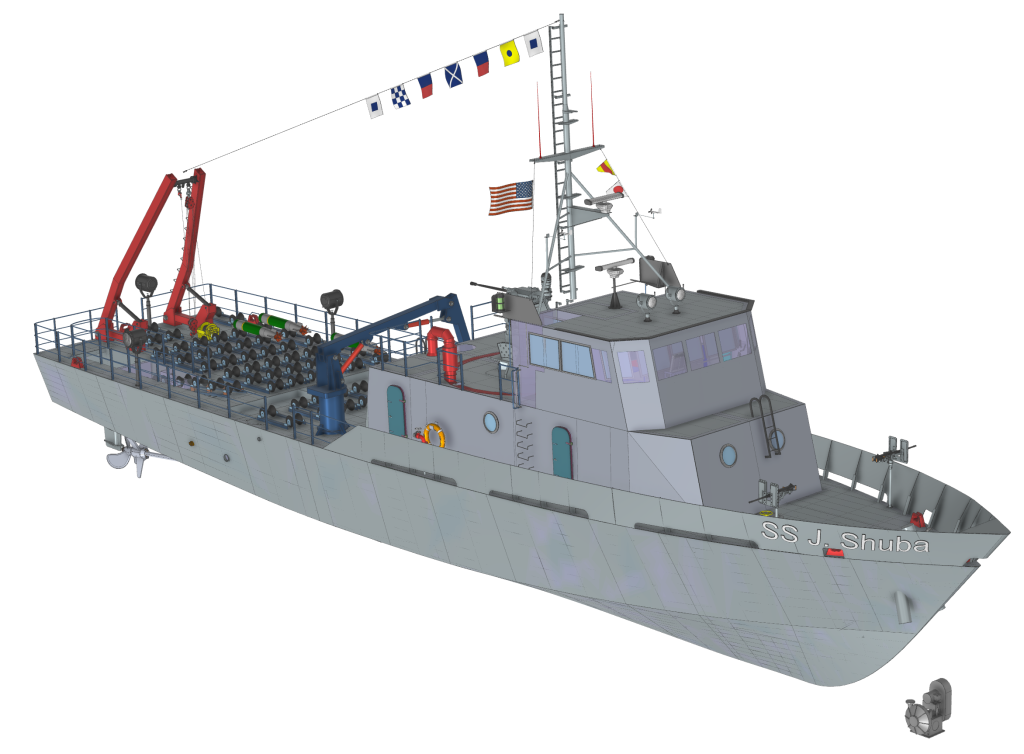
When you use Structure Designer, all your parts stay organized within an overarching structure. You can see how assemblies and subassemblies fit together and make adjustments as needed, ensuring accuracy throughout the process. Structure Designer puts control and clarity at your fingertips, letting you focus on practical solutions for real operational needs.
Sketching and building platforms in Structure Designer
Steel outfitting projects often start with a clear plan and a set of sketches. In Structure Designer, you can begin by creating basic sketches on selected datum planes. These sketches can then be used to set the size, location, and shape of the steel platforms that support maintenance or other operations. Taking the time to define these outlines provides a strong foundation for every part of the steel outfitting process.
Once the sketches are ready, the transition from two-dimensional drawings to three-dimensional models happens quickly. In Structure Designer, you can use the Platform command to interpret sketches and instantly generate 3D platform models. These tools allow for easy adjustments in dimensions or layouts before moving further into the project. Because the software links these models back to your sketches, making changes to one part automatically updates connected assemblies, keeping the entire steel outfitting project consistent.

Building platforms in Structure Designer also means working efficiently and accurately. The software allows you to check fit, tweak plate sizes, and experiment with different platform configurations without leaving their digital workspace. Every choice gets visual feedback right away, which helps you spot issues early and solve them before building starts. With this organized approach, steel outfitting becomes a smooth process that leads to stronger, safer designs.
Making safety improvements with handrails
Safety plays a central role in any steel outfitting project, and adding handrails is a straightforward way to make our platforms more secure. In Structure Designer, you can add handrails along platform edges during the planning stage. There are several customization options for rails, such as adjusting offsets, corners or the types of stanchions used. By choosing settings that suit the project’s requirements, you can fit handrails to complex or simple layouts without slowing down the workflow.
Including handrails as part of the digital model does more than meet safety standards. This step allows you to review the entire assembly to ensure every access point and edge receives the protection it needs. Structure Designer automatically updates the model to reflect handrail placements. This immediate feedback helps catch any safety issues right away, so you can address them early in the design process and deliver a thorough, finished steel outfitting project.
Designing in the context of your full ship assembly
Successful steel outfitting depends on understanding how each new platform or structure fits into the broader ship assembly. Structure Designer makes it easy to place these designs directly within the complete digital ship model. This integration gives a clear sense of where each platform, ladder or railing sits in relation to the ship’s hull, nearby equipment and other outfitted areas. Working in this context helps avoid clashes and ensures that every new addition fits into the vessel’s layout.
Seeing the whole assembly as you design provides crucial checks that save time and reduce the need for rework later in the project. You can spot potential access problems, identify areas that need extra support and verify that safety features like handrails connect properly across different platforms. Every change appears within the ship’s digital environment so you get immediate feedback that reduces the risk of surprises when construction begins. This level of visibility supports smooth coordination between different engineering teams and disciplines.
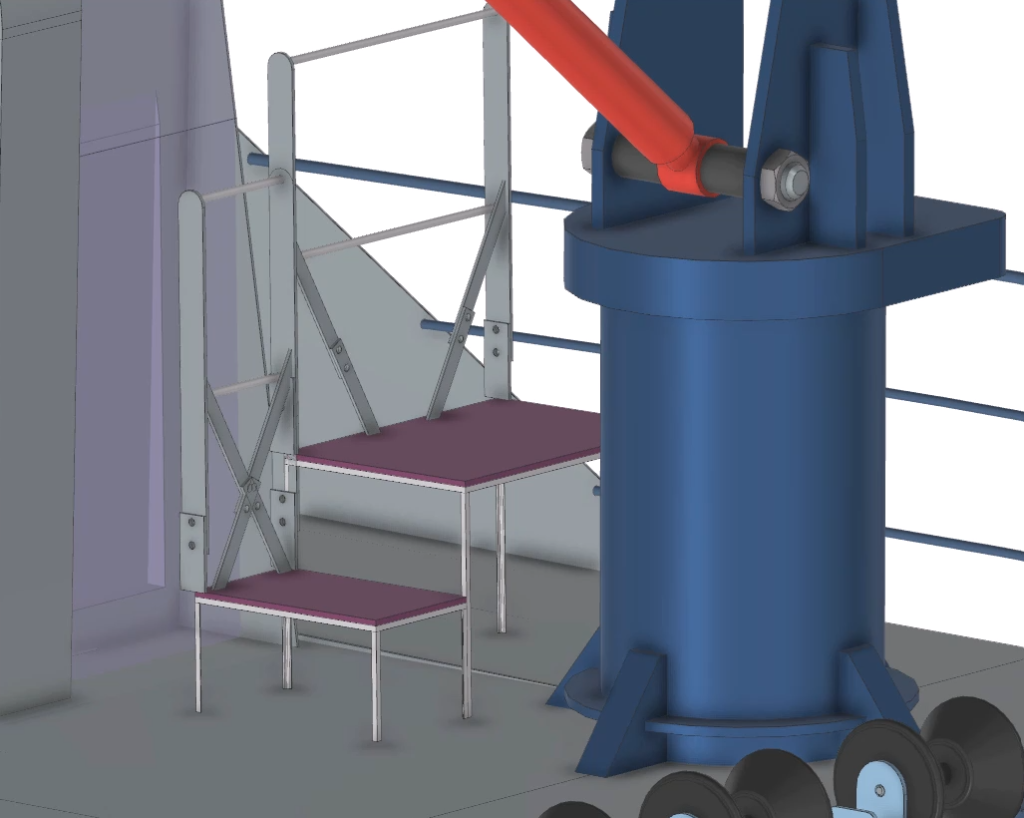
Bringing steel outfitting together with the full ship assembly helps create safer and more efficient vessels. This approach also gives you confidence that every detail lines up just as intended. When a project reaches completion in Structure Designer, the result is a set of accurate, coordinated digital models ready for production or review. Using Structure Designer’s integrated tools guides each idea from the first sketch to the final assembly, making every part of the outfitting process a natural part of building the ship.
Continue your journey with Designcenter
Watch the Getting Started in Ship Structures How To video here ▶️
Watch the Marine Routing Tips and Tricks video here ▶️
Take me to the Designcenter blog site 📚