What’s new in Designcenter X Essentials | March 2026

Table of Contents
The March 2026 release of Designcenter X Essentials introduces a broad set of enhancements across assembly, design, drawings and user experience. This update focuses on expanding core modeling and assembly capabilities, improving drawing creation and control and continuing to refine the overall usability of the browser-based experience.
Expanded assembly capabilities
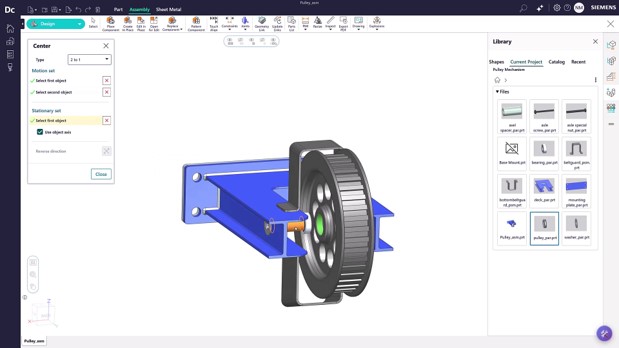
Assembly workflows see several key additions in this release, particularly around positioning, motion and visualization.
New constraint types, including center constraint, cylindrical joint and slider joint, expand how components can be defined and behave in an assembly. These enable more realistic motion and positioning, such as allowing both rotation and translation along a shared axis or restricting movement to a single direction.
To support assembly visualization and communication, manual explode has been introduced, allowing users to move and rotate components using the Smart Triad. This can also be used to refine auto-exploded views.
Additional improvements include the ability to copy components directly from the Assembly Navigator using drag-and-drop workflows, expanded access to standard parts across multiple global standards and improved performance when working with large assemblies.
Faster and more flexible design workflows
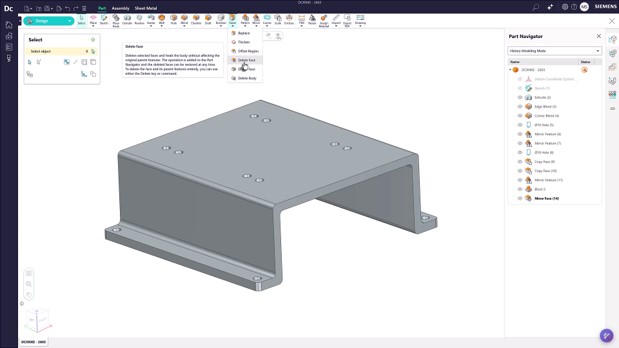
Design enhancements in this release focus on making it easier to create, modify and manage geometry with less friction.
New capabilities such as sketch pattern allow users to quickly replicate geometry in linear or circular arrays, while sketch chamfer adds more control when defining sketch-level detail.
Model editing is also more flexible with the addition of delete body and delete face, which allow users to remove geometry while maintaining associativity in the history tree. These features can be suppressed to restore geometry if needed.
Core modeling commands have also been extended, with extrude, revolve and replace face now supporting draft and thin feature parameters. Updates to shell provide more control over offset direction, and enhancements to the inquire command make it easier to access detailed face information such as surface area and centroid.
More complete and customizable drawings

Drawing functionality has been significantly expanded to support more complete documentation workflows.
Users can now edit embedded drawings directly within the same NX part file, simplifying transitions between modeling and detailing. New layer controls allow for better management of drawing visibility and selection, helping reduce clutter.
Several new annotation and detailing capabilities have been introduced, including center marks, centerlines and pitch circle diameter annotations, along with expanded control over dimension and annotation settings.
For sheet metal workflows, the addition of a bend table enables the inclusion of manufacturing-specific information such as bend radius, angle and direction directly on the drawing.
Further updates to drawing view settings, preferences, parts lists and hole tables provide more flexibility and control, helping teams align outputs with internal standards.
Continued improvements to usability and experience
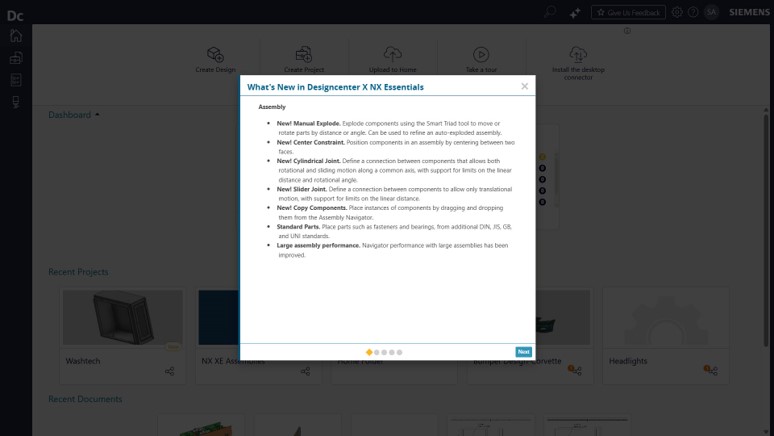
This release also introduces several updates aimed at improving usability and making the application more intuitive.
Users can now select user personas to align mouse and keyboard behavior with NX or other mainstream CAD systems, helping reduce the learning curve. Feature dependencies are now easier to understand through visual highlighting in the history tree, and direct sketch editing allows users to quickly modify geometry without navigating through features.
Additional enhancements include release update notifications, product version visibility, improved file path access and simplified file opening workflows, all contributing to a smoother day-to-day experience.
Learn more about Designcenter
Designcenter X is the leading, next-generation mechanical engineering solution that delivers advanced 3D design capabilities to the Designcenter portfolio. Seamlessly integrating across disciplines, including electrical and electronic systems, to enable more iterations and utilize the latest manufacturing and simulation methods to ensure you build the richest, most comprehensive digital twin of your product and ultimately deliver the best designs to market faster.
Learn more about Designcenter X Essentials
Try Designcenter X Essentials today.
Explore the future of design with a flexible, browser-based solution that moves as fast as your ideas.