What’s new in Teamcenter Quality 2512

🆕 Getting started with Teamcenter Quality 2512 release
Looking for a solution that empowers quality management with AI capabilities?
Discover what’s new in Teamcenter Quality 2512
Built on the Teamcenter backbone, Teamcenter Quality, part of Siemens Xcelerator, enables you to leverage product and process information and share cross-departmental workflows to streamline core quality management processes. This comprehensive quality management system (QMS) software supports a closed-loop quality (CLQ) management approach.
Teamcenter Quality version 2512 introduces features designed to improve software capabilities and usability, with Teamcenter Copilot delivering AI-powered enhanced tools for quality and compliance management.
✨ Drive quality and compliance with AI capabilities
Teamcenter Copilot brings AI-powered assistance into every Teamcenter Quality module. Teamcenter Copilot supports users in repetitive and complex tasks, significantly reducing manual effort and accelerating process creation and documentation. By leveraging AI-generated suggestions, it facilitates the adoption of best practices and boosts consistency across all processes while improving compliance via intelligent analysis and content generation.
Teamcenter Copilot supports users of all experience levels with guided, context-aware assistance. The content transferred to the respective add or create panels depends on the prompts, which are provided as system prompts (out of the box) or individually configured as custom prompts. Depending on the quality object you want to create, Teamcenter Copilot provides suggestions directly. From historical data analysis to LLM-powered analyses, chatbot interactions and content generation, Teamcenter Copilot assists across all quality-related processes.

🔧 Overall enhancements in Teamcenter Quality 2512
Teamcenter Quality 2512 features several enhancements across the overall software.
- Redesigned home page: The new home page offers a single, efficient dashboard for quick access to quality commands, global quality search, instant object creation, recent objects, favorites, reports, and tasks.
- Enhanced relation trees and layouts: Enhanced relation trees provide three visualization options for complete visibility of business objects and dependencies on a single page, enabling better end-to-end process management.
- Accessibility improvements: Teamcenter Quality meets Web Content Accessibility Guidelines (WCAG 2.1 Level AA) accessibility standards across its user interface, documentation, and downloadable content, supporting inclusiveness and helping organizations meet regulatory requirements in regulated industries.
- Enhanced smart quality checklists: Teamcenter Quality 2512 enhances the smart checklists feature with automated notifications for checklist assignments, improved answer controls that activate additional items based on rating rules, and enhanced visibility showing master checklist references and parent relationships.
⚠️ Realize more accurate FMEAs in Teamcenter Quality 2512
The failure mode and effects analysis (FMEA) methodology allows manufacturers to assess potential risks associated with product and process failures. The Teamcenter Quality FMEA module helps users apply this methodology and evaluate failure modes and related effects in early design, planning, and development phases. Teamcenter Quality FMEA version 2512 includes several improvements and AI-driven enhancements to facilitate application for subject matter experts.
- Teamcenter Copilot leverages AI to reduce effort when creating FMEA structures by generating suggestions for system elements, functions, failures, and quality action descriptions (preventive and detection types).
- Flexible risk calculation methods in the form sheet: Teamcenter Quality FMEA offers two risk calculation methods via preferences. The standard method uses the highest severity across all failure effects, while the alternative calculates risk individually per cause with separate action priority (AP) and risk priority number (RPN) values.
- Enhanced dashboards and navigation: FMEA dashboards now include locate-in-tree functionality, enabling direct navigation from AP, RPN, and difference overview dashboards to exact FMEA structure positions.
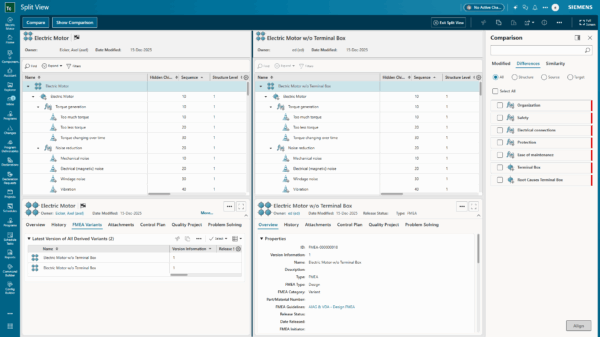
- Advanced comparison for master and variant FMEA: Teamcenter Quality 2512 introduces split, compare, and show comparison commands for side-by-side FMEA viewing, helping teams quickly identify differences and maintain consistency across variants.
- Project-based data security restricts access to sensitive data by project assignment, ensuring only authorized teams can view it. Security settings cascade automatically from top-level to all sublevels, protecting intellectual property throughout the FMEA structure and associated master data.
🔎 Strengthening the characteristic digital thread
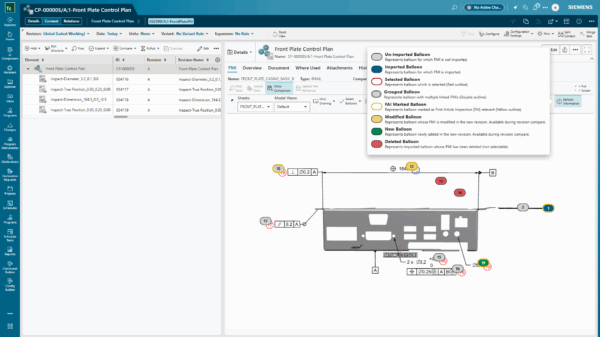
Teamcenter Quality Control and Inspection Planning module introduces improved handling of deleted or modified product manufacturing information (PMI) and enhanced naming conventions for annotation-type PMIs.
- Teamcenter Copilot accelerates control and inspection plan creation by providing AI-generated suggestions for inspection definitions, control methods, and reaction plans.
- Visual handling of deleted and modified PMIs: Teamcenter Quality 2512 strengthens the characteristic digital thread for lifecycle traceability. Deleted PMIs are marked with red balloons in the 3D model and red crosses in the inspection definition tree, enabling quick identification and updates. Modified PMIs trigger new inspection definition revisions for change monitoring. A preference setting allows updates without revisions for simpler workflows.
- Improved naming convention for annotation-type PMIs: Enhanced naming rules for annotation-type PMIs create more descriptive display names for characteristics and inspection definitions, reducing ambiguity and improving cross-departmental collaboration.
⚙️ Streamlined quality continuous improvement
The latest version of Teamcenter Quality Problem Solving and Issue Management modules features enhanced usability and AI-driven insights, supporting continuous improvement best practices and change management documentation.
- Teamcenter Copilot reduces effort in defining quality objects by generating proposals for quality issues, problem-solving processes, root cause analyses (Ishikawa and Five Whys), and quality actions.
- Optimized workflow and participant assignment: Users can now efficiently manage quality issues and problem-solving processes with enhanced workflow capabilities for selecting the desired role and assigning appropriate team members.
- Extended configuration possibilities for change management: Teamcenter Quality 2512 offers flexible configuration to track and document change processes directly within quality applications via services.
- Streamlined supplier collaboration: Share nonconformances, problem items, and quality actions directly via the Supplier Quality Hub, part of Siemens Xcelerator, allowing quick documentation of root causes and corrective measures. Access is available through Teamcenter Quality (iframe) or a web link.

📝Ensure consistency across various quality actions
Teamcenter Quality offers quality action management capabilities for creating and performing tasks in different modules or as a standalone system. The latest release features streamlined workflows, enabling organizations to use quality actions more efficiently across all departments.
- Teamcenter Copilot for quality actions: Manually creating quality actions is time-consuming for quality engineers. Teamcenter Copilot automates this process by extracting key information and generating pre-filled quality actions as tailored suggestions based on specific contexts like problem-solving or FMEA. Users can accept or edit proposed suggestions as needed. An integrated chat function provides ongoing guidance and support.
- Enhanced flexibility using configurable functionalities: Teamcenter Quality Action Management offers enhanced flexibility via configurable duplication and editing functionalities. Users can define which fields are copied when duplicating actions, including options to reset status or retain due dates, making it easier to reuse and adapt actions for various scenarios while maintaining consistency.
✅ Streamline audit management
Teamcenter Quality version 2512 delivers significant improvements to the Teamcenter Quality Audit & Assessment module. Teamcenter Copilot simplifies audit activities and boosts consistency of audit outcomes via intelligent insights.
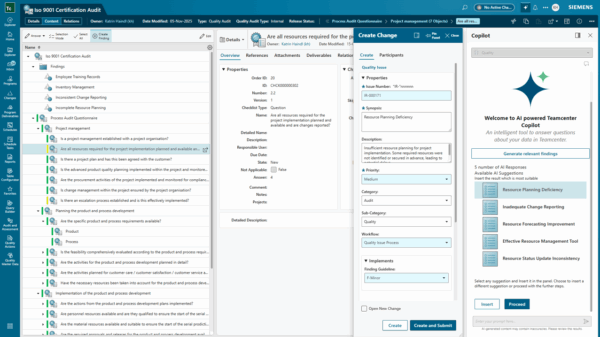
- AI-generated findings suggestions: Teamcenter Copilot provides support by analyzing audit data and deriving proposals for findings from historical data. The assistant proposes AI-generated findings suggestions based on the auditing standard, the question posed, and the assessment of respective questions, which users can accept or adjust as needed.
- AI-generated audit summary suggestions: Teamcenter Copilot empowers users by proposing customized audit summary suggestions. Leveraging LLMs and available historical information in master data, Teamcenter Copilot analyzes audit data and organizational context to deliver concise yet insightful summary suggestions, allowing auditors to focus on achieving results rather than administrative tasks.
🎓 Proactively identify training and qualification needs
Teamcenter Quality Training and Qualification module streamlines employee development by enabling systematic creation and maintenance of individual qualification and training profiles. It provides centralized tracking and documenting of all personnel training records, certifications, and competencies while maintaining auditable documentation.
- Teamcenter Copilot supports creating suggestions for qualification units, definitions, profiles, and profile groups. Users simply describe requirements, review AI-generated proposal descriptions, and accept or customize as needed.
- Qualification profiles for external users: Teamcenter Quality version 2512 extends qualification management beyond internal users to include external participants without Teamcenter accounts. External users, such as contractors or partners, receive automated email notifications when assigned qualifications, while organizations retain flexibility to distribute training materials through preferred channels.
- Streamlined qualification record workflow: A new workflow template integrates trainees directly into the training completion process. Internal users receive confirmation tasks within Teamcenter to approve and register completion. External users receive email notifications with coordinators registering completion on their behalf.
- Course offering enhancements: Training coordinators gain enhanced control with expanded course offering management capabilities in version 2512. Users can remove participants with automatic notifications, cancel sessions while notifying registered attendees, and reopen previously closed sessions to modify content or participant data. Non-Teamcenter users can be registered and receive email notifications for registration, unregistration, closure, or cancellation.
- Project-based data security: Project-based access control extends to all training and qualification objects, including definitions, profiles, groups, and units.

🏆 Benefits of the unique Teamcenter Quality 2512 capabilities
- Drive quality and compliance excellence using AI-powered features and insights
- Achieve greater accuracy with FMEA variant comparison and project-based data security
- Streamline inspection planning processes with enhanced traceability for PMIs
- Simplify supplier collaboration for issue and change management
- Streamline qualification management capabilities
- Improve overall flexibility and accessibility for all users
💡Interested in discovering more about Teamcenter Quality?
Interested in discovering more about the comprehensive quality core processes offered by Teamcenter Quality? Take advantage of this comprehensive solution and explore the Teamcenter Quality 2512 software release notes for a detailed list of capabilities. Find out more about quality management and compliance on our website!
Start fast and grow with Teamcenter X | Make smarter decisions with AI-powered PLM
Table of Contents