🧑🏻💻 Teamcenter Copilot

Teamcenter Copilot ⬆️ engineering productivity
The way we search for and interact with information is changing — and so is Teamcenter.
Teamcenter Copilot brings together the power of generative AI and the depth of your Teamcenter-managed data to help you work smarter, faster and more intuitively.
Built directly into Teamcenter, Teamcenter Copilot provides secure and intelligent context-aware assistance. It combines natural language processing, domain expertise, and intelligent task execution into an intuitive, natural language interface. It’s designed to help you quickly find answers, extract insights, and automate tasks – improving your overall engineering productivity.
Whether you’re analyzing a dense specification, navigating a complex product structure, or searching across hundreds of documents, Teamcenter Copilot delivers grounded, traceable answers that are tailored to your organization’s data and workflows.
Key Capabilities
🧠 Create AI-Powered Knowledge Bases
Teamcenter Copilot allows you to transform your Teamcenter-managed files into intelligent knowledge stores. You can create custom knowledge bases focused on specific topics – such as product lines, programs, or domains – and scope them to include only the most relevant documents. This ensures that Teamcenter Copilot’s responses are focused, accurate, and tailored to your unique terminology and use cases.
💬 Chat with Collections of Documents or Individual Files
Whether you’re working with a single document or an entire repository, Teamcenter Copilot enables you to ask questions in plain language and receive contextualized answers. Every response is grounded in your data and traceable to source files, giving you confidence in the accuracy and relevance of the information.
📄 Perform Complex Document Analysis
Extract exactly what you need from long, dense documents – such as key requirements, safety notes, or performance specifications. You can ask Teamcenter Copilot to summarize content or format results in a specific way (e.g., tables, bullet points, or paragraphs), making it easy to copy and share insights in Teamcenter discussions or reports.
🧩 Work with and Explore BOMs Using Natural Language
Teamcenter Copilot brings conversational intelligence to your bill of materials. You can navigate and filter 3D product structures, generate a working context of your BOM, and automate the creation of worksets – all through natural language prompts. Teamcenter Copilot can also execute multi-action tasks and weight and cost rollup report lookups, helping you to accelerate BOM analysis.
🧑🏻💻 Get Instant Product Support
Whether you’re an experienced Teamcenter user or a novice, chat-based product support makes it easy to find relevant information from the latest Teamcenter documentation and get step-by-step guidance on features and workflows. This Teamcenter Copilot capability streamlines onboarding, helping new and non-expert users get up to speed quickly, while also providing seasoned experts with instant access to the latest resources.
🔍 Analyze Your Requirements
Teamcenter Copilot brings AI expertise to MBSE, starting with requirements analysis. It can assess the quality of written requirements, ensure compliance with industry standards like INCOSE, and automatically identify new parameters as well as track changes in real-time. Catch ambiguous or incomplete requirements early, before they cascade into design errors and costly rework downstream.
🏭 Automate Manufacturing Planning Tasks
Automate tasks such as creation of Manufacturing Bill of Materials (MBOM) and Bill of Process (BOP), while intelligently assigning parts and resources to operations based on your manufacturing context. Teamcenter Copilot’s manufacturing planning capabilities understand user intent and transform it into executable plans in Teamcenter.
✅ Get Intelligent Assistance Across Teamcenter Quality
Get guided, context-aware assistance throughout your quality processes, with automated creation of suggestions for audit summaries and findings, quality actions, quality issues, and much more. From FMEAs to audit reports, Teamcenter Copilot helps ensure nothing falls through the cracks while dramatically reducing the time spent on documentation.
What makes Teamcenter Copilot different?
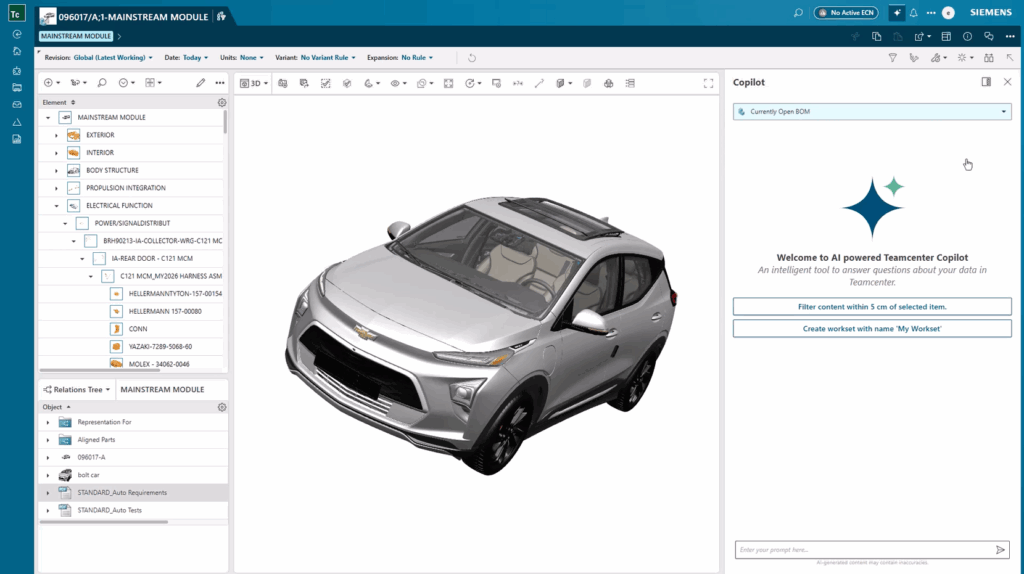
Teamcenter Copilot isn’t just another AI assistant – it’s a purpose-built, enterprise-grade solution designed to meet the unique demands of engineering and manufacturing organizations. Here’s what sets it apart:
🔐 Grounded in Your Data
Unlike generic AI chatbots that rely on their training data for their knowledge, Teamcenter Copilot is grounded in your Teamcenter-managed data. This ensures that every response is accurate, relevant, and traceable to your organization’s source of truth. Whether you’re querying a document, exploring a BOM, or analyzing a specification, Teamcenter Copilot’s answers are always backed by your own data.
🔄 Continuously Updated
Your data is constantly evolving – and so is Teamcenter Copilot. It automatically synchronizes with your Teamcenter data, ensuring that its knowledge base reflects the most current information. This means you’re always working with up-to-date insights, without needing to manually refresh or reindex content.
🔗 Embedded in Teamcenter
Teamcenter Copilot is not a bolt-on tool. It’s embedded directly into the Teamcenter user experience, providing seamless access to GenAI capabilities where you already work. This tight integration ensures consistency, security, and ease of use – no context switching required.
⚙️ Customizable to Your Needs
Every organization is different. That’s why Teamcenter Copilot is designed to be highly configurable. You can define custom knowledge bases, tailor the scope of data it can access, and even choose from multiple AI stacks to align with your IT strategy. Whether you’re focused on regulatory compliance, product development, or service documentation, Teamcenter Copilot can be adapted to your specific use cases.
📈 Scalable for the Enterprise
Built on a scalable architecture, Teamcenter Copilot can handle large volumes of data and users without compromising performance. Whether you’re a global OEM managing millions of files or a fast-growing startup scaling your operations, Teamcenter Copilot grows with you.
🛡️ Secure by Design
Security is a cornerstone of Teamcenter, and Teamcenter Copilot is no exception. It enforces your existing access management policies and integrates with your established security protocols. Teamcenter Copilot keeps your data within your own environment, ensuring that intellectual property and sensitive information remains secure and under your control. You maintain full control over what data is exposed to the AI.
Flexibility in deployment
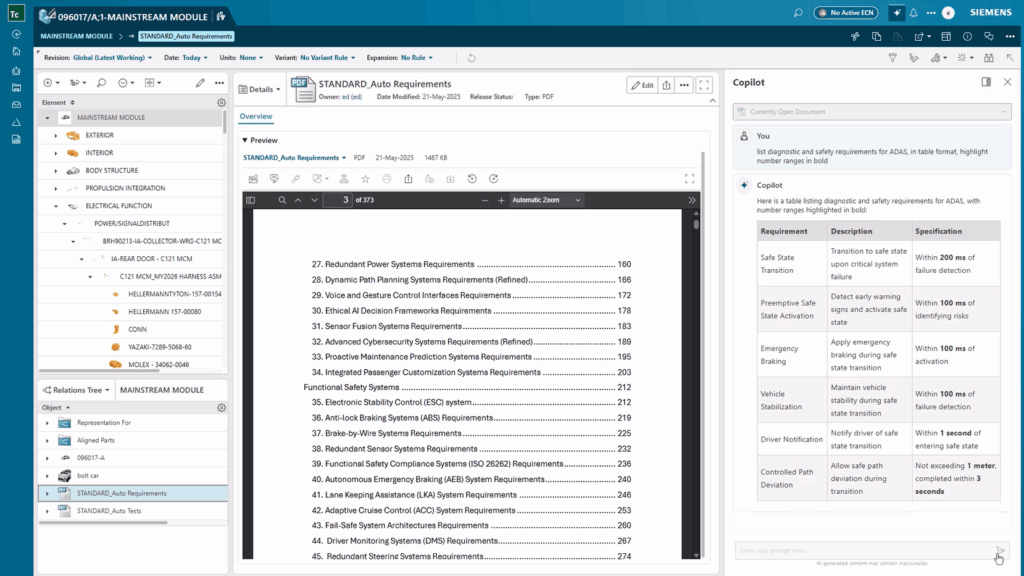
Teamcenter Copilot uses the latest IT technologies, including advanced pre-trained large language models and vector database systems. We realize that organizations have different preferences for how they leverage these technologies – some prefer turn-key deployment while others want to customize their own architectures and use specific models – so Teamcenter Copilot offers flexibility in how you deploy.
With the Teamcenter 2512 release, Teamcenter Copilot supports on-prem and on-customer-cloud deployment configurations via Microsoft Azure AI (using the GPT 4o LLM) and AWS Bedrock (using the Claude 3.7 LLM). You can also get Teamcenter Copilot on cloud SaaS with Teamcenter X.
Teamcenter Copilot also supports a fully on-prem deployment with the Llama 4.0 LLM. We’ll continue to certify more LLMs based on customer feedback and give you more options in the future.
Work smarter and faster with Teamcenter Copilot
The recent wave of AI advancements is making possible remarkable new capabilities in Teamcenter that will create significant value for our customers. Teamcenter Copilot starts you on this journey by helping you to get more value from one of your most significant assets – your data. Contact us today to learn more about how your organization can benefit from Teamcenter Copilot and how to get started.
📖 Complete guide to PLM
Simplify product lifecycle management – innovate faster, collaborate better and cut costs
No matter how you choose to deploy Teamcenter,
you get the same proven solutions designed to help you innovate faster.
Table of Contents