Polarion ALM 2512 – What’s New and Noteworthy
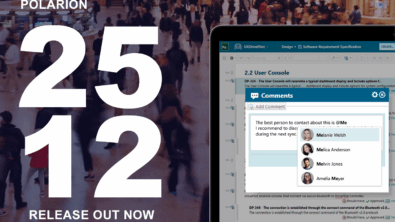
We’re absolutely delighted to unveil the newest iteration of Polarion: Polarion 2512.
This release is particularly packed with many new features and enhancements that we can’t wait for you to explore.
Our dedication to continuous improvement at Polarion is what consistently drives us to innovate and integrate your valuable feedback into each and every update.
To give you a taste of what’s inside, here’s a preview of the key highlights:
- Introduced new AI features with Polarion Copilot.
- Added support for Test Management in Collections.
- Boosted productivity with Mentions and Multiple sidebars.
- Helped our Administrators implement new options for managing Attachments, Import and Export Projects, and centralized the management of reporting Widgets.
Let’s dive in and explore the exciting new functionalities, as well as the latest enhancements in security, performance, and quality that await you.
Bringing the power of Artificial Intelligence to Polarion
Siemens is uniquely positioned to drive Industrial AI and help our customers bridge the gap between generic AI model-based agentic use cases and engineering processes adhering to strict regulations and factual results. Polarion plays a pivotal role in this strategy in the Software-defined lifecycle sphere.
Siemens envisions an end-to-end multi-layer AI stack from underlying engineering Foundational models specifically trained for various domains on real engineering data, through a flexible AI Fabric linking Siemens Xcelerator applications, including Polarion, as well as third-party apps, into unified ontologies empowering Digital Thread Agents executing actions across the integrated applications. Specific in-app AI features are also encompassed for rapid adoption by end users of various Siemens applications.
Polarion 2512 introduces  Polarion Copilot, a new paid add-on that delivers in-app AI features as a collection of three AI-powered tools, all accessible via a new icon on the top right of the Polarion UI.

Polarion Copilot lets you leverage your own Azure-hosted OpenAI LLM and use it with Polarion. It can be purchased for on-premise Polarion installations using Hybrid SaaS-type licenses.
Let’s review the three AI features included with Polarion Copilot in this release:
‘Similarity Analysis’ to locate duplicate Work Items
Managing a large number of Work Items can sometimes lead to duplicates or make it challenging to group related items for comprehensive planning and testing. Our new Similarity Analysis feature harnesses AI to help identify Work Items that are similar to one that you select.
Similarity Analysis goes beyond simple keyword matching by understanding the underlying meaning of the text. It helps in identifying semantically similar Work Items, even if they are phrased differently, which can prevent redundant entries and streamline related tasks.
Let’s say you are a product owner or a test lead, and you are looking at a “System Administrator must be able to set the user roles”  User Story. Your goal is to identify all related stories to consider while planning tests for this functionality.
Manually searching for related stories across a large backlog can be time-consuming, and you might miss stories that are conceptually linked but use different terminology.
Now you can select the User Story, and use Similarity Analysis to search a defined scope for similar Work Items.
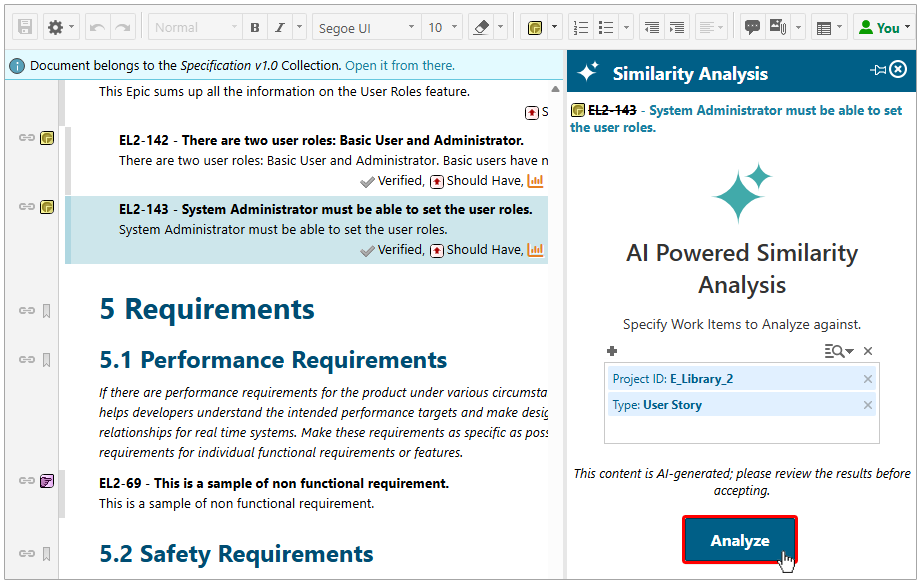
Similarity Analysis scans the defined scope and lists the Work Items it finds that are highly similar or conceptually related based on their descriptions.
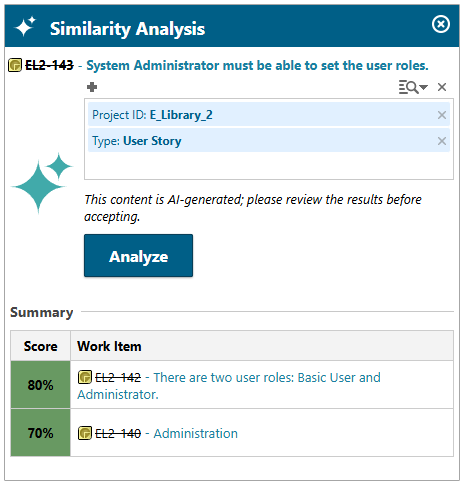
Only the most similar Work Items are listed, giving you a great starting point for comparison. Administrators can define how many results are listed and set a similarity score in the  Configuration Properties in
  Global Administration.
Detecting contradictions with Consistency Check
The last thing any company needs is to have safety issues caused by contradicting requirements. Imagine one requirement states the input voltage for a computer board is 5V, while a second requirement states that the output voltage of a power supply is 24V. To help prevent such problems, we created Consistency Check.
Simply select the Requirement and run Consistency Check.
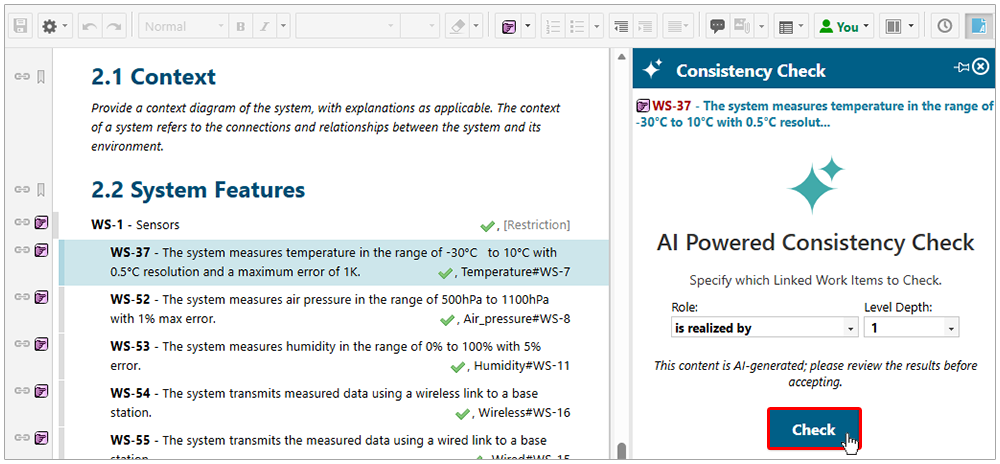
Consistency Check traverses all linked Work Items, depending on the Role and Level Depth configuration, and detects any inconsistencies in their Descriptions, their Types, and their linked Work Items.
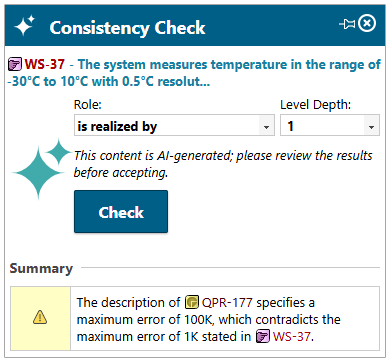
There might be multiple inconsistencies listed with links leading to all involved Work Items.
Content Validation for the INCOSE standard
Vague Requirements with open questions or overcomplicated language can also be a safety risk.
To help ensure your engineers craft Requirements and Specification Documents that are compliant with industry standards, we created Content Validation.
This feature allows you to compare Requirement descriptions directly against the rigorous standards developed by the INternational COuncil on Systems Engineering (INCOSE).
Just select a Requirement and run Content Validation.
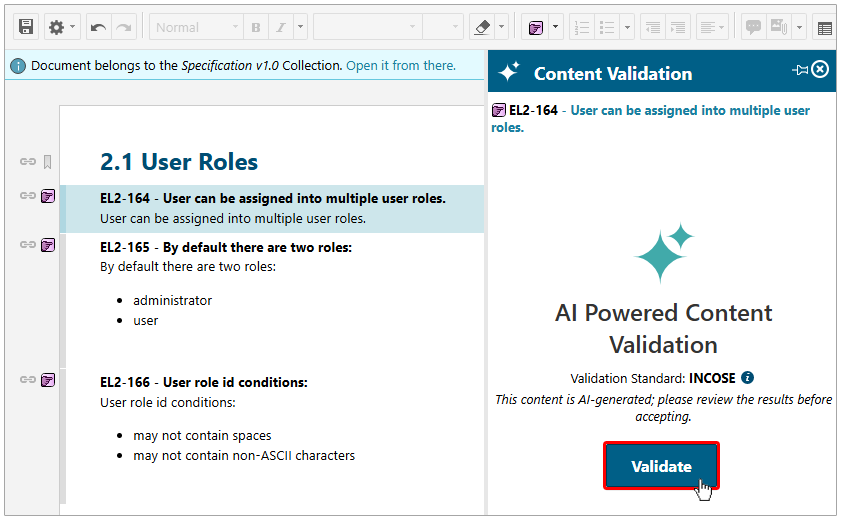
Content Validation reports which rules were not met, what was wrong, and how you can make the Requirements INCOSE compliant. (See the INCOSE website for a complete list of rules.)
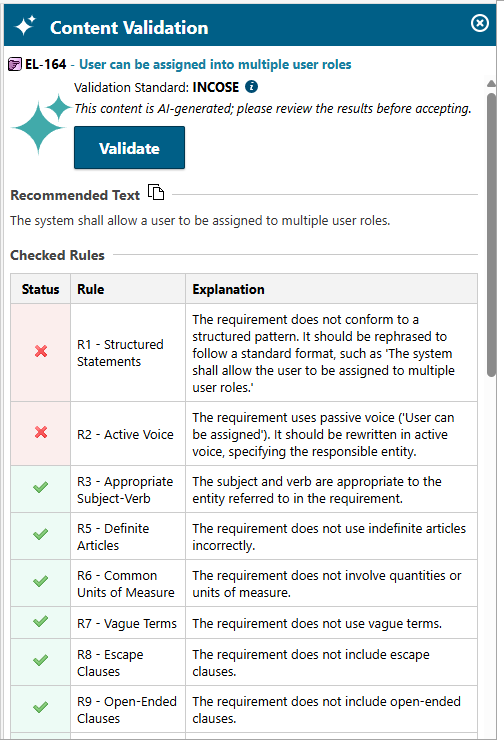
You can then often copy the suggested text to your clipboard and use it to replace the original text.
Test Management comes to Collections
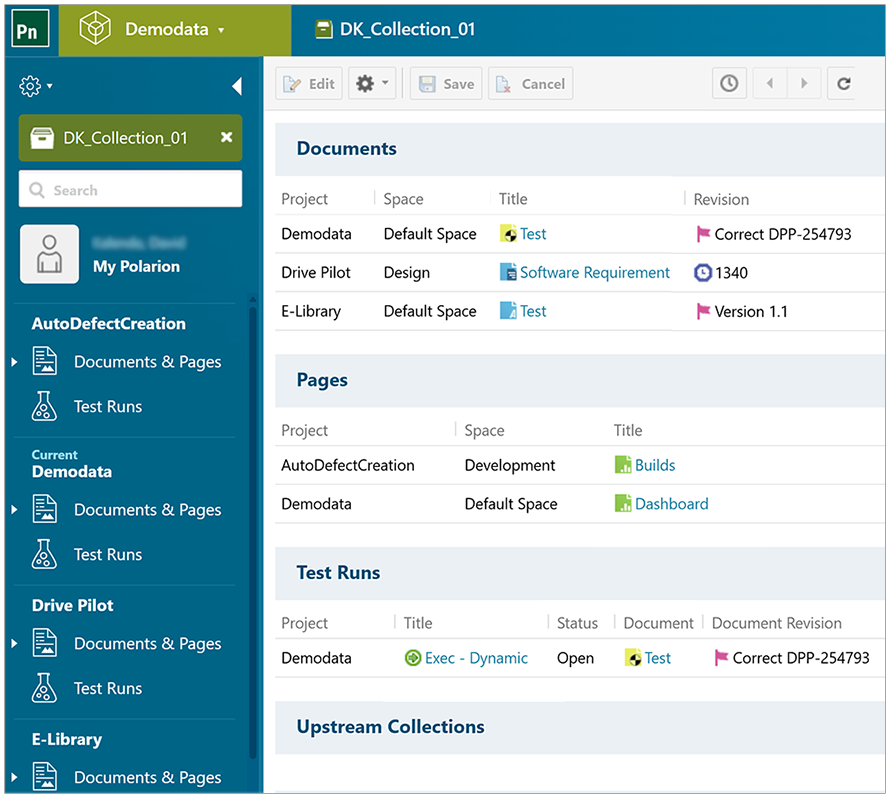
Continuing our work from recent releases on  Collections, we introduced the ability to create and manage Test Runs directly within the context of a Collection. This makes test execution more aligned, consistent, and aware of the exact
  Document set you are validating.
Now a Collection contains a specific set of Documents, the Test Runs that validate those Documents, and their Test Results all in a single, convenient place.
Collections now offer a dedicated Test Runs view filtered to the scope of the Collection, ensuring that only the Documents referenced within it are available for test execution. You can create new Test Runs without ever leaving the Collection view, allowing you to initiate campaigns that remain tightly linked to the baseline versions and artifacts defined by the Collection. This context-aware approach gives teams a unified place to track test progress, view relevant Test Runs, and maintain full oversight across all related Documents for more accurate coordination and higher confidence in validation outcomes.
Related Collection enhancements
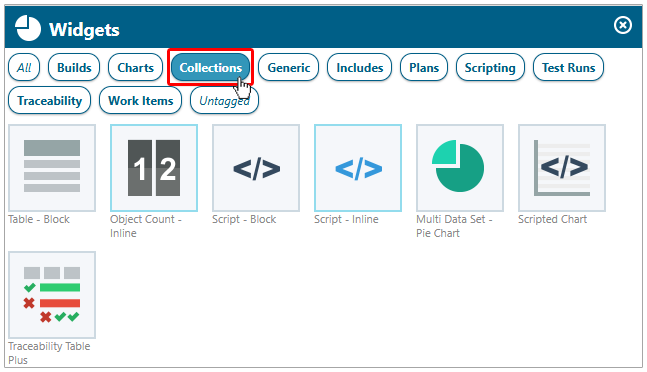
- We enhanced several of our report Widgets so that they can be used within the scope of a Collection. To make it easier to find and use these enhanced Widgets, we added a new Collections category. Several Widgets are supported for the 2512 release, and this complements the Collection-aware reporting with the scripting capability we added in the 2506 release earlier this year.
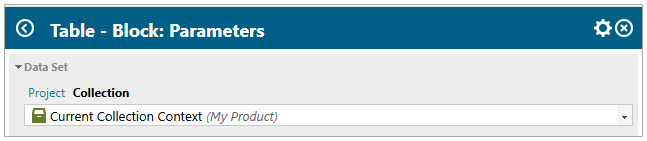
- Report Widgets now offer greater flexibility in handling Collection contexts. When a Widget is configured for the Current Collection Context, it automatically adapts to the Collection and scope where the report is viewed, enabling easy reuse across various Collections. Alternatively, you can explicitly assign a Widget to a specific Collection and baseline, ensuring it always displays that fixed context, regardless of where the report is opened.
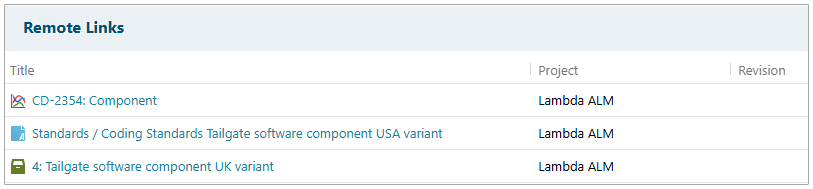
- OSLC linking is now fully supported for Collections, introducing a new Remote Links option within the Collection form. This lets you link a Collection to other OSLC resources, such as Work Items, Documents, or even other Collections, and simultaneously displays any incoming OSLC backlinks. For a seamless experience, rich hover provides convenient previews of linked items, and clicking a link navigates you directly to the associated resource.
- OSLC revision resource linking has also been extended to include Collections. For more information, see the OSLC now supports Revision-based linking section of this blog.
Boosting your productivity
We always value our conversations with customers. Your insights are invaluable in helping us continually enhance your Polarion experience. With this release, we focused on improving your productivity. We’ve listened to your needs, and it’s with great excitement that we announce a suite of enhancements designed to make your work even more effective and collaborative!
Driven directly by your input, we’re proud to share that this release incorporates a total of 32 functional enhancements requested directly by customers, successfully closing almost 202 customer Enhancement Requests (ERs)! These targeted improvements are all about making your daily tasks in Polarion more efficient and straightforward, helping you accomplish more with less effort.
Bring anyone into a conversation with @Mentions
We introduced user @Mentions to Polarion to improve team collaboration and boost productivity.
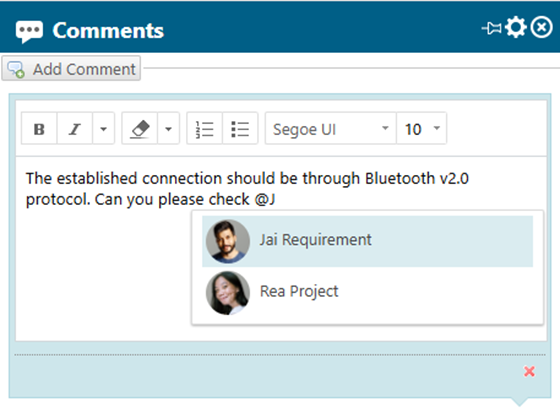
Now, when you type @ in  Work Item,
  Document, or
  Page comments, a dynamic pop-up appears with a list of relevant Project users configurable by role. This lets you give and receive timely feedback, to and from the right people, easily and efficiently.
To enable this feature, we upgraded all comments to rich text, so you can also use rich text formatting within your Work Item, Document, and Page comments to highlight important statements and increase clarity.

But we didn’t stop with comments. We extended the Mention feature across all of Polarion’s rich text fields.
You can Mention team members in:
- Work Item Descriptions and rich text Custom Fields.
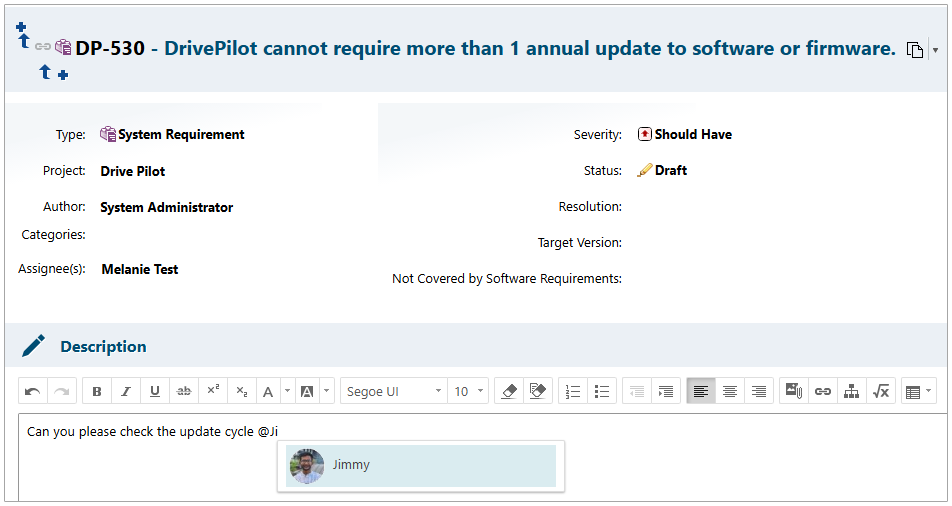
- Throughout Documents.
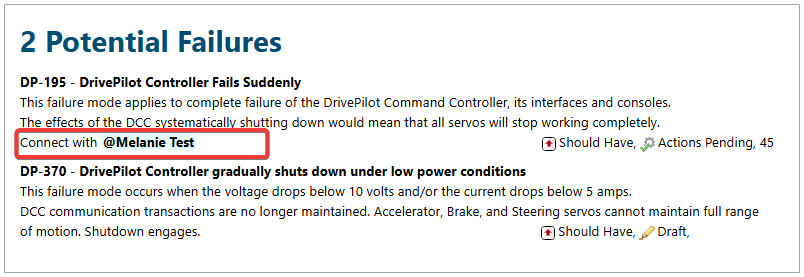
- Within Pages.
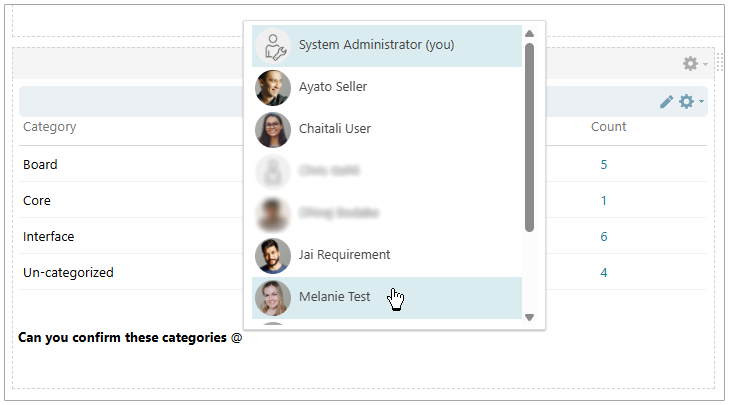
- Even in
 Test Run rich text Custom Fields.
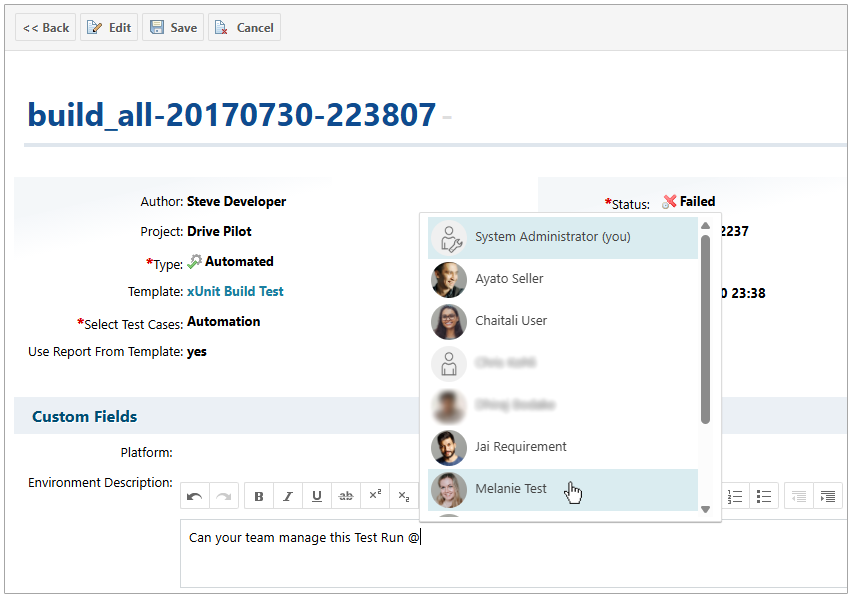
See Mentions, Notifications, and Watchers in Polarion Help for a table listing all the places you can use our new Mention feature.
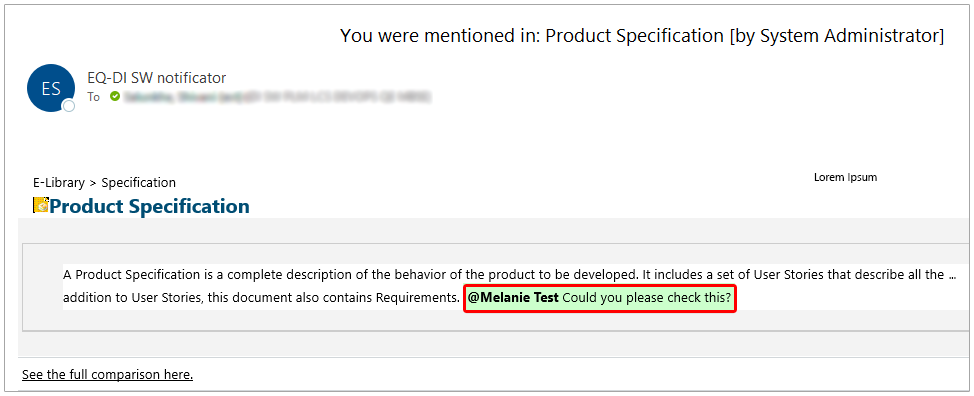
When a user is mentioned in a comment or rich text field, an email is immediately sent with a preview of the comment or the rich text that they are mentioned in. If multiple users are mentioned within the same comment, each of them receive a single notification for that comment.
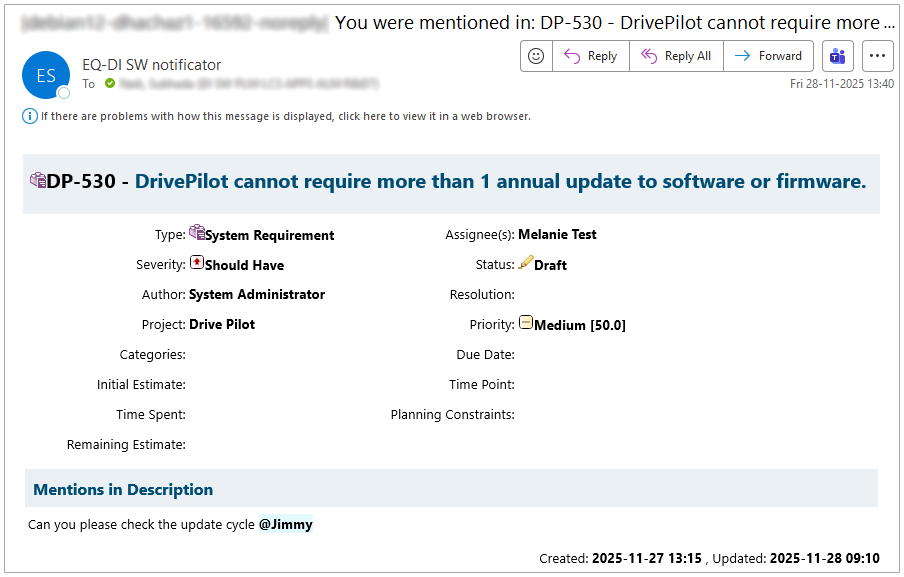
By default, when you mention someone in Work Item or Page comments, they are also added as a  Watcher. Administrators can disable this by setting the following property to
 false:
mentionedUser.addWatcher.enabled
See more with Multi-sidebar support in Documents
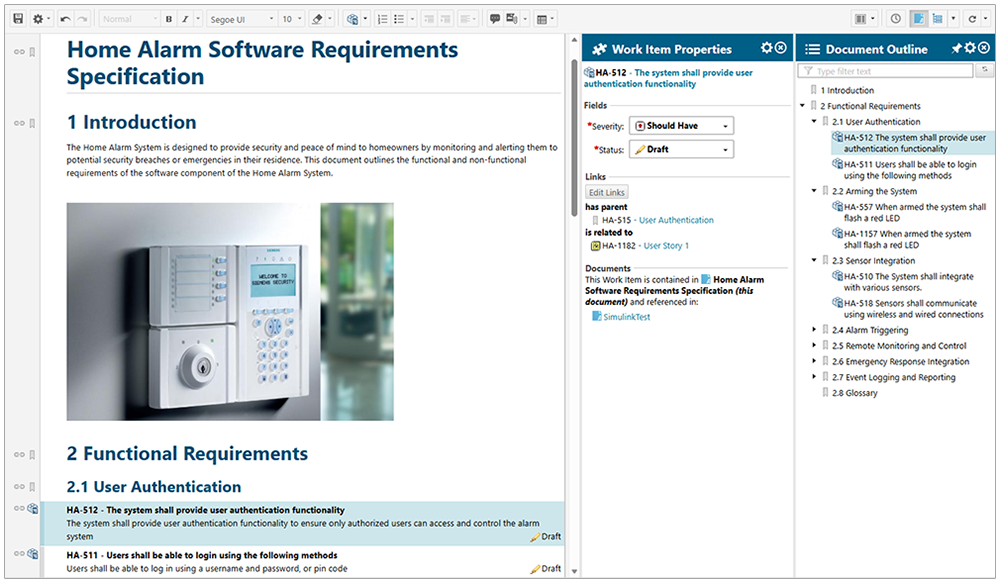
Continuing our focus on boosting your productivity, we’re thrilled to unveil Multi-sidebar support in Documents! To enhance overall usability and provide a more comprehensive view of your Document’s content, you can now select and display multiple sidebars simultaneously. Imagine having your Document Outline sidebar open for quick navigation while concurrently viewing the detailed Work Item Properties sidebar. This combination means you no longer need to manually switch between essential views, which can cause you to lose focus.
Merge links automatically between Branched and Master Documents
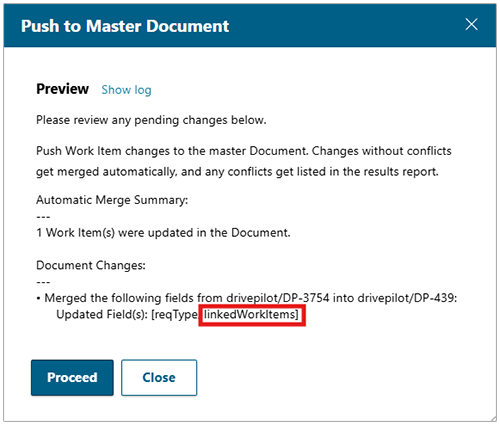
In an effort to improve and speed up dealing with changes between Master and Branched Documents, we are happy to announce that both Automatic and Manual merge (using the Compare/Merge action) have been enhanced to include the merging of Work Item links. The removal or update of links pointing to other Work Items also now happens automatically when merging all fields. Links relative to the Document are automatically converted.
Flexible Test Run creation from a Document at any Revision
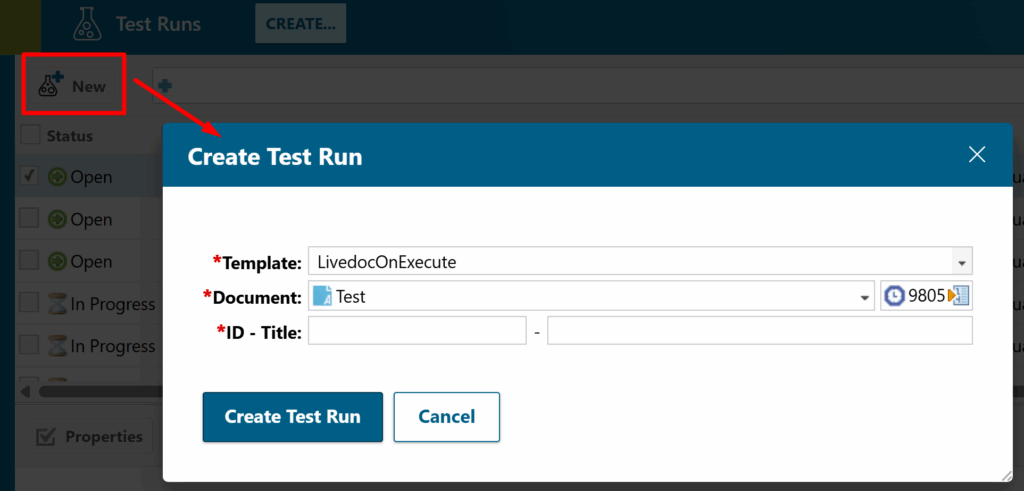
We didn’t forget about improving the productivity of our quality engineers and testers. You can now generate Test Runs directly from your Documents by selecting a specific Document, Revision, or even a Baseline during the creation process. This means no more editing or maintaining Test Run templates just to target a particular Document and version. Polarion intelligently prepares the Test Run with the correct Test Cases based on your chosen Document and its version, supporting both the ‘From LiveDoc on Create‘ and ‘From LiveDoc on Execute‘ strategies.
An intuitive new Document and Revision picker makes this process flexible. While Document and Revision settings can be pre-populated from your templates, you retain full control to adjust them on the fly. This enhancement directly addresses a key customer request, allowing you to initiate Test Runs precisely from the right Document version, without extra overhead, keeping your test planning focused, efficient, and aligned with your Project’s evolving context.
Quicker Document Approvals with signature notifications
To accelerate your Document Approval process, we added signature notifications. Say goodbye to delays and manual follow-ups, as Polarion now automatically alerts users when their signature is required on a Document. This means instant email notifications with direct links, allowing you to jump straight to the Document and take action without delay. You’ll also receive real-time updates, not just when you’re invited to sign, but also when others sign or decline, keeping everyone in the loop and significantly reducing approval cycle times.
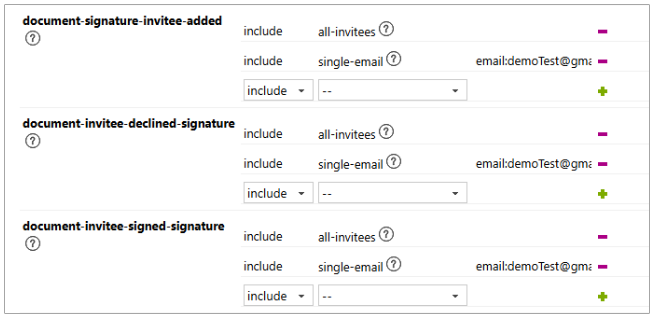
For administrators, a new notification event in  Notifications Administration provides full control and visibility over these alerts, ensuring your approval processes are as efficient and transparent as possible.
Your own support agent with Polarion Help AI Chatbot
And finally, to conclude on the productivity boosters, we’re introducing the Polarion Help AI Chatbot. This intelligent, AI-powered documentation assistant is designed to be a readily accessible resource, available directly from anywhere within Polarion. You can ask your questions, and it will provide clear, digestible help, serving as a quick reference without needing to search through extensive documentation, basically acting as your own support agent.
Trained on Polarion’s entire documentation set, it delivers structured answers with direct links to the source material for further details. This tool is conveniently located via the same new icon on the top right of the Polarion UI that you use for Polarion Copilot.
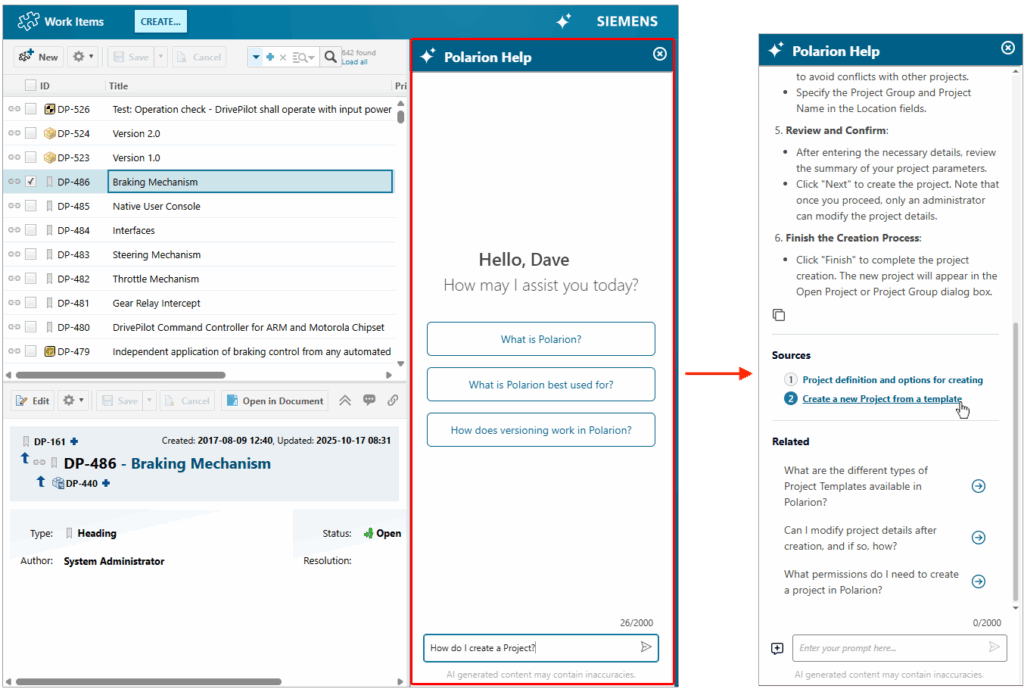
Polarion Help runs on Siemens infrastructure. It is available for free for on-premise Polarion installations using Hybrid SaaS-type licenses. It can be enabled upon request – the process is described in Polarion’s Help Documentation.
Helping our administrators
Polarion Administrators are essential. They support their Polarion users by mapping workflows, configuring Projects, and managing who can access what in Polarion. Many of these administrators are also responsible for additional infrastructure tasks, such as server maintenance and support. In Polarion 2512, we added the following features to make their lives easier:
Manage repository size by storing Attachments externally
As teams upload more screenshots, binaries, logs, and PDFs—especially during test execution—the Subversion repository can grow quickly. This can lead to increased repository size on the server, potentially impacting its maintenance.
To address this, Polarion now offers new Attachment storage options for storing files outside Subversion. This feature lets you attach files without inflating the repository or exceeding size limits. Storing these files externally helps keep the repository manageable, making backups and maintenance faster and more predictable.
Note: This feature is optional, so you can continue storing Attachments directly in Subversion if preferred.
When enabled, Polarion can store files in external systems such as AWS S3, Azure Blob Storage, Google Cloud Storage, or NFS, while preserving the same user experience and retaining full traceability.
Attachments remain accessible and secure, with real-time MIME type checks, file extension validation, and optional antivirus scanning on upload. This gives teams a cleaner and more scalable way to handle files – without changing the way they work.
Automatic antivirus scanning for Attachments
To help organizations maintain robust security around file uploads and meet compliance requirements, Polarion now supports antivirus scanning for all Attachments.
This new configurable scanning feature allows administrators to connect their preferred antivirus solution. Every uploaded file is checked before it’s stored. If the scanner reports a problem, the upload is blocked, and the uploader is notified. This provides a straightforward way to enhance security without disrupting existing workflows.
Note: The feature is optional; if no scanner is configured, Attachment upload will continue to work as it does today.
Import and export Projects across Polarion instances
Transferring Projects between different Polarion instances, bootstrapping new environments, or sharing standardized Project configurations have often required manual steps, reliance on Subversion tools, or workarounds.
To simplify these processes, we created a new Export/Import Project feature. You can now export an existing project as a simple .zip archive. You can then use that file to create a brand-new Project instantly.
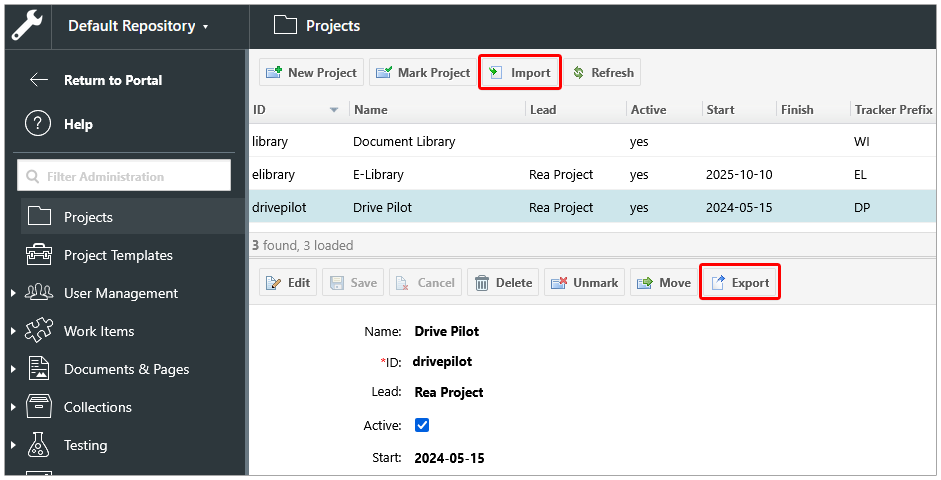
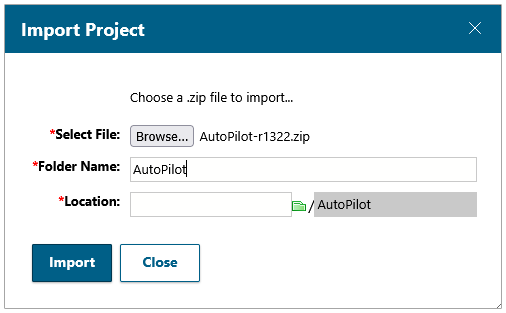
This eliminates the need for Subversion tools, manual checkouts, or template workarounds, making cross-instance Project mobility far more accessible. Teams can easily transfer Projects, quickly set up new instances, or share standardized setups across organizations. Imported Projects get created cleanly, without a version history, providing you with a lightweight, consistent starting point.
Managing Velocity Widgets
Velocity Widgets are a popular customization option in Polarion that extends Page content by rendering dynamic reports.
In 2512, we added a new  Administration topic in Polarion’s UI, making it easier than ever to manage Velocity Widgets and eliminating the need for external tools like the Repository Browser.
( Administration
 Documents and Pages Velocity Widgets )
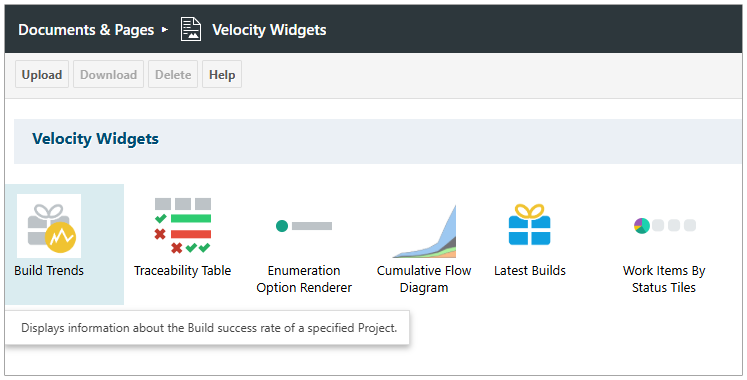
The Velocity Widgets topic is available on both the Global and  Project levels.
There, you can easily Upload, Download, or Delete Widgets from the Polarion repository.
Looking to update an existing Velocity Widget?
Just name the folder in your update archive to the same name as the existing Widget’s folder and Upload it.
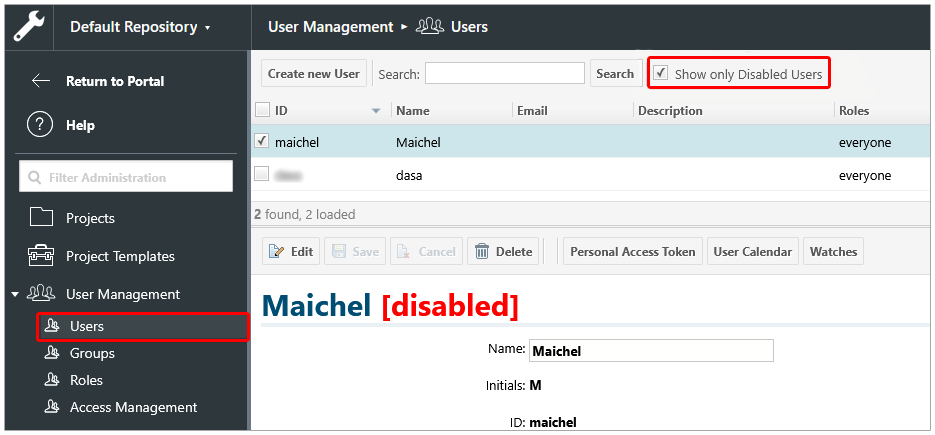
Search for deactivated users
Administrators can now search for deactivated users in  User Management
  Users, making user license management easier and more transparent. They can easily unassign licenses from users who are no longer active by selecting the new “Show only Disabled Users” filter at the top, then unassigning licenses from the users that appear in the list to help keep team license usage optimized and up to date.
Check for duplicated Project prefixes
When creating a new Project, Polarion now automatically checks for existing Work Item prefixes.
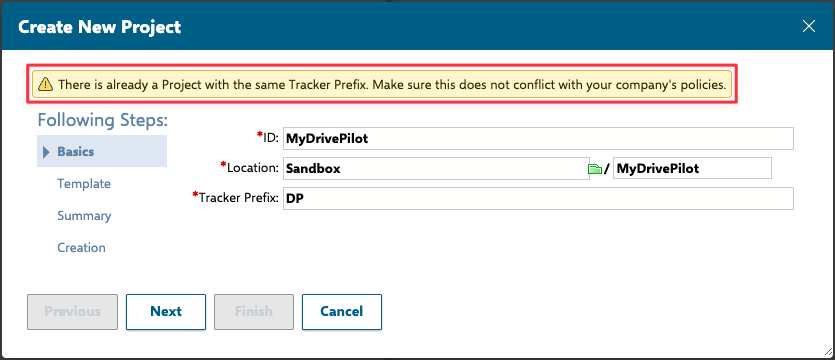
If a selected prefix is already in use, administrators receive a warning to help ensure unique prefixes across all Projects.
Execute Scheduled Scripts on-demand
Building on the  Scheduled Scripts feature introduced in our last release, you can now execute any configured scheduled script on-demand directly from Polarion Administration.
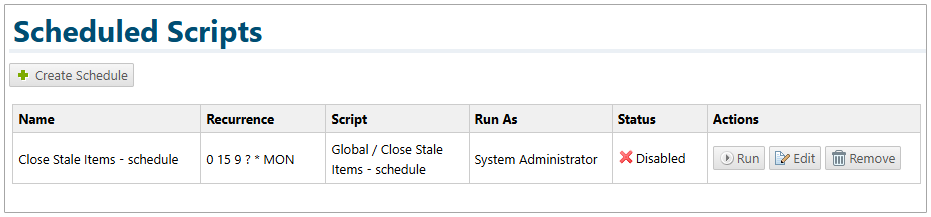
No more waiting for the next scheduled run. This capability allows you to instantly trigger scripts for immediate testing, troubleshooting, or urgent tasks, even those currently disabled from their regular schedule. Plus, for complete transparency, the script log will indicate whether a script was run by a schedule or manually via the Administration UI, giving you complete visibility and control over your automation processes.
Enhanced Integration Capabilities
OSLC now supports Revision-based linking
OSLC (Open Services for Lifecycle Collaboration) is an open standard for integrating tools across the software development lifecycle, enabling applications to share data, link related artifacts, and maintain traceability. In 2512, this integration offers a new level of precision, letting you create OSLC links that point directly to specific revisions of your Polarion Work Items, Documents, and Collections.
The Polarion delegated OSLC resource picker provides the flexibility to select and link to any particular revision you need, ensuring your OSLC connections accurately reflect the exact state of your artifacts at a given point in time, rather than just the latest version.
So, for example, if you use JIRA with a JIRA OSLC plugin that’s configured to work with Polarion, when you attempt to link from a JIRA item to a Polarion Work Item, the Polarion delegated OSLC picker lets you select not just the Work Item, but also its Revision (or Baseline).
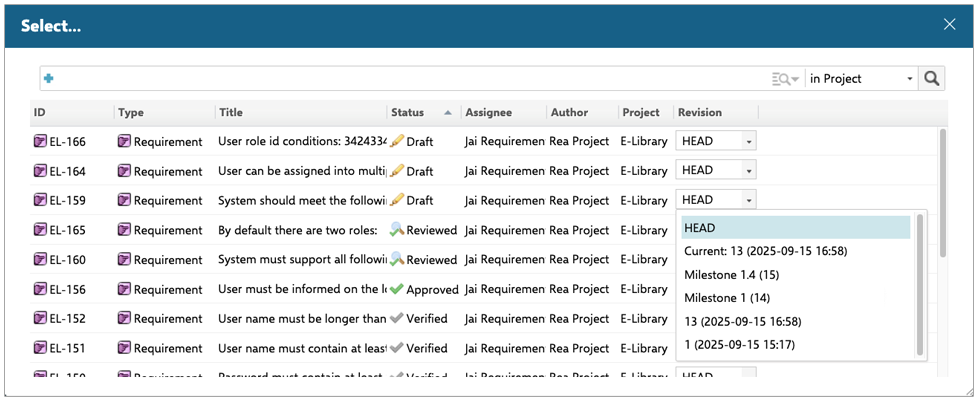
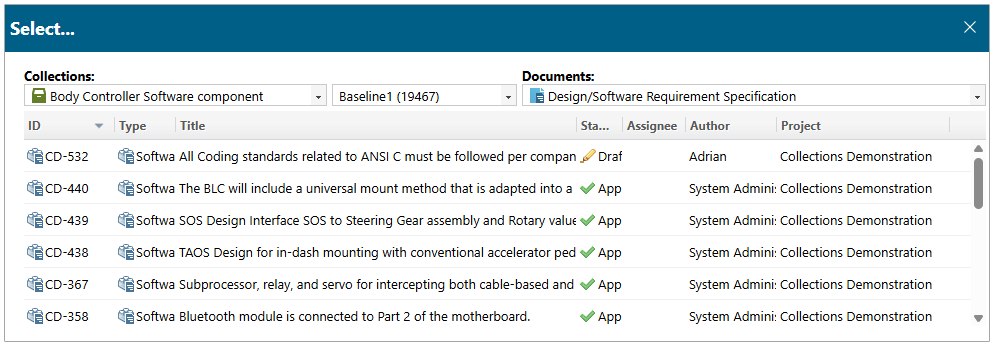
To further help and simplify linking to the correct Work Item Revision, the OSLC resource picker was enhanced so that you can filter the list of Work Items by either a Collection baseline and Document Baseline, or just the Document (baseline), and Polarion will then show the corresponding Work Item (revisions) that are valid for the filter. This makes it easier to find and link to the correct Work Items and their Revisions.
Third-party cookies support OSLC
To maintain the compatibility of our OSLC feature set with modern browsers, we have updated our approach for handling third-party cookies. This ensures that OSLC remains functional and consistent as you integrate your tools.

Because this is security-related, this is a great opportunity to review your security settings! For details, please review the bundled config changes text (5_Required_Config_changes.txt).
Documents from the same Space and Simplified Export for ReqIF
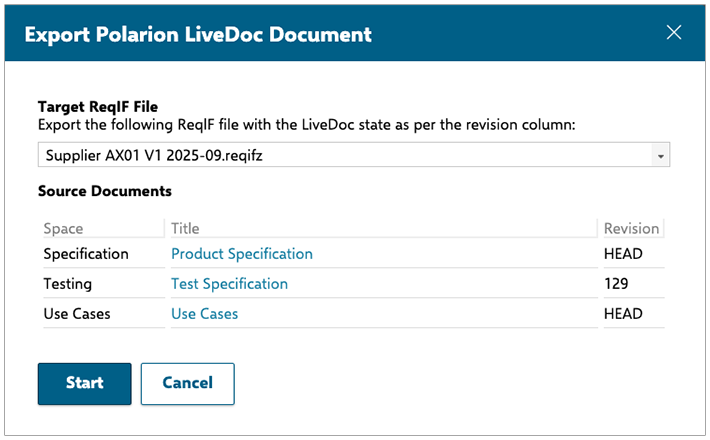
- We added the ability to add several Documents from the same Space to an existing ReqIF file to the UI. This can be useful when leveraging the Spaces for classifying your Requirements specifications.
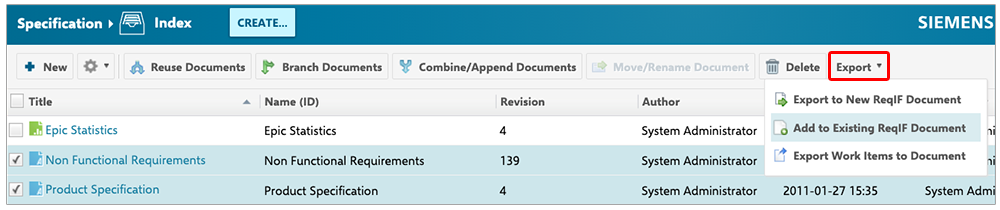
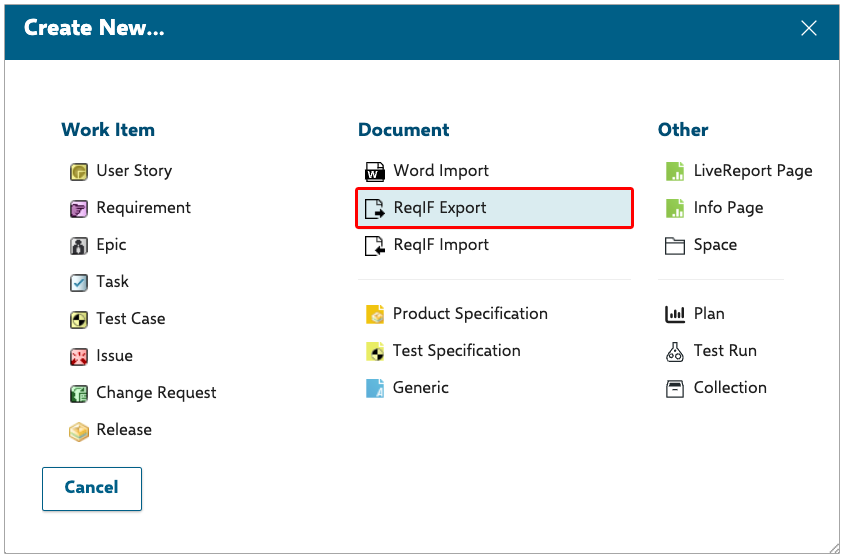
- To help you keep your ReqIF files up-to-date, we’ve introduced a new ‘ReqIF Export‘ option, conveniently located under the ‘CREATE‘ button in the Navigation header. This opens a new dialog listing all ReqIF files in your current Project. From there, you can easily export them, ensuring they reflect their most recent data with just a single click. This feature is particularly useful for quickly updating ReqIF files that were previously exported from Polarion.
Improved ReqIF compatibility with IBM DOORS
We revised the way Polarion treats ReqIF files that only contain a single item type. Previously, for all of these files, we showed two “virtual” item types: Heading and Requirement. This led to confusion and customers wondering where the second item type comes from. We resolved this by now only having “virtual” item types for ReqIF files that come from DOORS and adapted the terminology of virtual types in the UI to indicate DOORS connections.
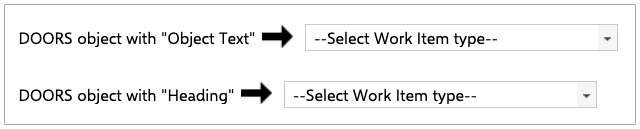
Note: You can revert to the old behavior by adding the following Configuration Polarion property:reqif.import.virtualTypesForNonDoors.enabled=true
Support of rich text Comments with JIRA integration
As mentioned earlier, user Mentions are now fully supported within the now rich text-capable comment fields. Building on this, our JIRA Connector was updated to support bi-directional synchronization of rich text formatting and user Mentions, complete with correct user mapping across applications. This means your conversations and critical information stay aligned, no matter which tool your team uses.
Personal Access Token support for sync pair configuration
Personal Access Tokens (PATs) are a widely adopted alternative to password authentication when integrating third-party applications. In this release, we extended the use of PATs in sync pair configurations when connecting to Polarion (the left side of the configuration) with the DOORS, JIRA, Azure DevOps and HP ALM integrations.
PATs are securely stored in your User Account Vault, providing a more robust and secure authentication method than traditional credentials. They allow you to set expiration dates and can be revoked at any time, giving you more control over your integrations.
Expanded Polarion REST API capabilities
We have significantly enhanced our REST API capabilities by introducing new endpoints that provide comprehensive control and flexibility across key areas.
For detailed information, see our REST API documentation in the SDK and the REST API User Guide, but here’s a brief summary:
Collections
We expanded the Collection endpoints to support Document and Page retrievals from Polarion Collections. We also implemented an action endpoint to reuse an existing Collection.
Custom fields
You can now administer Custom fields through our REST API. You can use new custom field endpoints to read and change the configuration for Polarion artifact types like Work Items and Documents and their subtypes (Tasks, Defects, User Stories, and so on).
Documents
It is now possible to search for Documents on both the Project and Global levels and filter the results with a Lucene query.
With improved POST and PATCH endpoints, Document Parts can now be placed and moved within a Document, and their indentation can be updated to set the level of their parent-child relation, along with their children in the Document structure.
Headings are now considered a standard Document Part, and their handling is no longer impeded.
Enumerations
New endpoints allow the listing of all existing Enumerations on a given level ( Project or Global), including those that are inherited, for all Polarion object types that support them.
Fields metadata
The new Fields metadata endpoints let you retrieve the complete field schema of Work Items, Documents, Test Runs, and Plans. You receive a list of all attributes and relationships, including both built-in and custom fields, that are currently configured for a given object or are inherited from a higher-level custom field definition.
Jobs
It is now possible to search for Jobs on both the Project and Global levels and filter the results with a Lucene query. Retrieved Jobs now provide access to the Job logs, ensuring complete visibility into Job execution details. A new endpoint also allows users to execute a specific Job directly.
Licensing
The newly introduced endpoints extensively cover Licensing.
Admins can configure the default Base and Add-on type Licenses and manage License Groups and Slots. They can also assign Licenses to specific Users and display an overview of assigned Slots for all available License types.
Polarion now provides License Usage Statistic reporting, including detailed usage information and usage limits.
There have also been updates to the existing User Management endpoints that enable the display of License information that’s currently assigned to a specific User. This ensures that User License data can be easily accessed alongside other User-related information, so it can be validated in external tools and ensures your users receive the appropriate licenses.
Metadata
This endpoint, available to all Polarion users, provides general information about the Polarion instance and its configuration:
- Polarion Version, Build, Node, Time Zone, Logo URL
- REST API Properties: Default Page Size, Max Page Size, Max Relationship Size, Body Size Limit, Max Includes Size
Pages
It is now possible to search for Pages on both the Project and Global levels and filter the results with a Lucene query.
The Page resource also supports accessing and updating the HomePage Content attribute, which contains the Page LiveReport, allowing users to adjust the data displayed on the Page.
We’ve also expanded the LiveReport Pages topic with new endpoints that let users create/delete Pages, get and manage Page Attachments, and work with Page Comments and Watches.
User Management
As already mentioned in the Licensing section, the User resource now contains information about the Base and Add-on Licenses currently assigned to a specific user.
We also added a new GET user endpoint that allows any user to retrieve information about themselves. Every user has access to this endpoint, regardless of whether their Global REST API Permissions are enabled.
Work Items
It is now possible to create multiple backlinked Work Items using a single endpoint call. This reduces the number of REST API calls required to make a linked Work Item structure.
Configuration Management and branching with the MathWorks Simulink Connector
We have added many new productivity and ease-of-use improvements to our very popular Mathworks Simulink Connector. Some of the highlights of this new release include support for configuration managment-aware models as well as improved support for working with Polarion Branched Documents.
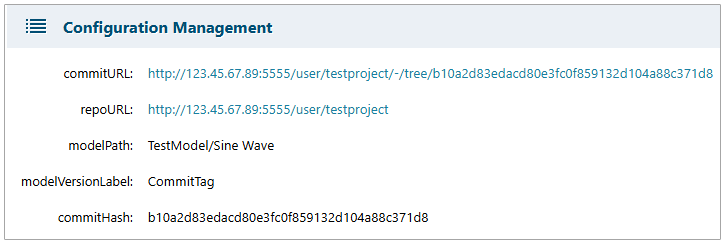
It’s not uncommon to put Simulink models under revision control using a third-party revision control system such as GitLab. We improved our Polarion Connector so that model surrogates contain information about the model under revision control and even provide a navigation link to the model in the revision control system. This means that you can create a global baseline in Polarion that reflects not just the Polarion artifacts (Documents, Requirements, Work Items, Test Cases, and so on) but also the model artifacts and a pointer to the revision of the model in the remote revision control system.
Polarion itself has powerful reuse and branching capabilities built in. Sometimes it may be necessary to work with a branched version of a Polarion Document rather than the document’s master version with your Simulink model – if, for example, you need to patch an earlier version of your product’s software or implementation.
The Connector has been enhanced so that it’s now easy to work with Branched Documents. The Connector will automatically recognize a Branched Document and ask you if you wish to replace the Master version of the Document with the newer Branched version. In this case, the Connector will automatically move any links to model elements that were linked to the Master Document over to the new Branched Document. After running the update backlinks operation, the surrogate model elements in Polarion will now automatically point to the Branched Document.
Several additional productivity improvements have been made to the Connector, including:
- Enabled setting the startup mode for the Connector (for example Requirements or Direct Linking modes).
- Improved the labeling of direct links for enhanced readability and to ensure they can be kept current.
- Added the ability to skip documents during import if they are part of a Collection.
- Improved backlinking speed by restricting backlink processing to selected model elements.
- Introduced the ability to define a live Document to contain all Simulink surrogate Work Items.
The new version of the Simulink Connector will be available from the Extension Portal shortly.
Domain validation for the Rhapsody Connector
We’re always working to ensure our Connectors provide robust support for your specific engineering needs. The Polarion Connector for Rhapsody was tested and validated to work with the following predefined domain specific profiles:
AUTOSAR_470AUTOSAR_480_R2211FMEA_ProfileISO_26262_ProfileModernCppUAF
You can now confidently use Polarion with your Rhapsody models that leverage these domain profiles, ensuring your Projects remain compliant and efficient.
Security updates
Refined Monitor topic and Job management permissions
In our last release, we introduced a new global permission, MANAGE_JOBS, to execute jobs and limit access to information about those that are currently running and scheduled. We had to grant this permission to the global user role by default to ensure continuity.
With this release, we enhanced job management permissions for more granular control over job visibility and execution. Users without MANAGE_JOBS permission can now access the  Monitor topic to view the status and logs of jobs they personally initiated (such as exports or merges), but they cannot execute any system jobs.
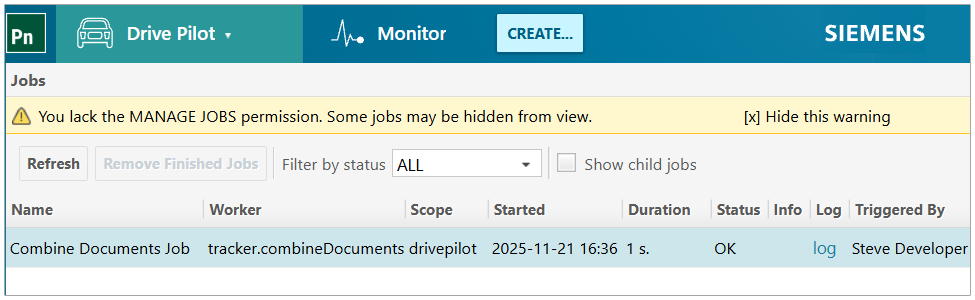
In contrast, users granted the MANAGE_JOBS permission have full visibility into all executed jobs and the ability to execute system jobs directly from the Monitor topic:
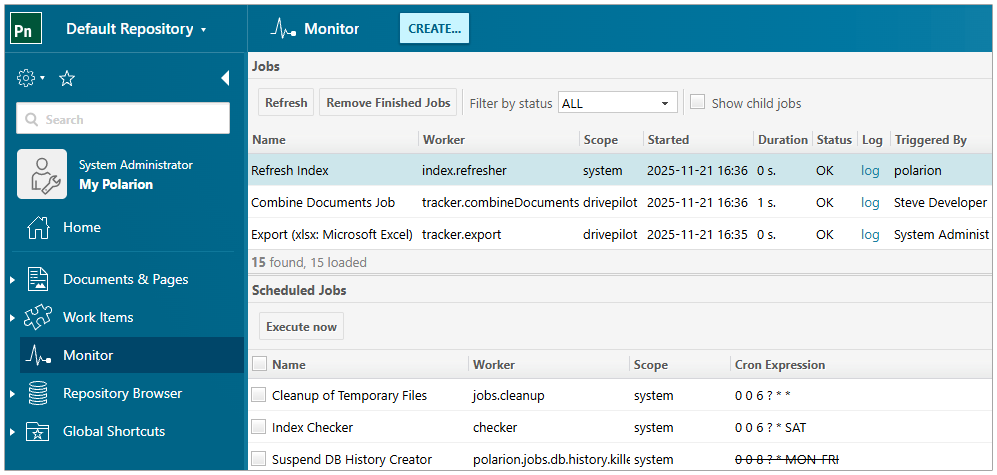
On the Monitor page, Jobs are displayed and organized according to their execution context. For example, if a Job was triggered by an API, it will be assigned a global context, which appears as system in the Monitor. In the Global context, you will see all globally executed jobs that you have permission to view.
Performance and scalability
Scalability white paper
Performance remains one of our top priorities, and Polarion 2512 delivers continued stability even under demanding enterprise workloads. As part of this release, we executed extensive performance, scalability, and endurance tests using a 20-million–work-item repository and thousands of concurrent simulated users. These tests validate not only response times but also long-running system behavior, data handling, and the impact of new security features introduced in recent versions.
To help customers understand the results and apply the same practices in their own environments, we’ve published a comprehensive performance white paper. It includes detailed findings, test methodology, system configuration, tuning guidance, and a release-to-release comparison of key use cases. If you want a deeper look into the numbers, setup, scenarios, and runtime insights, the white paper provides everything end-to-end.
Read the dedicated blog post here.
Performance improvements
With Polarion 2512, we are delivering a series of performance and scalability boosts, bringing faster response times across the platform:
- Significantly faster save operations when saving Work Items that use Save Hook scripts — reducing Work Item save times by tens of percent in real scenarios.
- More efficient authentication with database-backed password handling as the new default for SVN, low-level operations, and report delivery is 5 – 10% faster.
- Java 21 support brings modern JVM optimizations, resulting in overall performance gains – typically 5–20% across different use cases like rendering formulas, loading Work Items, using Save Hooks and Word Round-trip, reusing Documents, and so on.
- Improved PostgreSQL caching, providing consistent performance enhancements across a wide range of workflows – including up to 10% faster logins and up to 5% faster Document saves.
- Optimized SVN access-file evaluation, reducing NFS and Apache overhead and improving responsiveness in Cluster and large-scale deployments. This results in a 30% reduction in memory usage and a 20% improvement in Page loading.
- Up to 90% faster Project loading in the Project Explorer, thanks to a redesigned loading mechanism that also accelerates document-reuse workflows.
Location Index (early adoption)
Polarion 2512 introduces an early adoption release of the new Location Index, a foundational update to the underlying data layer, and the long-term replacement for legacy Object Maps. Built on a PostgreSQL-backed design, Location Index enhances robustness and system resilience. Even in this early phase, it already supports the main indexing scenarios and historical object resolution across typical operations such as moves and renames. Certain complex or less common scenarios – especially those involving repeated renaming, deletion, or reuse of old names – are still under active development and planned for completion in future releases. The database-driven design also helps alleviate several pain points seen in large deployments, including the shutdown overhead associated with legacy Object Maps.
Detailed documentation for this early adoption feature is available on Support Center, and we strongly encourage customers to evaluate the Location Index in their test environments – ideally using production-like data.
Early feedback is essential: Reindex logs, usability observations, performance impressions, and reports of any workflows that do not behave as expected will help us refine the feature ahead of its full rollout.
Technology updates
The new version also brings a number of changes to the supported operating systems and platforms:
- Java 21 is supported as the only runtime, and Java 17 support is dropped.
- Bundled Apache HTTP Server was updated to 2.4.65 in the Windows distribution.
- Bundled PostgreSQL was updated to 17.6 in the Windows distribution.
- Windows Server 2025 is supported, and Windows Server 2019 support has been dropped.
Notable issue fixes and enhancements
At Polarion, we are dedicated to providing the best experience to our users. With every new release, we consistently work to resolve issues, enhance overall system speed, and fine-tune the user interface. Whether you’re operating Polarion directly on your own servers or leveraging Polarion X in the cloud, our objective is always to provide you with an experience that is both fluid and highly productive.
Explore the list of bug fixes, performance improvements, and enhancements we’ve delivered in Polarion 2512.
Deprecations
In our commitment to keeping Polarion current, we periodically evaluate and clean up outdated features and embrace new technologies. See our Deprecation and Removal Plan for details.
Update information
Polarion 2512 is an update of Polarion ALM, available to all customers with a current maintenance subscription. This update is your gateway to the latest enhancements and security fixes. Staying up to date with our latest release ensures you benefit from new features, enhanced security, improved usability, and better performance.
To download the update distribution package, please visit this link.
For comprehensive details on the update process, read the bundled 2_How_to_update_Polarion.txt file in the update package.
(Or online on Support Center for both Single Instance and Cluster or Multi-instance deployments.)
Conclusion
As we wrap up, we want to reiterate our commitment to delivering an exceptional experience with Polarion 2512. This release is packed with functionalities designed to streamline your development processes and ensure Polarion fits into your existing ecosystem.
We genuinely value your input and continuously integrate your suggestions into our updates, solidifying Polarion’s standing as a leader for collaborative software development, orchestration, and project management.
Should you have any inquiries or wish to share your thoughts, please don’t hesitate to connect with us through the blog comments, the Polarion Community Portal, or by contacting your dedicated Polarion technical support.
Thank you for being a part of the Polarion journey. We trust you’ll find great value in the new features and improvements in this release, and we’re excited to continue bringing you even more innovations down the road!
Regards,
Jean-François Thibeault
Polarion ALM Product Management