What’s new in Opcenter X Intosite 2510

Summary
Opcenter™ X Intosite is a cloud-based web application that provides an immersive representation of production facilities in their geographical context with the ability to navigate intuitively through the facility. It unifies factory visuals with authoritative enterprise data in a single, contextual view. Users explore facilities through map-like navigation across 2D layouts, interactive 3D models and 360° panoramas, then open exactly the information they need via visual placemarks anchored to assets and locations.
Delivered as SaaS and accessed securely through a browser. Built-in connectors to Teamcenter®, Siemens analytic tools and Mendix™, together with open REST APIs, bring PLM, IoT, MES and ERP data into the same experience. Information layers and role-based views keep teams focused; status placemarks and live events provide at-a-glance readiness. Reality-capture integration with in-scene measurements supports layout reviews, production ramp-up and maintainability checks.
Location-tied discussions and virtual reviews accelerate collaboration and knowledge sharing across plants. Through four user workflows: Navigate, Investigate, Integrate, Collaborate – organizations can adopt a step-by-step path toward digitalization that delivers value at each stage. The result is faster decisions, earlier issue detection and a scalable digital twin for both existing and future factories.
The latest release of Opcenter X Intosite introduces a set of powerful enhancements designed to improve visualization, monitoring, and user experience across the platform.
With new capabilities such as advanced data integration, real-time operational tracking, enhanced visualization tools, and a modernized user interface, this version delivers greater efficiency, clarity, and flexibility for managing and analyzing your digital factory environment.
These updates empower users to work more intuitively, make faster data-driven decisions, and maintain seamless alignment between the physical and digital worlds.
Benefits
Enhanced Visualization and Context
- Combine panoramic imagery, point cloud data, and 2D layouts to create a more immersive and realistic digital factory view
- Improve spatial awareness and context for better planning, validation, and analysis
Increased Operational Transparency
- Monitor background operations and asynchronous tasks in real time, providing clear visibility into ongoing processes and system activities
- Reduce downtime and boost productivity by allowing users to continue working while tasks run in the background
Greater Flexibility and Customization
- Tailor visualization elements such as status indicators, colors, and shapes to align with organizational standards and workflows
- Support a broader range of production and monitoring use cases with more granular and adaptable tools
Streamlined User Experience
- Benefit from a modern, intuitive interface that aligns with Siemens’ design standards, ensuring consistency and ease of use
- Simplify user management and day-to-day administration, reducing time and effort for system administrators
Improved Integration between Physical and Digital Worlds
- Enhanced synchronization of 3D scan data, panoramic views, and operational data bridges the gap between real factory environments and their digital twins
- Empower more informed, data-driven decisions by providing accurate, context-rich visual information
In summary, the new Opcenter X Intosite release enhances how teams visualize, monitor, and manage factory operations, delivering a more connected, efficient, and insightful digital manufacturing experience.
Capabilities
E57 Panoramic images importer
Opcenter X Intosite now supports importing E57 scan files to enhance factory visualization with real-world 3D data.
What is E57?
E57 is an industry-standard file format for storing point cloud data and panoramic images captured by 3D scanning devices. It is widely used for creating accurate 3D imaging and virtual representations of physical environments.
Key Feature:
With this new capability, Admin users can import E57 panoramic scan data into Opcenter X Intosite using automated tool. The system extracts the E57 files and places panoramic images directly onto the 2D factory layout, enabling a realistic and immersive view of the production environment.
Benefits:
- Quickly integrate real-world 3D scan data into your digital factory model
- Enhance visualization and context for planning, analysis and collaboration
- Provide administrators and engineers with an interactive, photo-realistic view of factory spaces

Operations status board
The new Operations Status Board in Opcenter X Intosite provides authorized users with a centralized view to track and manage background operations running asynchronously.
Key Capabilities
- Monitor active operations – View and track all background tasks you have initiated
- Real-time progress updates – Stay informed on the current status of ongoing processes without interrupting your work
- Automated notifications – Receive an email alert as soon as an operation is completed
Supported Asynchronous Operations
- Import objects into the system
- Create tours within Intosite
- Export access rights
- Upload high-resolution images to the 2D factory layout
- Import E57 panoramic scan files
Key Benefits
The Operations Status Board ensures greater transparency and efficiency when managing time-intensive operations. Users can continue working seamlessly while tasks such as data imports or image uploads are processed in the background,improving productivity and workflow visibility.

Status Layer and Placemarks enhancements
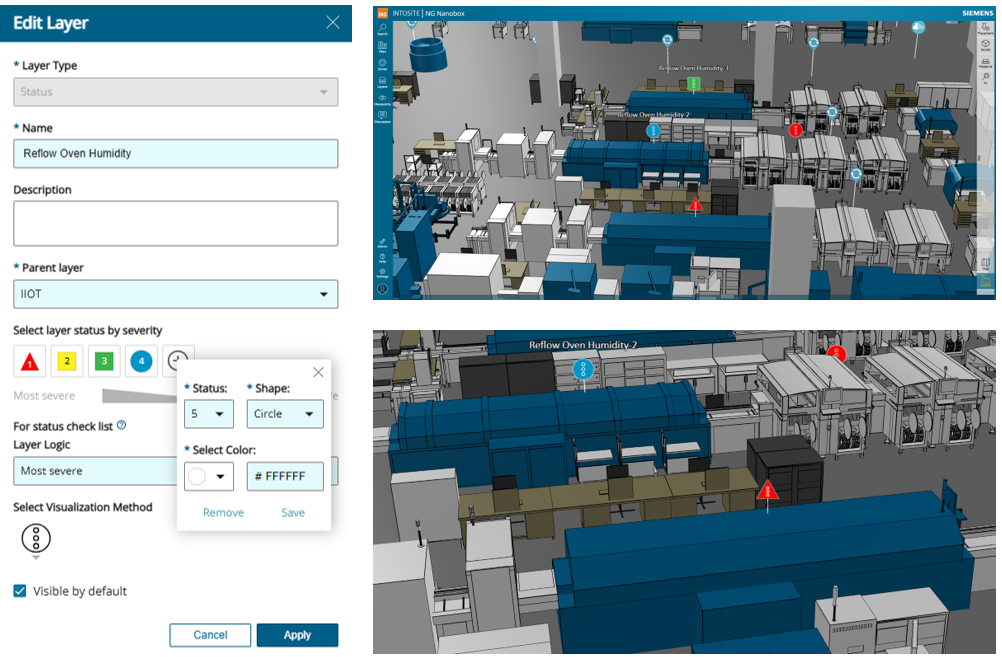
This update enhances the Status Layer functionality in Opcenter X Intosite, delivering greater flexibility and precision to meet customer requirements, particularly for production line monitoring and other real-time operational use cases.
Key Objectives
- Expanded operational state support for more detailed and accurate monitoring
- Customizable color and shape indicators to align with specific visualization standards
The goal of this enhancement is to provide customers with deeper insight and improved visual control over machine, process, and line status, ensuring that operational visibility meets the exact needs of their environment.
New Capabilities
- Support for up to 12 distinct statuses – enabling more granular tracking of machine and process conditions
- Custom color mapping – define color codes that match your organization’s internal standards or conventions
- Shape customization – choose between circle, rectangle or triangle indicators to enhance visual differentiation
- Improved visual clarity and flexibility – providing a more intuitive, adaptable view across diverse production scenarios
Key Benefits
These enhancements deliver greater flexibility, precision and clarity in real-time monitoring.
By tailoring visual indicators to reflect specific operational states and internal standards, customers gain clearer insights and faster response capabilities which empowering smarter decision-making on the factory floor.
Embedded Point Cloud View within the Panoramic Viewer
The enhanced integration with the FARO Point Cloud Hub now allows users to view point cloud data directly within the Opcenter X Intosite panoramic viewer.
This integration eliminates the need to switch between applications or views, providing users with a unified, immersive environment for analyzing real-world factory data.
Key Capabilities
- Direct Access: Open the Point Cloud View directly from a scan or via the panoramic viewer toolbar for faster and more intuitive navigation
- In-Scene Visualization: View FARO point cloud data within the same Intosite scene,no context switching required
- Spatial Synchronization: Align panoramic imagery and 3D scan data to improve spatial analysis and enable more informed decision-making
Key Benefits
By embedding point cloud visualization directly into the panoramic viewer, users gain a richer spatial context, enhanced efficiency, and simplified workflows when working with detailed factory scan data.
This deeper integration helps teams better understand their physical environments, supporting more accurate planning, analysis, and collaboration.


Enhanced user management interface and streamlined user experience
The User Management feature in Opcenter X Intosite allows administrators to easily create and manage all company users within the system.
This release introduces a redesigned interface and improved usability to deliver a more consistent and efficient administration experience.
What’s Enhanced
- Updated Interface: All dialogs have been redesigned to align with the Siemens Style Guide, providing a modern, cohesive look and feel
- Improved Usability: A more intuitive layout and refined controls help administrators complete tasks faster and with fewer errors
- Streamlined Experience: Simplified workflows and a consistent design across the feature ensure smoother user interactions and better overall efficiency
Key Benefits
These enhancements make user administration easier, faster, and more visually consistent with the broader Siemens ecosystem, helping administrators manage users confidently while ensuring a seamless experience across the platform.

Find out more about Opcenter X Intosite