What’s New in Opcenter X 2601

Opcenter X for scalable digital transformation
Summary
Siemens Digital Industries Software is pioneering modular MOM, enabling more manufacturers to take a stepwise approach to digital transformation. Built with cloud technologies and offered as software as a service (SaaS), using Opcenter™ X software, which is part of the Siemens Xcelerator business platform of software hardware and services, lowers the time and cost barriers for SMBs, enabling you to realize rapid return-on-investment (ROI) with modules that connect and adapt as your enterprise matures.
With Siemens as your MOM solution partner, you can be sure Opcenter X is built on a rich and deep knowledge base and the extensive capabilities of a leading software company. We listen to and learn from our customers, then innovate and capture best practices for every digital task. Then we apply best practices to accelerate time-to-value of our software.
Implementing Opcenter X can boost manufacturing productivity, product quality, time-to-market, and compliance by streamlining operations and decision-making. Siemens supports clients in their digital transformation journey, unlocking the full potential of manufacturing operations.
Capabilities
Track and Trace
- Now it is possible to define operations executed in parallel via the Create Work Order API for production types Untraceable and Batch. The change introduces the concept of a Parallel Gateway, allowing the user to specify parallel branches. When two or more Work Order Operations are placed in parallel branches, the queue contribution of the parent is distributed across all branches simultaneously, resulting in a parallel execution.
Material Management
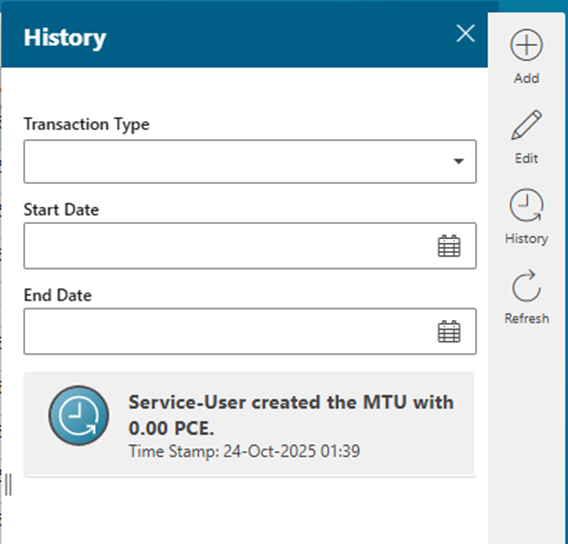
Material Tracking Units UI page is now fully extensible
The History view is extended with additional search capabilities
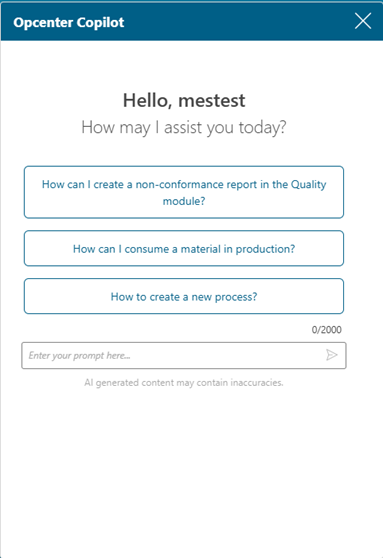
Opcenter Copilot chatbot
Opcenter Copilot, an intelligent assistant designed to read and understand available product documentation, is being introduced to both the Configurator and the applications. Opcenter Copilot responds to user prompts by providing accurate, context-aware answers derived from the documentation, helping users quickly find information and improve productivity. It is available in all applications and in the Configurator.
Order Management
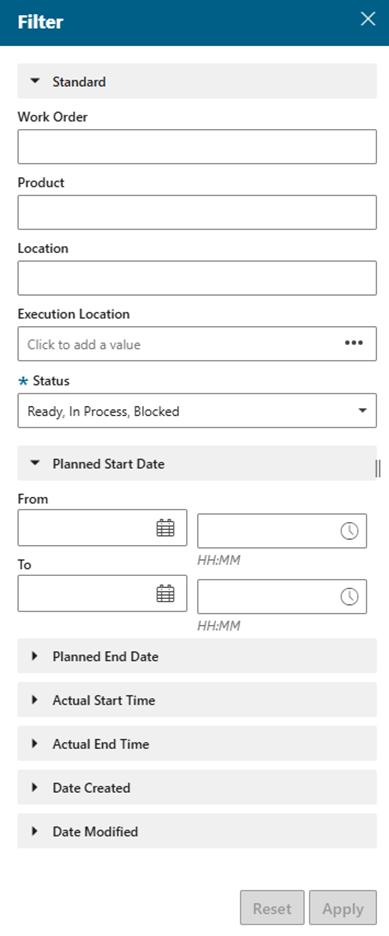
Work Order filtering enhancements. It is now possible to filter by multiple date and time parameters
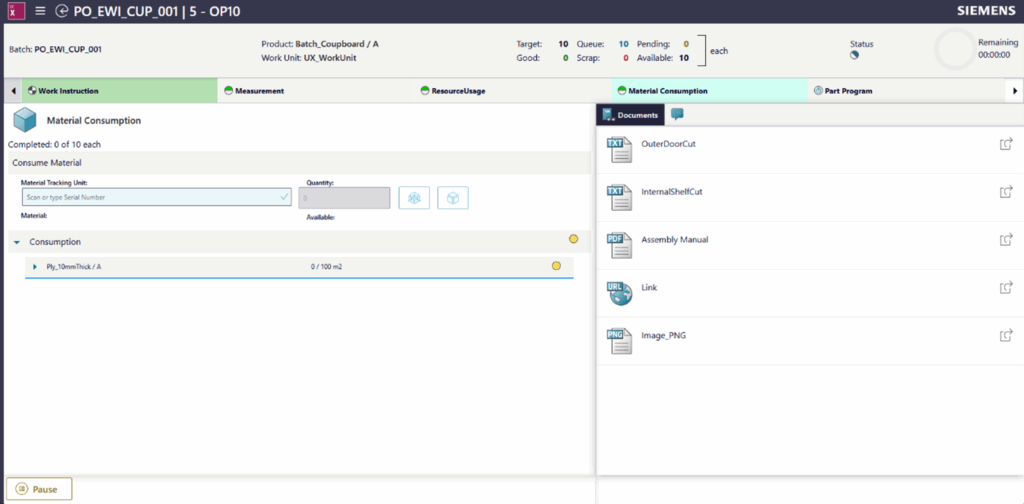
New Operator Terminal
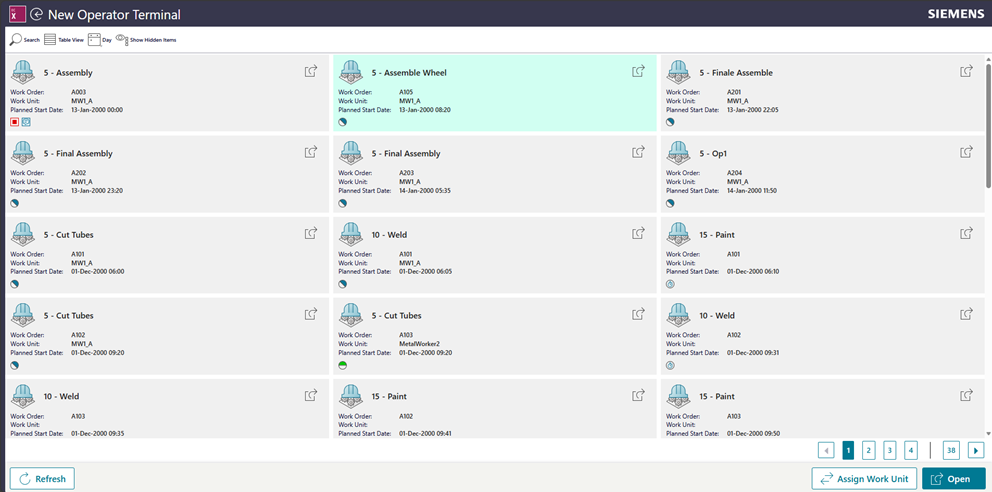
The New Operator Terminal page has been introduced based on Mendix user interface. Although the Operator Terminal and New Operator Terminal pages display differently, the concepts and procedures remain identical for both
New Unit of Measure
The following UOM have been added:
| Symbol | Name |
| μm | Micrometer |
| hPa | Hectopascal |
| MPa | Megapascal |
| kPa | Kilopascal |
| rpm | Revolutions per minute |
| mPa·s | Millipascal second (viscosity) |
| kgf/cm² | Kilogram-force per square centimeter |
| mm/s | Millimeter per second |
| Hz | Hertz (frequency) |
Configurator
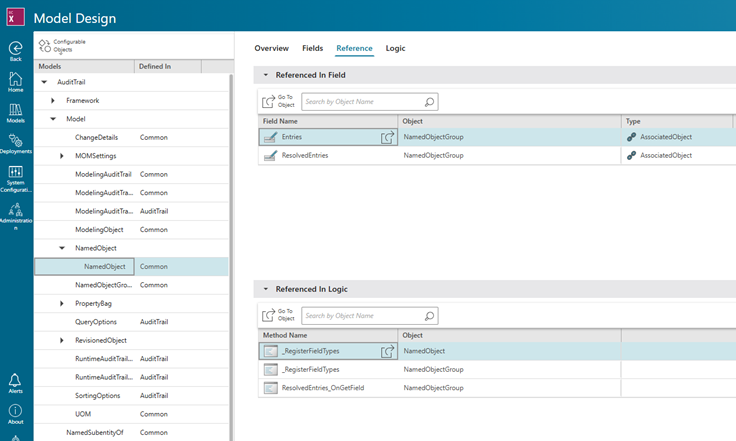
- We’ve introduced a new “Reference” tab designed to streamline model analysis. This feature empowers users to effortlessly locate every instance where a selected metamodel object is referenced or used throughout the entire model. This significantly improves traceability, helps in understanding object dependencies, and simplifies maintenance tasks.
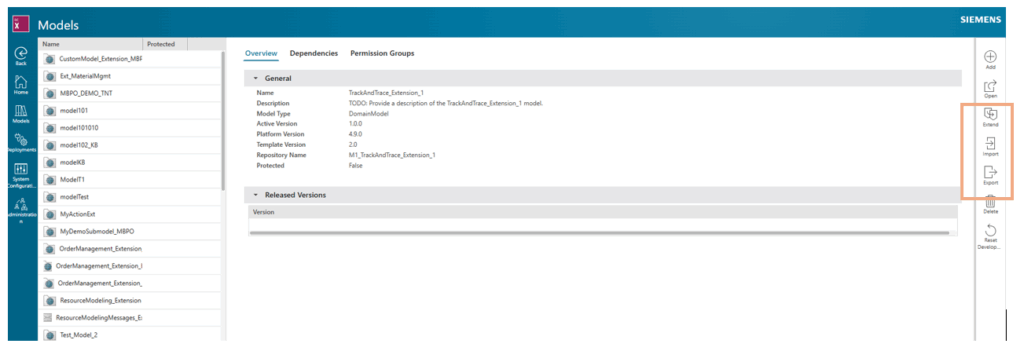
- We introduced a robust import and export capability that allows users to transfer entire models, complete with their business logic, directly through the user interface, from one environment to another. This functionality is particularly beneficial for service providers and project team, enabling them to develop and standardize templates that can be efficiently deployed and reused across multiple client environments or diverse projects, ensuring consistency and accelerating implementation with minimal effort.
Interoperability
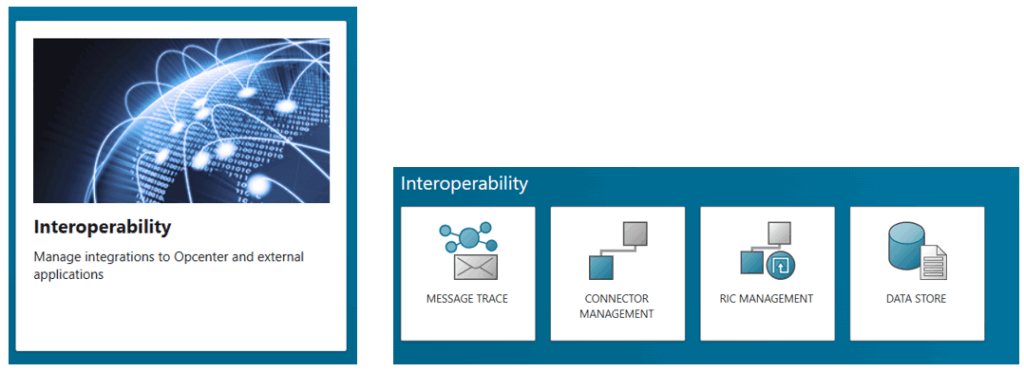
- Interoperability tiles can now be found under the new Interoperability card
- New connectors are available for the Remote Interop Connector (RIC)
- Database Connector, which allows you to connect to Microsoft SQL Database sources.
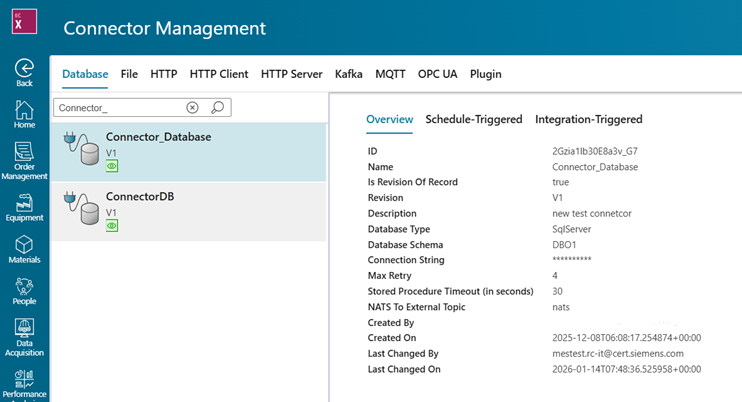
- Http Client Connector, which allows you to connect to Http Servers using asynchronous communication pattern. This connector does not replace the existing Http connector and provides an alternative option for some use cases.
- Plugin Connector, which allows you to develop your own custom plugin for the RIC to support protocols or connectivity that RIC does not support as standard.
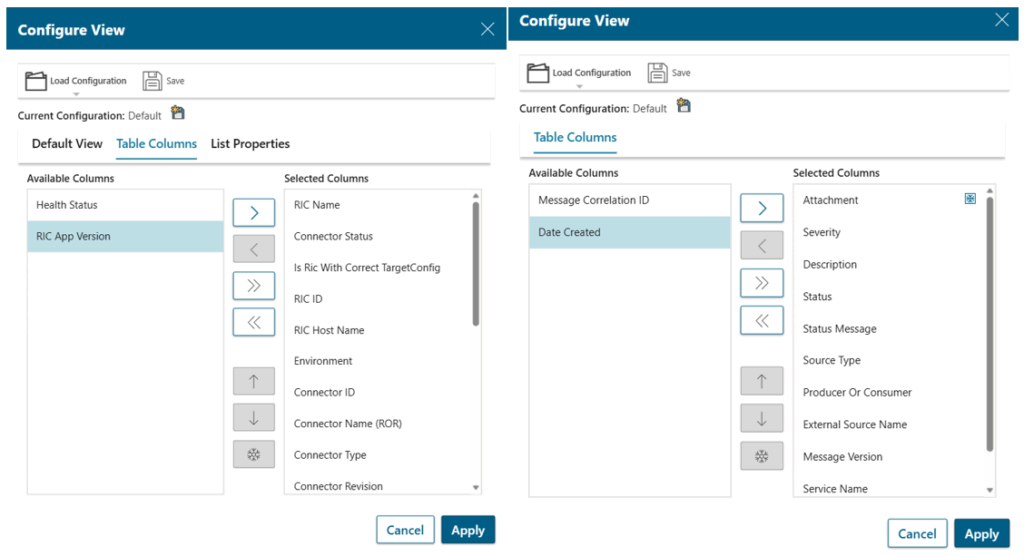
- On the RIC Management and Message Trace page you can now configure columns and choose a tabular or tree data view.
Quality Management
Non-Conformance Management
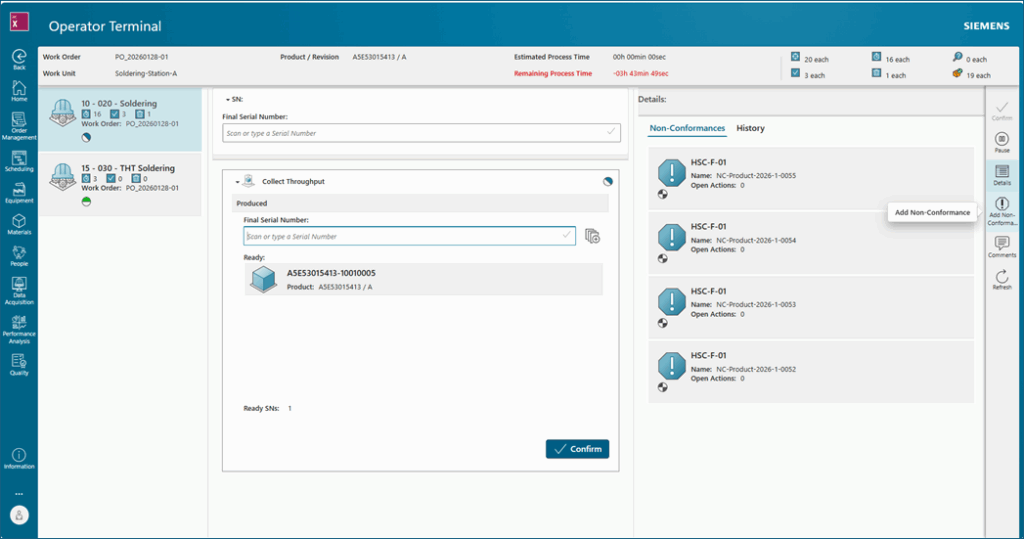
- Putting the MTU selection to the product within the ‘Create Non-Conformance’ workflow:
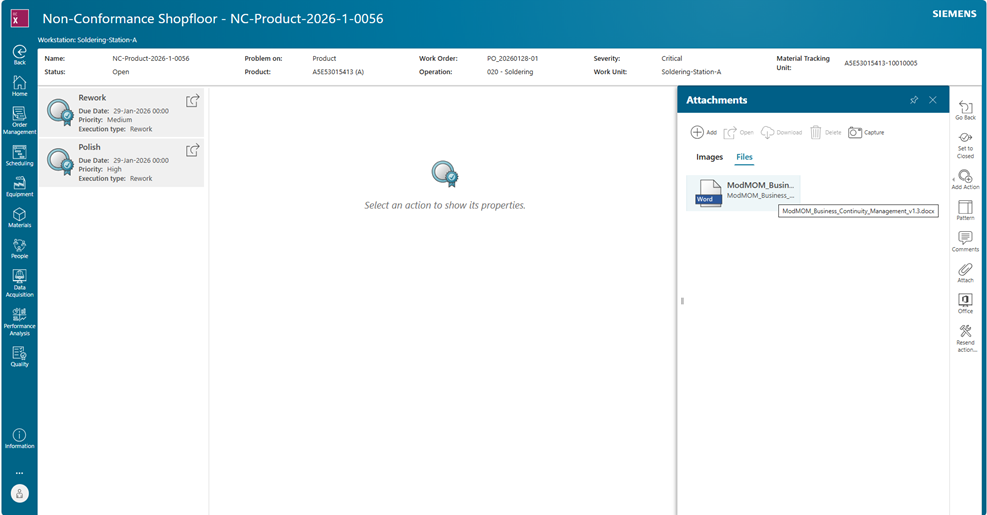
- Document attachments – Word format is supported
File upload for Non-Conformance recording allows users to attach evidence such as reports, or logs directly to the issue, improving traceability and clarity. This enhances the quality of investigations and accelerates resolution by providing all relevant information in one place.
- NC export including attachments
The user is able to export all NC relevant information including the uploaded Images and file properties to Interop, which can later be used by other system for further processing - List of Non-Conformances includes inspection order, work order, and operation
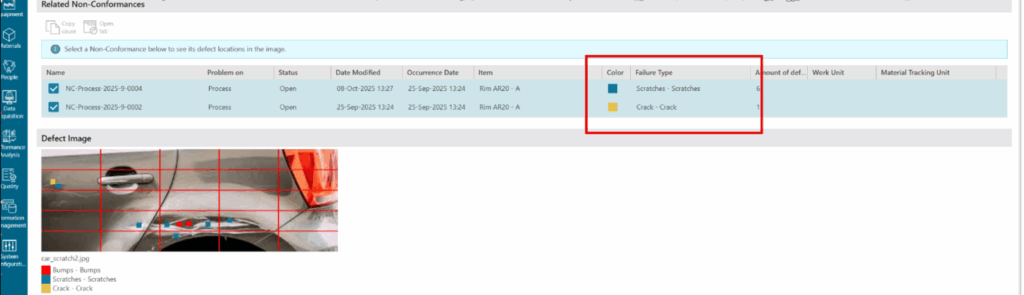
Color coding of failures is supported
- New action execution type ‘Supplier Issue’ is available
- Failure = Obsolete
It is now possible to set a released failure specification to obsolete.
- Optimization in the MTU – Failure Processing View
Only open tasks are displayed in this worklist.
- Cause – Failure – Effect Relationships
What was the cause of a non-conformance? What impact can this have?
It is possible to document cause-and-effect relationships. The connection type is represented by a corresponding icon.
IES – Inspection and Evaluation Shopfloor
- CPK-Value is handed over to Opcenter X Intosite
- An inspection plan written in Teamcenter CPIP can be consumed by the Process Designer
- Support for part-oriented inspection intervals
A NATS message is supported to update the Inspection Order part counter.
After a part is produced in MES a NATS message is send with the produced parts.
This message is processed in IES and the part counter is updated in the IES Inspection Order Header.
This is enabling now the option to work with part based Inspection Intervals.
Failure Catalog
- Optimized filter panel
Scheduling
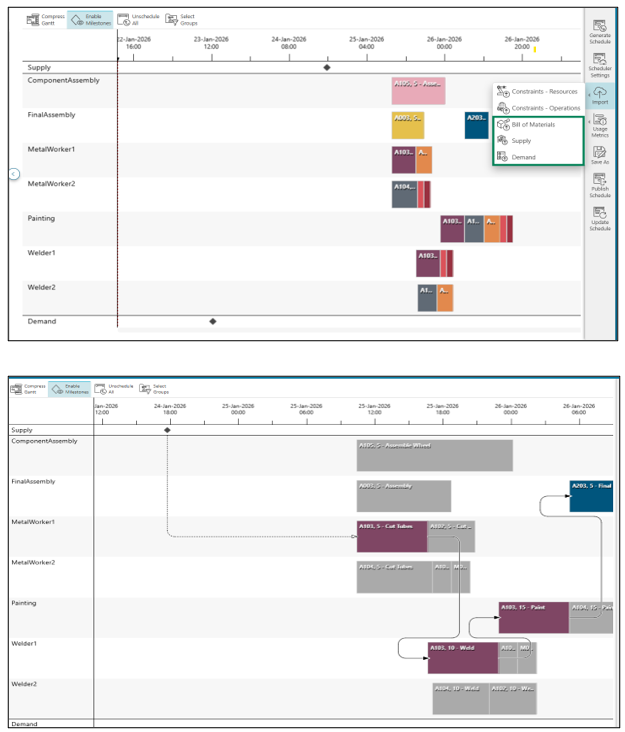
- Material-aware scheduling has been introduced to help close the gap between planning and execution by generating schedules based on actual material availability. You can now upload Supply, Demand, and Bill of Materials (BoM) data directly into the Scheduling application. During schedule generation, materials are automatically linked, and Gantt chart milestones can be used to view supply–demand–work order relationships.
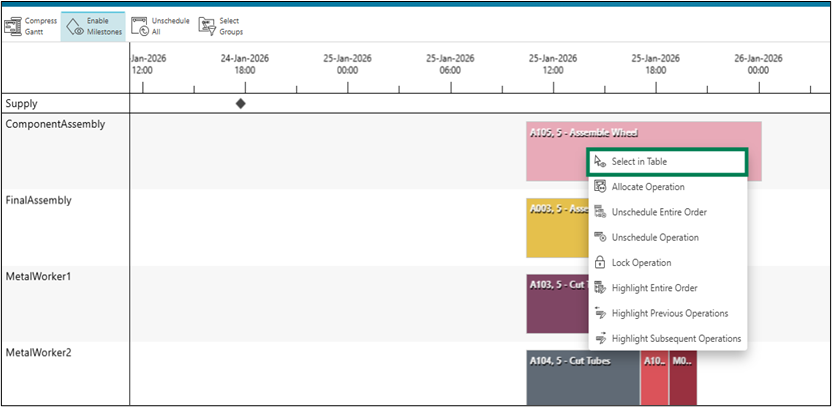
- You can now locate an operation in the Orders table directly from the Gantt chart using the Select in Table option, making navigation faster and more intuitive.
- The Priority column is now available in the Orders table, providing clearer visibility into priority-based scheduling.
- Operations can now be filtered by Execution Groups in the Orders table, helping you quickly focus on relevant orders.
Visual Information Navigator
Visual Information Navigator is a new module in Opcenter X that integrates with the Opcenter X Intosite application to deliver immersive factory visualization while serving as a central visual information hub for the factory.
It provides a rich, intuitive view of the production environment, enriched with contextual links to smart factory systems and applications—bringing critical insights directly to manufacturing personnel, exactly where and when they are needed.
With Visual Information Navigator manufacturers can:
- Navigate complex production environments by visually exploring factories, assets, and related information with ease.
- Increase productivity through quick, natural access to production and quality data in context.
- Improve process planning by enabling central engineering teams to virtually understand the as-built factory and leverage this knowledge for future planning.
- Accelerate ramp-up of new production processes by sharing process studies and documentation early and making them accessible to global factory teams.
- Promote knowledge sharing and standardization by capturing and scaling local best practices across the organization.
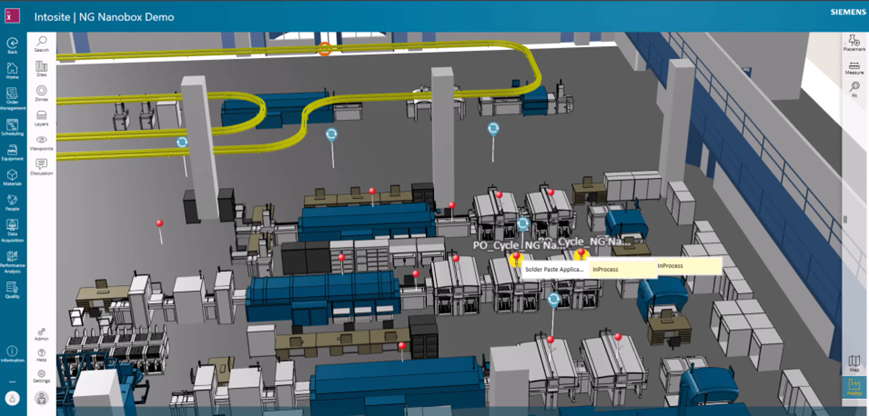
The Visual Information Navigator connects key product and production objects, such as Work Units , Non-Conformances, Inspection Orders , and Work Orders, directly to the factory’s visual context, highlighting critical events and enabling bidirectional navigation between the visual environment and application data.
This integration delivers clear business value:
- Brings the Shopfloor Closer to Engineering
Connects operational data with engineering context for better collaboration and faster problem-solving - Smarter, Faster Decision-Making
Transforms complex data into clear, visual insights that support confident and timely decisions. - Contextual Navigation
Enables intuitive, visual access to manufacturing processes and assets, making factory operations easier to understand and manage. - Real-Time Insights
Embeds live data from Opcenter X systems into the factory’s visual context, improving responsiveness, efficiency, and operational awareness.
Main supported use cases
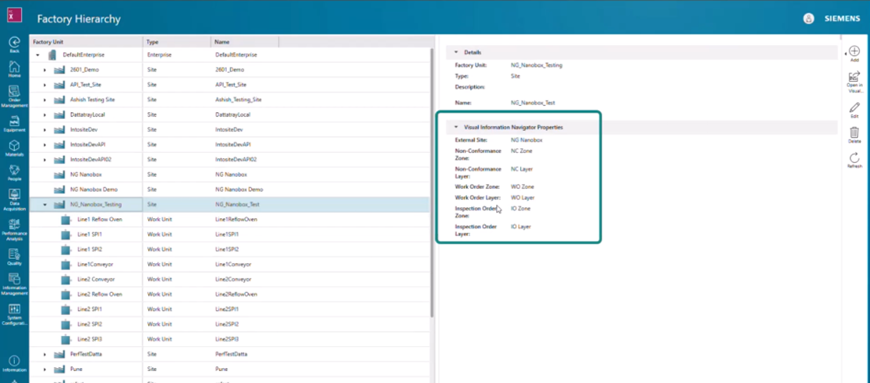
Use case 1: Factory Hierarchy Mapping to the Visual Layout
With Visual Information Navigator Module, factory structures from Opcenter X- Factory Hierarchy are visually mapped to the digital factory layout in Opcenter X Intosite.
Sites and work units from the Opcenter X factory hierarchy are linked to Opcenter X Intosite sites, zones, and layers, including their precise X, Y, Z locations within the factory.
This foundational step establishes the visual context needed to connect operational data to the physical factory layout, enabling all subsequent visual use cases across production, quality, and execution.
Business Value
- Creates a unified visual foundation for all factory data
- Connects Opcenter X factory hierarchy to the physical plant layout
- Enables accurate, location-based visualization of shop-floor objects
- Simplifies setup and accelerates adoption of visual factory use cases
Use case 2: Visual Work Order Management in Factory Visual Context
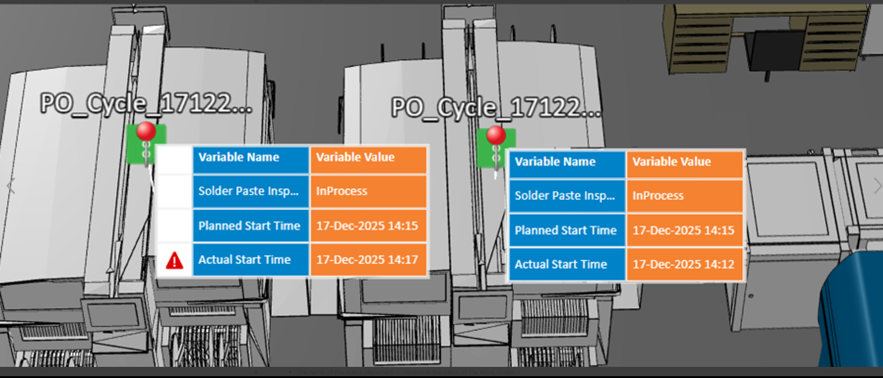
With Visual Information Navigator Module, Work Orders are managed directly in the visual factory context.
Each Work Order created in Opcenter X appears as a status placemark at the corresponding work unit location, with bidirectional navigation to detailed Work Order data.
Work Orders display operation status along with planned and actual start times, giving supervisors instant visibility into execution progress, delays, and deviations from plan, directly in the factory view.
Business Value
- Real-time, visual management of Work Orders
- Faster access to Work Order details through contextual navigation
- Clear alignment between planning and execution
- Better prioritization of work that is falling behind
- Real-time, plant-wide visibility of production activities
Use case 3 :Visual Non-Conformance Management in Factory Visual Context
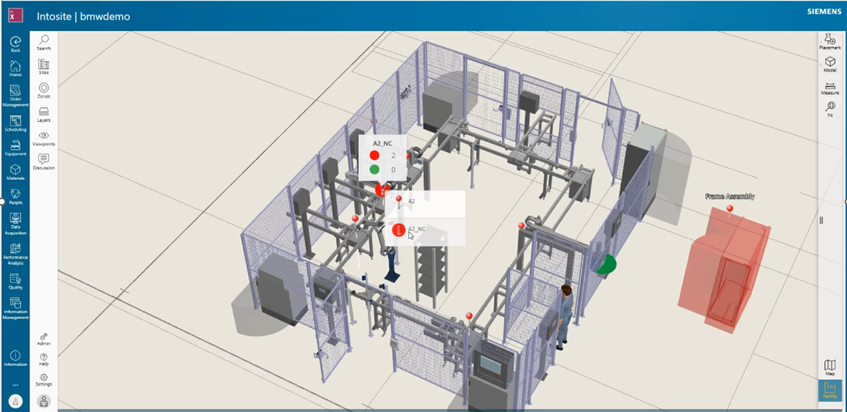
With Visual Information Navigator Module, Non-Conformances (NCs) are managed directly within the visual factory context.
When a Non-Conformance is created in the operator terminal, it automatically appears in Opcenter X Intosite as a visual status placemark on the associated work unit in the plant layout. Each placemark is bidirectionally linked, enabling seamless navigation between the visual factory view and the NC management interface.
By visualizing Non-Conformances in their physical context, manufacturing teams gain immediate awareness of quality issues at the work-unit level. Selecting an NC placemark opens the relevant NC details for the selected work unit, enabling fast access to information and actions without switching tools or losing context. This visual, contextual approach simplifies quality issue tracking and improves responsiveness across the factory.
Business Value
- Enhanced visual management of Non-Conformances
- Faster access to NC details through contextual navigation
- Intuitive monitoring of quality issues within the factory layout
- Improved responsiveness and issue resolution
Use case 4: Andon Board for Real-Time Production Status Monitoring
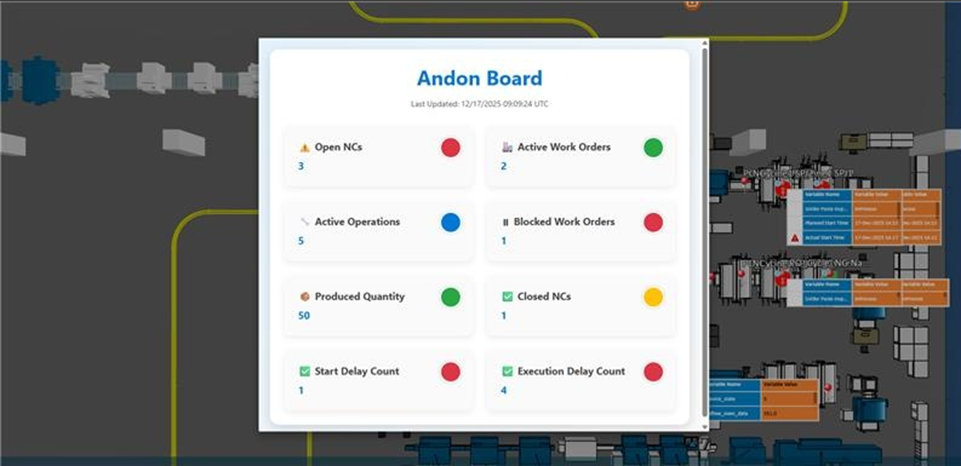
With Visual Information Navigator Module enables monitoring of critical factory events directly within the 3D factory context using an Andon board.
The Andon board can be placed at relevant locations in the visual factory model and integrates real-time data from Opcenter X. It displays key production metrics such as open NCs, work orders in progress, and production quantities, while highlighting critical events like delays in operation start or execution times.
Factory teams gain instant, visual insight into issues, enabling faster response and improving operational efficiency.
Business Value
- Real-time, visual monitoring of critical production events
- Faster response and resolution of shop floor issues
- Improved operational efficiency and productivity
- Enhanced decision-making through live, contextual production data
Use case 5: Visual CpK and Inspection Order Monitoring in Factory Visual Context
With Visual Information Navigator Module enables real-time, event-driven monitoring of product quality using CpK (Process Capability Index) visualization. Dynamic status placemarks are created for each inspection order, displaying inspection status directly in the factory visual context. Alerts are triggered when CpK values fall outside predefined limits, providing immediate visual feedback on process quality.
This allows quality managers and production teams to monitor quality metrics visually, track actual CpK values for ongoing production, and detect process issues early.
Business Value
- Real-time visibility of process quality through CpK status
- Early detection of process deviations and potential quality issues
- Data-driven decision-making based on live process capability metrics
- Improved monitoring and tracking of production quality
- Enhanced alignment between production execution and quality objectives
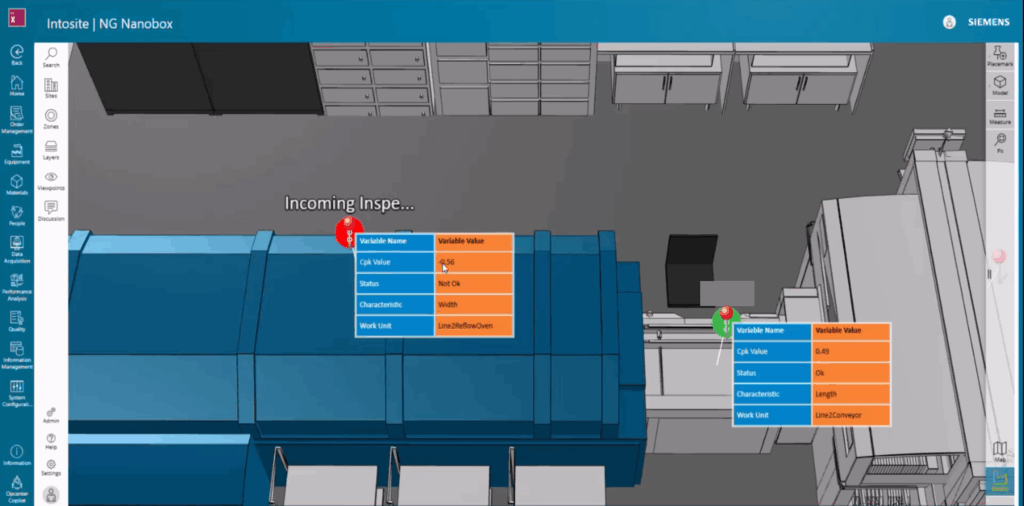
See Opcenter X Intosite in action:
If you are a decision-maker in an SMB in discrete industries and resonate with the challenges discussed, consider exploring Siemens’ new solution Opcenter X. It might just be the catalyst your company needs to leap into the future with confidence.
Try our product through our Trial page, or by requesting a demo.