Beyond the AA Battery: Follow Shrouk’s USB-C Replacement Project with Xpedition Standard Free for 60 Days

Think of this blog as your Getting Started Guide … because it is your getting started guide 😊
What if you could replace two AA batteries with a USB-C rechargeable module that fits right into the same battery compartment?
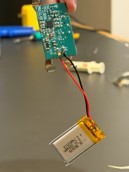
That’s exactly the idea behind Shrouk’s new project: a compact PCB that works as a drop-in replacement for a standard 2 x AA battery setup, bringing USB-C recharging to everyday devices that were never designed for it.
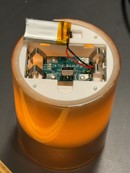
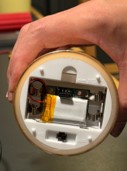
And now, you can follow the full build yourself.
Over the next 8 weeks, Shrouk will release 24 tutorials, with 3 tutorials published each week, showing how the project comes together step by step in Xpedition Standard. To give you enough time to follow along, build, explore, and catch up if life gets in the way, we’re offering a free 60-day trial of Xpedition Standard for this project.
If you want to build along, this blog post is important to help you get started!!
Let’s have some fun
This is not just a software trial. It’s a guided build experience.
With the 60-day Xpedition Standard trial, you’ll be able to:
- follow Shrouk’s tutorial series from start to finish
- explore the schematic and PCB design workflow in Xpedition Standard
- access the same core environment used for the project
- work through the design within the free trial window
If you’re coming from Shrouk’s LinkedIn post and thinking, “I just want to get into the tool and start,” fair warning: there are a few setup steps first. That’s normal. This guide is here to make those steps easier.
Before you start: a quick reality check
The trial onboarding process is not instant-click access.
There are a few screens, a couple of emails, and a short provisioning step before everything is ready. If you know that going in, the rest is easy, but give yourself several minutes to get through all the steps..
In plain English, here’s what to expect:
- create or sign in with a Siemens account (email/password)
- verify your email
- complete the trial registration steps
- choose your region when prompted
- wait a few minutes while your trial access is provisioned
- receive onboarding emails with links and next steps
- install Xpedition Standard via Siemens Software Center
- launch the tools and sign-in with your Siemens account (email/password created during the Trial onboard process)
The good news: once you’re through the Getting Started setup (completing Steps 1-3 below), you’re ready to follow Shrouk’s tutorials.
Step 1: Register for the free 60-day trial
Start with the Shrouk Xpedition Standard trial landing page and click the “Log in to Siemens” button to begin your free trial.
From there, you’ll either:
- log in with an existing Siemens account, or
- create a new Siemens account OR login with Google or LinkedIn
If you’re creating a new account, expect a few setup screens. You may be asked to:
- enter your user information
- create a password
- verify your email address
- add a phone number or acknowledge terms
- choose a region for data storage
- wait briefly while the system provisions your access
This can feel like a lot if you were expecting a one-screen signup. Stick with it. It’s part of getting your account and access configured correctly.
Step 2: Watch for up to three emails
During setup and trial launch, you should expect a few emails on day one.
1. Verify your email address
This email is there to confirm your new account (only if you created a new account).
What to do:
- open the email
- click the verification link or enter the verification code if prompted
Do this first. If you skip it, your registration may not complete.
2. Welcome to Xpedition Standard trial
This is your trial welcome email.
What to do:
- open it
- You are welcome to click the link, but it will merely take you back to this blog
3. Welcome to Xpedition
This email is more of a formality. It merely confirms access and points you to more (optional) onboarding resources. Personally, I would NOT worry about this email.
If you only remember one thing from this section, remember this: the “verify your email” is most important if you are creating a new account.
Step 3: Install Xpedition Standard
Once your access is assigned, install Xpedition Standard using Siemens Software Center.
Here’s the short version:
- install Siemens Software Center. Siemens Software Center is an application that will list the products you are entitled to use with a simple one-click command to download and install Xpedition Standard.
- log in to Siemens Software Center using your Siemens account
- find the products you’re entitled to use
- install Xpedition Standard
- NOTE: you will also find “Xpedition Add Ons” as an optional download in Siemens Software Center, however, they are NOT required for Shrouk’s project.
Follow the guided installation steps. Installation can take approximately 20-minutes +/-.
When installation is complete, you can launch:
- Xpedition Designer
- Xpedition Layout
- Basically, you are ready to now follow along with Shrouk’s project.
What Shrouk’s tutorial series will cover
Across 24 tutorials released over 8 weeks, Shrouk will walk through the design journey behind this AA-battery-replacement project.
You’ll be able to follow how the project comes together inside Xpedition Standard, from concept through implementation, while seeing the real-world decisions behind a compact USB-C-powered design.
This is a good fit if you want to:
- Have fun and learn by building something real
- Explore a practical PCB workflow rather than a generic demo
- Follow an engineer’s actual project process over time
- Use the 60-day trial for something concrete, not just poke around menus
Why this project is worth following
There are plenty of trial experiences that begin and end with “open the software and click around.”
This one is different!!
The board may look simple, BUT you’re following a real design challenge: how to replace a legacy battery format with a rechargeable USB-C solution in a form factor that has to fit the real world.
That makes the tutorials more useful, and frankly, more interesting.
Instead of learning features in isolation, you’ll see them in context.
A few tips before you dive in
To make the experience smoother:
- Start the trial as soon as possible so your 60-day window aligns with the tutorial rollout
- Complete the registration flow in one sitting if you can
- Check spam or junk folders for onboarding emails
- Bookmark the install/setup page once you receive it
- Install the desktop tools before tutorial #1 if possible
- Give yourself a little buffer time on day one for account setup and provisioning
IMPORTANT: where to find help
If you have any troubles with the above getting-started Steps, you can either send us an email Onboard_support_XSTD.disw@siemens.com or schedule a quick 15-minute session with a Siemens expert
Ready to build along?
Shrouk’s project is designed to be completed within the free trial period.
So if you’ve been curious about Xpedition Standard, this is a good excuse to stop lurking and actually build something.
Start your free 60-day trial, get through the setup, and follow the tutorials as they roll out.
The AA battery had a good run. Time to build what comes next.